
Multimedia & graphics Windows
Total Image Converter
Convert batches of photos and graphics on Windows with Total Image Converter. Resize, crop, rotate or watermark images during conversion; a 30-day trial precedes the paid license.
- Operating system
- Windows 7, 8, 10 and 11; publisher also lists older Windows versions
- Architecture
- 32- and 64-bit Windows listed; linked installer architecture not independently identified
- Download package
- EXE installer
Publisher lists 4 GB memory. Exact installer build and architecture were not established; no installation or compatibility test was performed.
Link checked · Download guidance
What is Total Image Converter?
Total Image Converter is a Windows desktop tool for converting batches of images rather than uploading each picture to an online service. CoolUtils lists input support for TIFF, JPEG, RAW, PNG, BMP, PSD, TGA and WebP, with output choices including JPEG, PNG, TIFF and PDF. It suits preparing a folder of photos for another application or converting graphics while applying the same size and watermark settings across the batch.
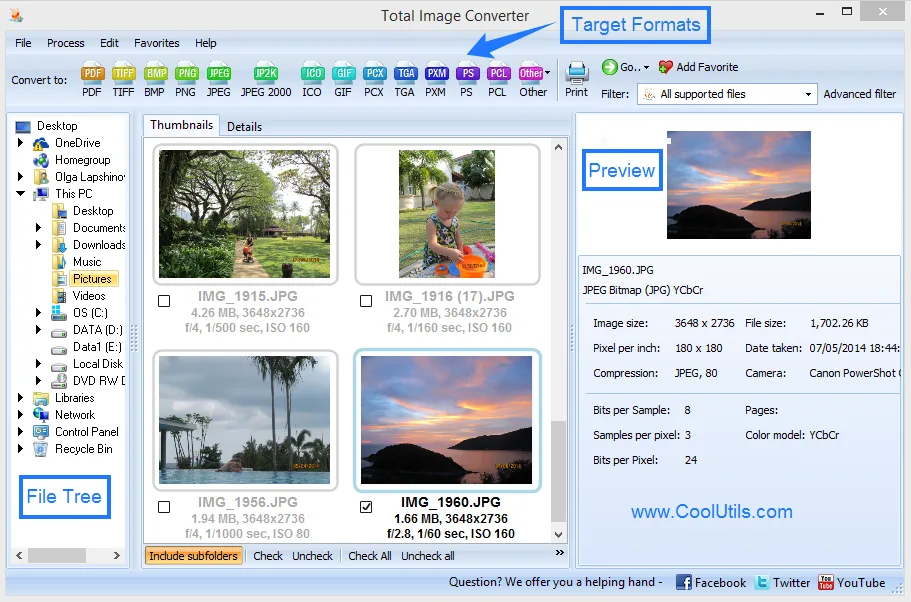
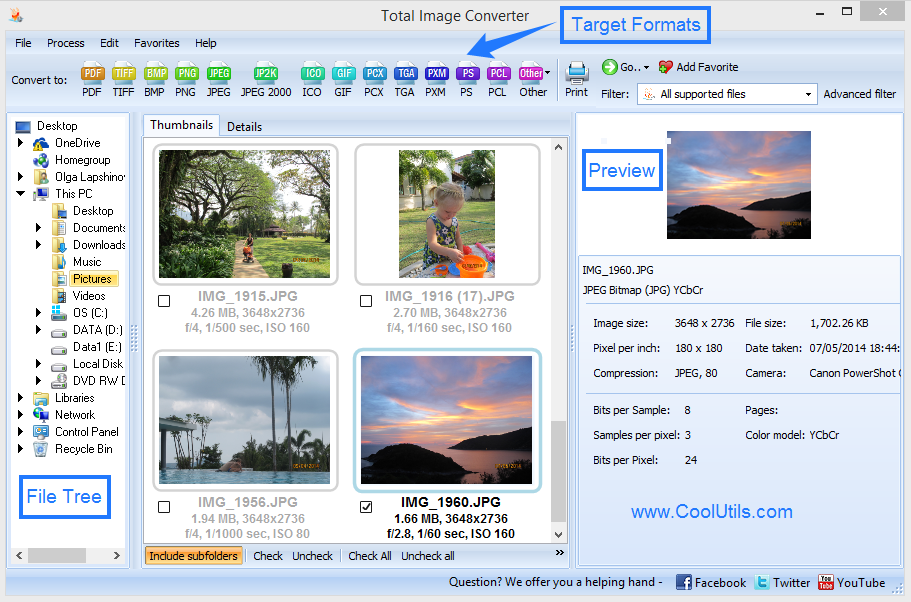
The publisher's workflow starts in the folder browser: select the images, choose a target format and set the conversion options before starting. The interface offers thumbnails or a detailed file list, plus a preview panel for inspecting a selected image. Resize, crop and rotation options can accompany conversion; text, logo or date watermarks and CMYK-to-RGB conversion are also advertised. A command-line interface supports repeated jobs, and the publisher says the graphical settings can generate a command line.
This is commercial software with a 30-day free trial, not a permanently free converter. CoolUtils lists Windows 7, 8, 10 and 11 and both 32- and 64-bit Windows in its requirements; the precise architecture and build number of the linked installer were not established. The download is the publisher's EXE installer. Its availability was checked with HEAD only: the application was not downloaded, installed or tested. Server integration is offered separately as Total Image ConverterX, so the desktop download should not be mistaken for that SDK.
What it offers
- Convert selected images in batches, with publisher-listed support for TIFF, JPEG, RAW, PNG, BMP, PSD, TGA and WebP inputs.
- Choose output formats such as JPEG, PNG, TIFF and PDF.
- Apply resize, crop, rotation and text, logo or date watermark options during conversion.
- Convert CMYK images to RGB and inspect files using thumbnails, a detailed list and a preview panel.
- Automate conversion through the command line; the publisher says GUI settings can generate the command.
Good to know
- The free trial lasts 30 days; continued use requires a paid license.
- The server SDK is a separate product, Total Image ConverterX, rather than the desktop installer linked here.
Product images
Sources
References used for this listing. Retrieval dates do not indicate hands-on testing.
More in multimedia & graphics
View category ↗
1by1 2.17
Play music directly from folders with 1by1, a free Windows audio player with resume, gapless playback and file tools. Formats beyond MP3 need additional decoders.
3DVista Virtual Tour Pro
Build interactive 360° virtual tours from panoramas, videos and 3D models with 3DVista Virtual Tour Pro for Windows. Commercial software with a 30-day trial.

4DDiG Video Repair
Repair corrupted or unplayable videos in batches with the Video Repair tool in 4DDiG File Repair for Windows. A free trial is available; advanced features require a paid license.