

Multimedia & graphics Windows
Transcribe! for Windows
Work out music by ear with Transcribe! for Windows: slow recordings without changing pitch, loop phrases and inspect notes and chords. Paid software with a 30-day trial.
- Operating system
- Windows 10 or Windows 11, 64-bit
- Architecture
- x64 (Intel); no native Windows ARM build
- Download package
- EXE installer
The publisher provides separate older 32-bit versions. Windows S mode prevents installation of this directly distributed application unless the user switches out of S mode.
Link checked · Download guidance
What is Transcribe!?
Transcribe! is a specialised player for musicians learning a piece from a recording or practising along with it. Slow a difficult passage without changing its pitch, store named loops and use waveform markers to return to a section, measure or beat. Pitch adjustment and EQ help you focus on parts you want to hear.
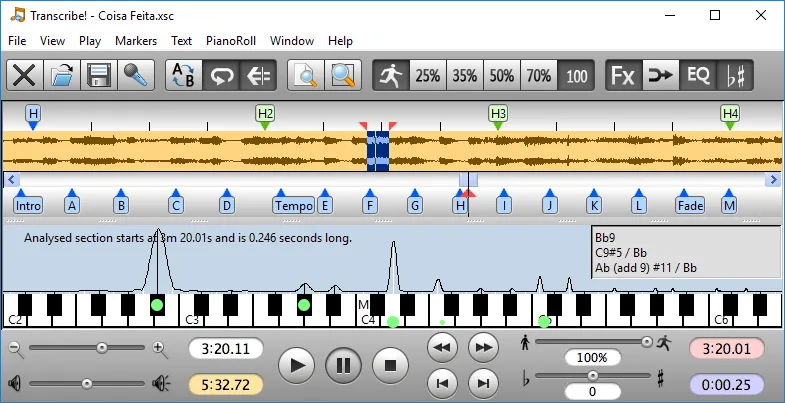
For difficult chords, the spectrum display plots pitches above an on-screen piano keyboard. Note guesses, chord guesses and a piano-roll view offer clues, but you still need to judge what is being played. Transcribe! does not automatically turn a recording into musical notation or MIDI, and it is not an audio editor.
This entry links to the publisher's version 9.70.3 installer for 64-bit Windows 10 or 11. It is an Intel build, not a native ARM build; older 32-bit Windows packages are separate. The application is free to evaluate for 30 days, with purchase required for continued use. The publisher screenshot shown here depicts the older Windows version 8.64, not the linked release.
What it offers
- Slow down or speed up playback without normally changing pitch; adjust pitch separately.
- Store named loops and navigate a waveform using section, measure and beat markers.
- Inspect a spectrum over a piano keyboard, with note guesses, chord guesses and a piano-roll view.
- Apply EQ and other playback effects, with an option to save modified audio to a new file.
- Control playback using configurable keyboard shortcuts or supported foot pedals.
Good to know
- Does not automatically produce musical notation or MIDI from an audio recording; note and chord guesses require interpretation.
- Continued use after the 30-day evaluation requires purchase.
- The selected installer requires 64-bit Windows 10 or 11 and is not a native ARM build.
Product images
Sources
References used for this listing. Retrieval dates do not indicate hands-on testing.
More in multimedia & graphics
View category ↗
1by1 2.17
Play music directly from folders with 1by1, a free Windows audio player with resume, gapless playback and file tools. Formats beyond MP3 need additional decoders.
3DVista Virtual Tour Pro
Build interactive 360° virtual tours from panoramas, videos and 3D models with 3DVista Virtual Tour Pro for Windows. Commercial software with a 30-day trial.

4DDiG Video Repair
Repair corrupted or unplayable videos in batches with the Video Repair tool in 4DDiG File Repair for Windows. A free trial is available; advanced features require a paid license.