
Multimedia & graphics Windows
Tuniac
Play and organize music on Windows with Tuniac, a free audio player with playlists, search-as-you-type and a playback queue.
- Operating system
- Windows; exact supported versions not established by the current publisher page
- Architecture
- Includes a 64-bit build
- Download package
- EXE installer
Selected publisher package: Tuniac_Setup_260815.inc.64bit.exe. No installation or OS compatibility test performed.
Link checked · Download guidance
What is Tuniac?
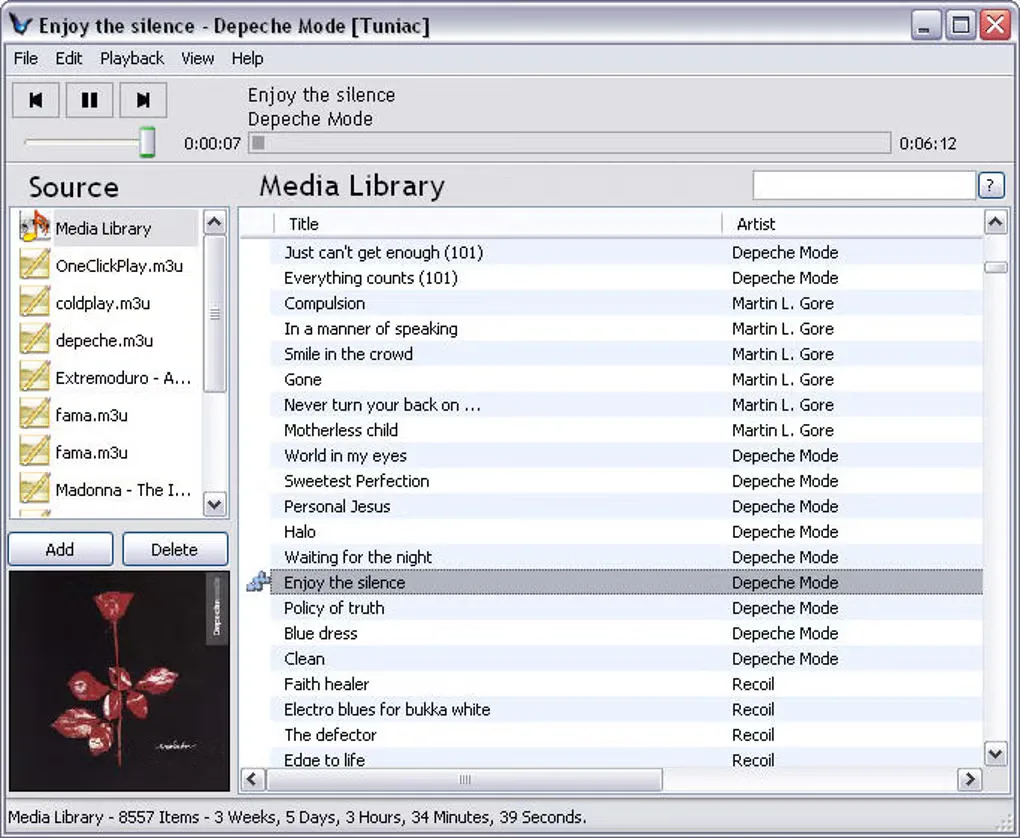
Tuniac is a Windows music player and library manager with an iTunes-style layout. It brings a music collection, playlists and a playback queue into one interface, with search-as-you-type for finding tracks. Its publisher lists support for MP3, FLAC, AAC, Apple Lossless, WMA, Vorbis and Opus, alongside other audio formats.
The project also supports radio streaming, but describes streaming support as covering most of its listed audio formats rather than every format. The linked EXE package is release 260815 and includes a 64-bit build. The screenshot shows an older Tuniac interface from the source gallery; it is not a capture of release 260815.
What it offers
- Manage a music library and edit playlists.
- Find tracks with search-as-you-type and organize playback with queue support.
- Play audio formats including MP3, FLAC, AAC, ALAC, WMA, Vorbis and Opus.
- Listen to radio streams in supported audio formats.
Good to know
- Radio streaming covers most of the publisher’s listed audio formats, not a stated guarantee for every format.
Product images
Sources
References used for this listing. Retrieval dates do not indicate hands-on testing.
More in multimedia & graphics
View category ↗
1by1 2.17
Play music directly from folders with 1by1, a free Windows audio player with resume, gapless playback and file tools. Formats beyond MP3 need additional decoders.
3DVista Virtual Tour Pro
Build interactive 360° virtual tours from panoramas, videos and 3D models with 3DVista Virtual Tour Pro for Windows. Commercial software with a 30-day trial.

4DDiG Video Repair
Repair corrupted or unplayable videos in batches with the Video Repair tool in 4DDiG File Repair for Windows. A free trial is available; advanced features require a paid license.