

Multimedia & graphics Windows
VidCoder for Windows
Convert video files and unencrypted DVDs or Blu-rays to MP4 or MKV with VidCoder, a free, open-source Windows transcoder powered by HandBrake.
- Operating system
- Windows 10 and Windows 11
- Architecture
- 64-bit
- Download package
- EXE installer
The publisher also offers a portable EXE. HandBrake does not need to be installed separately.
Link checked · Download guidance
What is VidCoder?
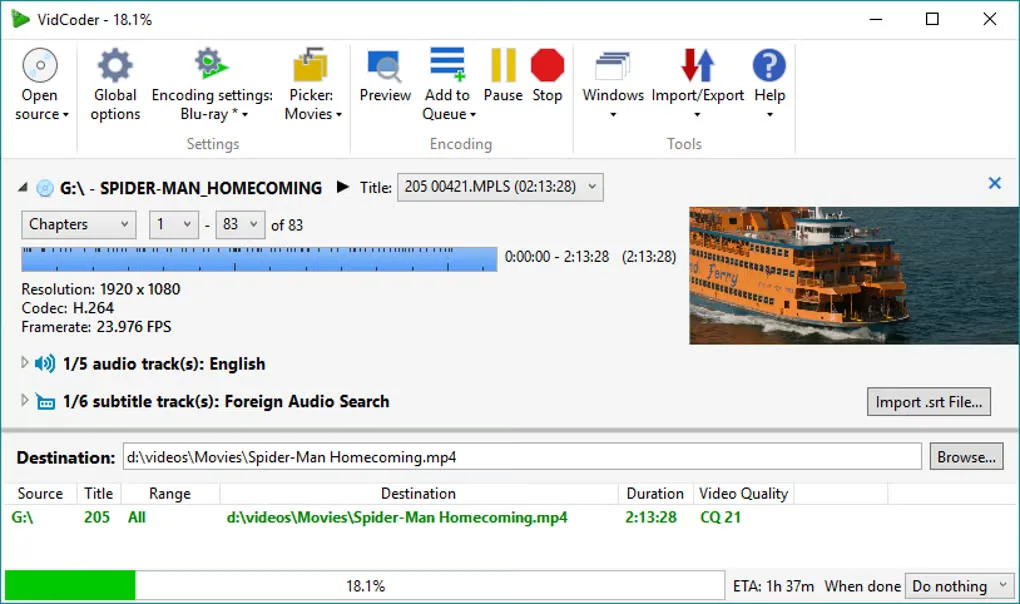
VidCoder converts video files and unencrypted DVD or Blu-ray sources into MP4 or MKV files. It uses the HandBrake encoding engine and provides controls for video quality, bitrate or target size, along with audio and subtitle selection. Batch encoding, simultaneous jobs and a folder watcher suit recurring conversion tasks rather than processing each file individually.
You can preview a source, generate a short encoded preview clip and pause or resume encoding. The publisher lists hardware encoding through Nvidia NVENC, Intel QuickSync and AMD VCE. HandBrake does not need to be installed separately.
Disc support has an important boundary: VidCoder does not defeat the encryption found on commercial DVDs and Blu-rays. A disc appearing in the interface does not mean the program can process its protected contents. The linked download is the publisher's version 12.23 EXE installer for 64-bit Windows 10 and 11; a portable edition is also offered on the official site.
What it offers
- Encode to MP4 or MKV using video codecs including H.264, H.265 and AV1.
- Set video quality, target bitrate or target size and use multi-pass encoding.
- Queue batch conversions, run simultaneous encodes or watch a folder for videos to encode.
- Select audio and subtitle tracks with customizable Pickers.
- Preview sources, create short encoded preview clips and pause or resume encoding.
- Use hardware-accelerated encoding through Nvidia NVENC, Intel QuickSync or AMD VCE.
Good to know
- VidCoder does not remove the encryption found on commercial DVDs and Blu-rays.
Product images
Sources
References used for this listing. Retrieval dates do not indicate hands-on testing.
More in multimedia & graphics
View category ↗
1by1 2.17
Play music directly from folders with 1by1, a free Windows audio player with resume, gapless playback and file tools. Formats beyond MP3 need additional decoders.
3DVista Virtual Tour Pro
Build interactive 360° virtual tours from panoramas, videos and 3D models with 3DVista Virtual Tour Pro for Windows. Commercial software with a 30-day trial.

4DDiG Video Repair
Repair corrupted or unplayable videos in batches with the Video Repair tool in 4DDiG File Repair for Windows. A free trial is available; advanced features require a paid license.