
Multimedia & graphics Windows
VideoProc Vlogger for Windows
Edit vlogs and travel footage with VideoProc Vlogger, a free Windows video editor with a multi-track timeline, speed ramping, motion effects and color tools.
- Operating system
- Windows 7, 8/8.1, 10 and 11 or later (publisher-listed)
- Architecture
- 64-bit Intel/AMD
- Download package
- EXE installer
Publisher minimums include a 2 GHz processor, 1 GB RAM, 512 MB GPU VRAM, OpenGL 3.3 and 600 MB installation space. For 4K/8K media, 8 GB RAM or more is recommended.
Link checked · Download guidance
What is VideoProc Vlogger?
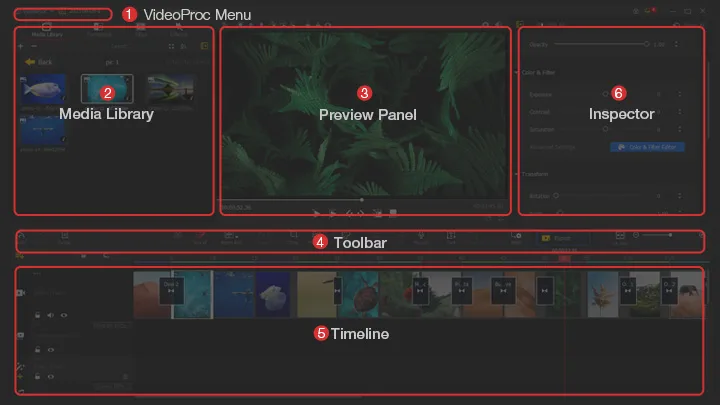
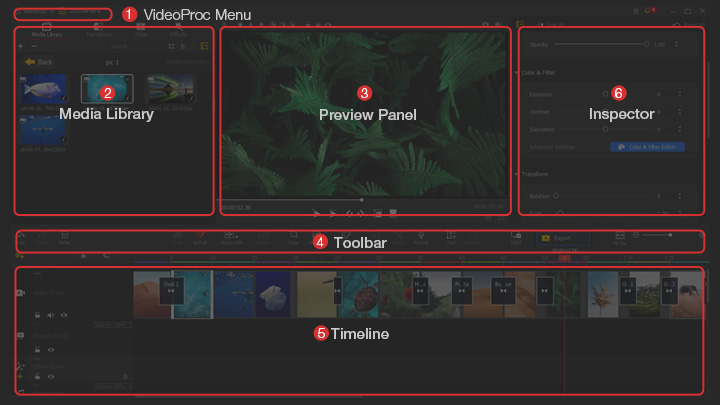
VideoProc Vlogger combines video, music, images and text on a multi-track timeline. Use it to trim and arrange footage, add transitions and titles, or build picture-in-picture sequences. Its speed editor uses presets and adjustable Bezier curves for changes between slow and fast motion, while motion controls add pans, zooms and reframing to clips or still images.
Color correction and 3D LUTs help match shots, and audio tools include a 10-band equalizer, fades and beat analysis. The publisher offers the editor as proprietary freeware with watermark-free output. First-time use requires an email address and a free license code; a code activates at most two computers. Video export is limited to the MP4 and MKV containers listed in the official specifications, even though the editor accepts a broader range of input formats.
What it offers
- Arrange video, audio, overlays and subtitles on a multi-track timeline.
- Create speed ramps with presets, Bezier curves and automatic keyframes.
- Add motion crop, pan-and-zoom effects, transitions and titles.
- Adjust exposure, contrast, saturation and HSL values, or apply 3D LUTs.
- Shape audio with a 10-band equalizer, fades, beat analysis and voiceover recording.
Good to know
- First-time registration requires a valid email address and a free license code; one code is limited to two computers.
- Video export is listed as MP4 or MKV with H.264 or HEVC, rather than every supported input format.
Product images
Sources
References used for this listing. Retrieval dates do not indicate hands-on testing.
More in multimedia & graphics
View category ↗
1by1 2.17
Play music directly from folders with 1by1, a free Windows audio player with resume, gapless playback and file tools. Formats beyond MP3 need additional decoders.
3DVista Virtual Tour Pro
Build interactive 360° virtual tours from panoramas, videos and 3D models with 3DVista Virtual Tour Pro for Windows. Commercial software with a 30-day trial.

4DDiG Video Repair
Repair corrupted or unplayable videos in batches with the Video Repair tool in 4DDiG File Repair for Windows. A free trial is available; advanced features require a paid license.