

Multimedia & graphics Windows
Virtual Cables for Windows
Route playback from one Windows application into another with up to 32 virtual USB audio loopback cables. The free GitHub edition requires a USB/IP transport driver.
- Operating system
- Windows 10 or Windows 11
- Architecture
- x64
- Download package
- EXE installer
GitHub desktop edition. Requires usbip-win2 transport; administrator approval may be needed during transport setup. Fixed 48 kHz stereo, 16-bit PCM.
Link checked · Download guidance
What is Virtual Cables?
Virtual Cables connects the audio output of one Windows application to the recording input of another. Each numbered cable appears as a playback device and a matching recording device. Choose the same cable number in both applications to pass audio between them locally, for example when sending playback into a recording workflow.
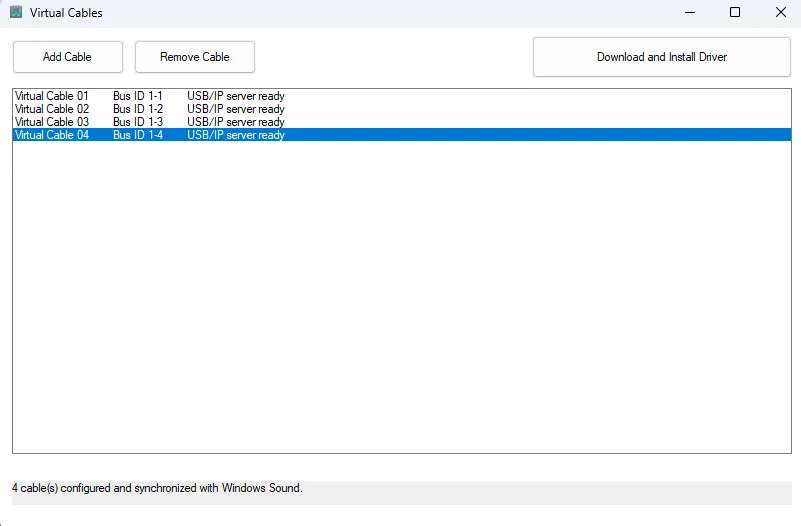
The application creates USB Audio Class 1.0 devices through a local USB/IP server. Windows uses its built-in USB audio class driver, but the separate usbip-win2 transport is still required. The native interface lets you add or remove cables, with an independent audio buffer for each one.
This entry links to the free, open-source GitHub installer, not the separate paid Microsoft Store edition. The GitHub edition uses a fixed 48 kHz stereo, 16-bit PCM format. The publisher describes the project as experimental and recommends checking it on the intended system before production or live-performance use.
What it offers
- Create between 1 and 32 independent virtual audio cables.
- Send playback audio to the recording endpoint of the same numbered cable.
- Add or remove cables through a native Windows interface.
- Route samples locally through a separate in-memory buffer for each cable.
- Expose standard USB Audio Class 1.0 devices using Windows’ built-in USB audio class driver and the usbip-win2 transport.
Good to know
- The free GitHub edition uses a fixed 48 kHz, stereo, 16-bit PCM format; the paid Microsoft Store edition has different capabilities.
- Requires the separately installed USB/IP transport driver; configuring the transport can require administrator approval.
- Experimental project: the publisher says stability depends on the Windows system, transport, system load and number of active cables.
Product images
Sources
References used for this listing. Retrieval dates do not indicate hands-on testing.
More in multimedia & graphics
View category ↗
1by1 2.17
Play music directly from folders with 1by1, a free Windows audio player with resume, gapless playback and file tools. Formats beyond MP3 need additional decoders.
3DVista Virtual Tour Pro
Build interactive 360° virtual tours from panoramas, videos and 3D models with 3DVista Virtual Tour Pro for Windows. Commercial software with a 30-day trial.

4DDiG Video Repair
Repair corrupted or unplayable videos in batches with the Video Repair tool in 4DDiG File Repair for Windows. A free trial is available; advanced features require a paid license.