
Multimedia & graphics macOS
Virtual MIDI Piano Keyboard
Play MIDI notes from your Mac keyboard or mouse and send them to a synthesizer. VMPK is a free MIDI controller and note display, not a standalone sound generator.
- Operating system
- macOS; Softonic lists macOS 10.15
- Architecture
- Universal (publisher label; exact CPU targets unconfirmed)
- Download package
- DMG disk image
Publisher identifies the selected 0.9.2 package as mac OSX Universal. Historical build instructions do not establish current CPU support. Requires a MIDI synthesizer to produce audio.
Link checked · Download guidance
What is Virtual MIDI Piano Keyboard?
Virtual MIDI Piano Keyboard (VMPK) lets you send MIDI notes with a computer keyboard or mouse instead of a physical piano keyboard. Connect its MIDI output to a hardware or software synthesizer to hear the notes. It can also receive MIDI from another instrument or a MIDI file player and show the played notes on its on-screen keys.
Keyboard mapping is configurable, with layouts for different alphanumeric keyboards and XML files for saving maps. VMPK can send program changes and controller messages; instrument definition files provide names for a synthesizer's available sounds. These controls make it useful for playing or inspecting a MIDI connection without a separate keyboard controller.
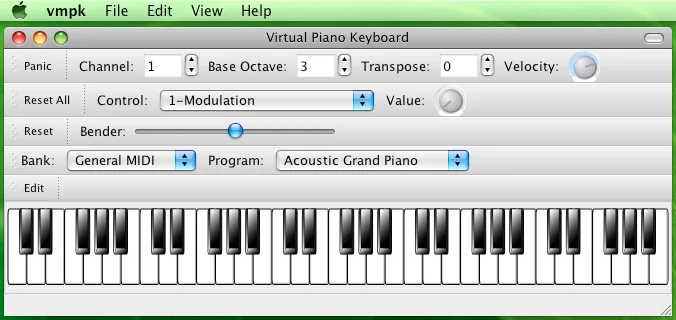
VMPK does not generate audio by itself. A synthesizer and the appropriate MIDI connection are required, so a silent keyboard can mean the output has not been connected rather than that the keys are broken. The linked Mac package is version 0.9.2. The publisher-provided screenshot shows the older 0.3.0 Mac interface and is included as a historical UI illustration, not a capture of this release.
What it offers
- Send MIDI notes using the computer keyboard or mouse.
- Display incoming MIDI notes from another instrument or MIDI file player.
- Configure alphanumeric keyboard mappings and save maps as XML files.
- Send program changes and controller messages to a connected synthesizer.
- Use instrument definition files to display synthesizer patch names.
Good to know
- Does not produce sound by itself; connect a hardware or software MIDI synthesizer to hear notes.
- Instrument names depend on a definition matching the connected synthesizer or soundfont.
Product images
Sources
References used for this listing. Retrieval dates do not indicate hands-on testing.
More in multimedia & graphics
View category ↗
1by1 2.17
Play music directly from folders with 1by1, a free Windows audio player with resume, gapless playback and file tools. Formats beyond MP3 need additional decoders.
3DVista Virtual Tour Pro
Build interactive 360° virtual tours from panoramas, videos and 3D models with 3DVista Virtual Tour Pro for Windows. Commercial software with a 30-day trial.

4DDiG Video Repair
Repair corrupted or unplayable videos in batches with the Video Repair tool in 4DDiG File Repair for Windows. A free trial is available; advanced features require a paid license.