
Multimedia & graphics Windows
Virtual MIDI Piano Keyboard
Send MIDI notes from your computer keyboard or mouse, or display notes from another MIDI source. VMPK needs a synthesizer to turn those notes into sound.
- Operating system
- Windows; specific supported Windows versions not independently verified
- Architecture
- Intel x64 (64-bit)
- Download package
- EXE setup installer
Publisher lists a separate Windows ARM64 installer. MIDI sound requires a synthesizer; application-to-application routing may need a virtual MIDI cable. No installer was downloaded or run.
Link checked · Download guidance
What is Virtual MIDI Piano Keyboard?
Virtual MIDI Piano Keyboard (VMPK) is a MIDI controller and note display for Windows. Play its on-screen piano with a mouse or computer keyboard to send notes to a hardware or software synthesizer. Connect a MIDI instrument or MIDI file player's output to VMPK's input to see the notes being played.
You can customize the computer-keyboard mapping, save maps as XML files, and send program changes and controller messages to a connected synthesizer. Instrument definitions in Cakewalk-style .INS files give names to the sounds available on the destination synth.
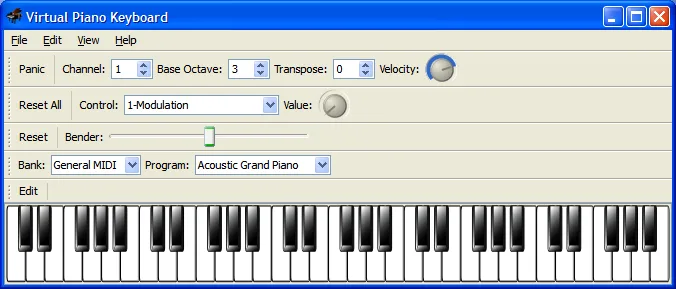
VMPK is not a standalone sound source: it sends and receives MIDI events rather than generating audio. Routing notes into another Windows application may require separate virtual MIDI cable software. This entry links to the publisher's version 0.9.2 Windows Intel x64 setup executable; an ARM64 package is listed separately. The screenshot is the publisher's historical Windows 0.3.0 interface, not a capture of version 0.9.2.
What it offers
- Play MIDI notes with the computer keyboard or mouse.
- Display incoming notes from a connected MIDI instrument or MIDI file player.
- Customize keyboard mappings and load or save them as XML files.
- Send program changes and controller messages to a MIDI synthesizer.
- Use .INS instrument definitions to match program names to the connected synthesizer.
Good to know
- Does not generate audio itself; hearing the notes requires a hardware or software MIDI synthesizer.
- Connecting VMPK to another Windows music application may require a separate virtual MIDI cable driver.
- Included instrument definitions cover standard GM, GS and XG sounds; other synth sound sets need matching definitions.
Product images
Sources
References used for this listing. Retrieval dates do not indicate hands-on testing.
More in multimedia & graphics
View category ↗
1by1 2.17
Play music directly from folders with 1by1, a free Windows audio player with resume, gapless playback and file tools. Formats beyond MP3 need additional decoders.
3DVista Virtual Tour Pro
Build interactive 360° virtual tours from panoramas, videos and 3D models with 3DVista Virtual Tour Pro for Windows. Commercial software with a 30-day trial.

4DDiG Video Repair
Repair corrupted or unplayable videos in batches with the Video Repair tool in 4DDiG File Repair for Windows. A free trial is available; advanced features require a paid license.