
Multimedia & graphics Windows
Voicemeeter Potato
Mix and route Windows audio between microphones, applications and output devices with five physical and three virtual I/O, built-in effects and per-application volume controls.
- Operating system
- Windows XP through Windows 11, as listed by the publisher
- Architecture
- 32-bit, 64-bit and ARM64, per publisher package listing
- Download package
- ZIP containing Windows setup
Publisher lists the package as September 2026. Administrator setup and a reboot are required; Voicemeeter and Banana are included. No installation or compatibility testing performed.
Link checked · Download guidance
What is Voicemeeter Potato?
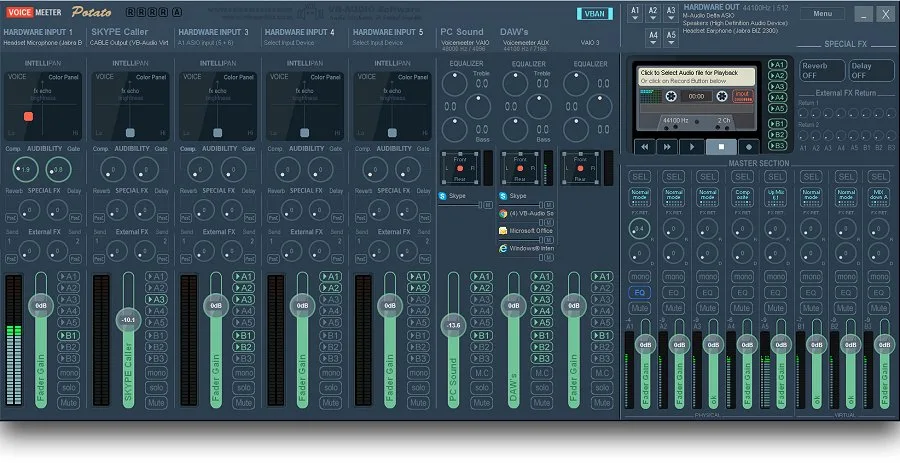
Voicemeeter Potato is a virtual audio mixer for Windows that brings hardware audio and application sound into one routing console. Its five physical and three virtual inputs and outputs suit setups that combine microphones, music, games and communication apps for streaming or audio production. Virtual input strips show connected Windows applications with individual volume and mute controls.
Potato adds internal reverb and multi-tap delay, plus external effects through a send/return workflow. It supports MME, DirectX, KS, WDM and ASIO interfaces. The publisher positions this edition for experienced Voicemeeter users rather than as a simple replacement for a volume slider.
The linked publisher ZIP contains version 3.1.3.0 and also installs Voicemeeter and Voicemeeter Banana. Setup requires administrator privileges and a reboot. Potato uses a donationware activation-code model, not unrestricted freeware: optional features are excluded from the free-use statement, and an About-box reminder appears after 30 days to buy a license or continue evaluation. A paid license is required for professional or organizational use under the publisher's licensing terms.
What it offers
- Mix and route audio through five physical and three virtual inputs and outputs.
- Apply internal reverb and multi-tap delay, or connect external effects through send/return routing.
- Adjust volume and mute for Windows applications connected to the virtual input strips.
- Work with MME, DirectX, KS, WDM and ASIO audio interfaces.
Good to know
- Donationware with activation-code licensing: optional features are excluded from the free-use statement; a license/evaluation reminder appears after 30 days, and professional or organizational use requires a paid license.
- Installation needs administrator privileges and a reboot; the package also installs the standard and Banana editions.
- The publisher targets experienced Voicemeeter users; its multi-bus routing is more involved than a basic volume control.
Product images
Sources
References used for this listing. Retrieval dates do not indicate hands-on testing.
More in multimedia & graphics
View category ↗
1by1 2.17
Play music directly from folders with 1by1, a free Windows audio player with resume, gapless playback and file tools. Formats beyond MP3 need additional decoders.
3DVista Virtual Tour Pro
Build interactive 360° virtual tours from panoramas, videos and 3D models with 3DVista Virtual Tour Pro for Windows. Commercial software with a 30-day trial.

4DDiG Video Repair
Repair corrupted or unplayable videos in batches with the Video Repair tool in 4DDiG File Repair for Windows. A free trial is available; advanced features require a paid license.