

Multimedia & graphics Windows
VOICEVOX for Windows
Turn text into character voices with VOICEVOX for Windows. Adjust pronunciation, accent and timing, then export speech as WAV audio.
Version 0.26.1 · Direct publisher file
Link checked · Download guidance
What is VOICEVOX?
VOICEVOX is a free text-to-speech and singing-synthesis application. Its speech editor lets you enter text, choose a character voice and refine how each line sounds before exporting audio. It is useful for preparing voiced dialogue or narration when you want control over pronunciation rather than a single read-aloud command.
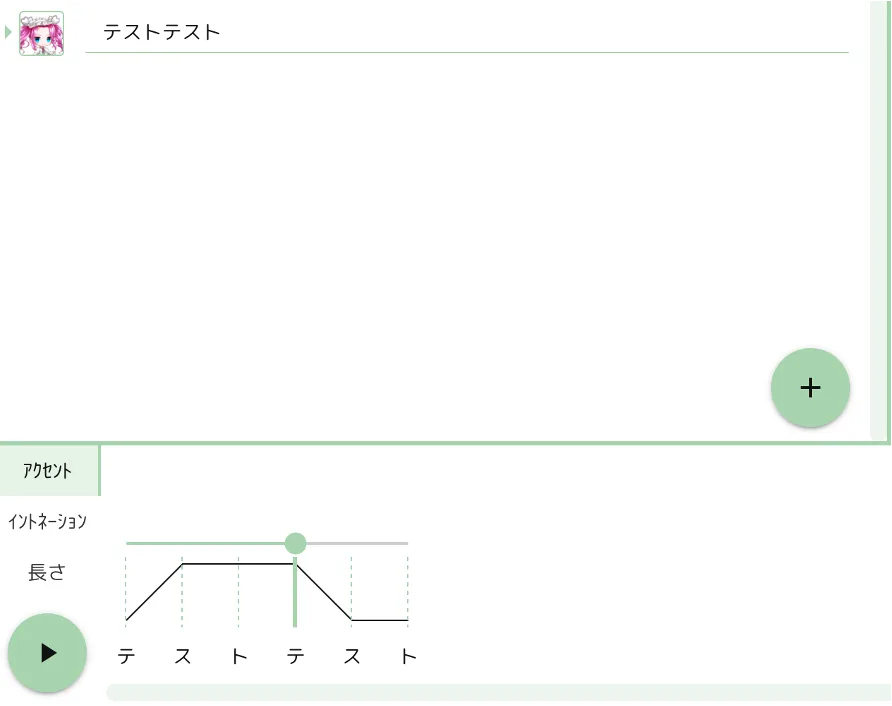
The editor provides controls for speech speed, pitch, intonation, volume and pauses. You can correct readings, change accent patterns and adjust individual sound lengths. Export finished speech as WAV files or save the text, voices and adjustments in a .vvproj project for later editing. The publisher lists Windows 10 and Windows 11 support.
This entry links to the publisher's 0.26.1 Windows web installer. The installer edition downloads a speech-synthesis engine on first launch, so it is not a complete offline bundle. Free use does not mean unrestricted voice rights: VOICEVOX credit is required, and generated audio must comply with the chosen voice library's terms. Check those terms before publishing or using the audio commercially.
What it offers
- Choose character voices and available speaking styles for individual text lines.
- Correct readings and accent patterns, with detailed intonation and sound-length editing.
- Adjust speech speed, pitch, volume and silence for each line.
- Export synthesized speech as WAV audio and save editable .vvproj projects.
- Includes singing synthesis and a humming feature alongside text-to-speech.
Good to know
- The web installer downloads a speech-synthesis engine on first launch; the linked file is not a complete offline package.
- VOICEVOX credit is required, and each voice library has its own terms for use of generated audio.
Product images
Sources
References used for this listing. Retrieval dates do not indicate hands-on testing.
- VOICEVOX for Windows — Softonic discovery ↗Retrieved
- VOICEVOX — official product overview ↗Retrieved
- How to use VOICEVOX — official guide ↗Retrieved
- VOICEVOX software terms ↗Retrieved
- VOICEVOX — official Q&A ↗Retrieved
- Release 0.26.1 — VOICEVOX official repository ↗Retrieved
More in multimedia & graphics
View category ↗
1by1 2.17
Play music directly from folders with 1by1, a free Windows audio player with resume, gapless playback and file tools. Formats beyond MP3 need additional decoders.
3DVista Virtual Tour Pro
Build interactive 360° virtual tours from panoramas, videos and 3D models with 3DVista Virtual Tour Pro for Windows. Commercial software with a 30-day trial.

4DDiG Video Repair
Repair corrupted or unplayable videos in batches with the Video Repair tool in 4DDiG File Repair for Windows. A free trial is available; advanced features require a paid license.