
Multimedia & graphics Windows
void Image Viewer
View still images and animated GIF or WebP files with void Image Viewer, a lightweight, open-source Windows viewer with slideshow and customizable controls.
- Operating system
- Windows; exact minimum version/build not established by the consulted publisher pages
- Architecture
- x64
- Download package
- English EXE installer
Selected package: 1.0.0.15 x64 en-US. Separate x86 installer and x64, x86, ARM64 and ARM portable ZIP packages are listed by the publisher.
Link checked · Download guidance
What is void Image Viewer?
void Image Viewer is a standalone Windows application for opening pictures and playing animated GIF and WebP files. The publisher lists BMP, GIF, ICO, PNG, JPG, TIF and WebP support. It suits browsing local images or displaying them in a slideshow, with fullscreen viewing and a configurable slideshow rate.
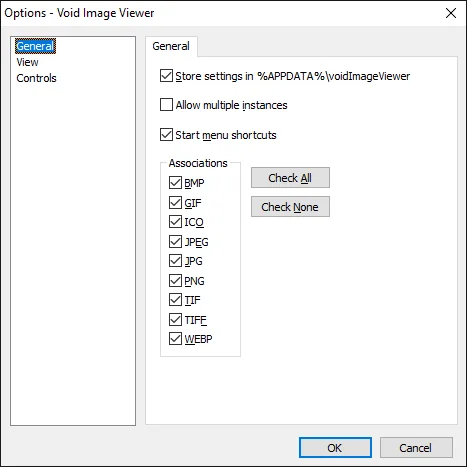
Its options separate General, View and Controls settings. The publisher's General Options screenshot shows file-association choices for individual image extensions, an option to allow multiple instances and a setting to store preferences in the user's application-data folder. Keyboard and mouse customization is also documented in the publisher's changelog. These controls make it possible to choose how the viewer opens and how you navigate, rather than treating every supported format as an obligatory default association.
The linked download is the English x64 EXE installer for version 1.0.0.15. The publisher also provides a separate x86 installer and portable packages, including ARM variants. This x64 installer is not the package for every Windows architecture; the sources consulted do not establish an exact minimum Windows version or build. The January 12, 2026 changelog describes fixes for scrolling large images and position offsets when using the numeric keypad.
What it offers
- Open BMP, GIF, ICO, PNG, JPG, TIF and WebP images.
- Play animated GIF and animated WebP files.
- Use fullscreen viewing and slideshows with a configurable rate.
- Customize keyboard and mouse controls.
- Choose individual image-file associations in General Options.
Good to know
- The linked installer is x64 only; other architectures require a different package from the publisher.
- The consulted publisher sources do not specify an exact minimum Windows version or build; compatibility with a particular Windows installation is not verified here.
Product images
Sources
References used for this listing. Retrieval dates do not indicate hands-on testing.
- Downloads - voidtools ↗Retrieved
- void Image Viewer — publisher README ↗Retrieved
- voidImageViewer - voidtools forum ↗Retrieved
- voidImageViewer — publisher LICENSE ↗Retrieved
- Publisher screenshot — void Image Viewer General Options ↗Retrieved
More in multimedia & graphics
View category ↗
1by1 2.17
Play music directly from folders with 1by1, a free Windows audio player with resume, gapless playback and file tools. Formats beyond MP3 need additional decoders.
3DVista Virtual Tour Pro
Build interactive 360° virtual tours from panoramas, videos and 3D models with 3DVista Virtual Tour Pro for Windows. Commercial software with a 30-day trial.

4DDiG Video Repair
Repair corrupted or unplayable videos in batches with the Video Repair tool in 4DDiG File Repair for Windows. A free trial is available; advanced features require a paid license.