

Multimedia & graphics Windows
Vovsoft Voice Changer for Windows
Apply voice effects to recorded audio, preview the result and save MP3 or WAV files with Vovsoft Voice Changer, a freeware Windows audio tool.
- Operating system
- Windows 11, 10, 8/8.1 and 7
- Architecture
- 32-bit and 64-bit Windows support listed by publisher
- Download package
- EXE installer
A separate portable edition is listed. Windows support is publisher-reported; executable architecture and operation were not tested.
Link checked · Download guidance
What is Vovsoft Voice Changer?
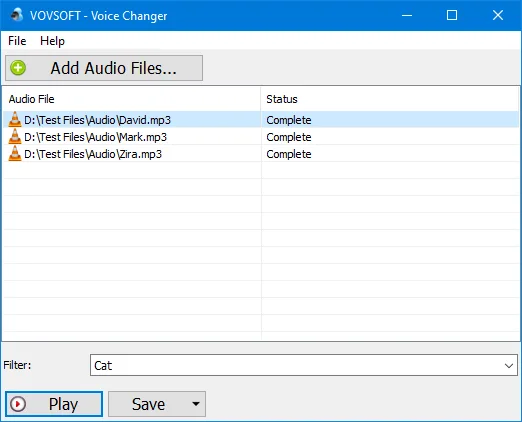
Vovsoft Voice Changer changes the sound of existing audio files. Add a voice recording or music track, choose an effect, listen to the processed audio and save the result as MP3 or WAV. It suits preparing altered recordings rather than changing your microphone during a call.
Presets include Cat, Child, Robot, Whisper, Chorus and Echo. A Custom setting lets you adjust rate and tempo instead of relying only on a preset. The file list supports adding multiple audio files and drag and drop.
The publisher explicitly describes processing completed recordings, not live audio. Do not choose it for real-time microphone effects in calls, games or livestreams. Windows installer and portable editions are listed; the download linked here is the EXE installer.
What it offers
- Apply presets such as Cat, Robot, Whisper, Chorus and Echo to recorded audio.
- Adjust rate and tempo through the Custom setting.
- Preview processed audio before saving it as MP3 or WAV.
- Add multiple audio files, including by drag and drop.
Good to know
- Processes existing recordings, not a live microphone feed; it is not a real-time voice changer for calls or games.
- The documented export options are MP3 and WAV.
Product images
Sources
References used for this listing. Retrieval dates do not indicate hands-on testing.
More in multimedia & graphics
View category ↗
1by1 2.17
Play music directly from folders with 1by1, a free Windows audio player with resume, gapless playback and file tools. Formats beyond MP3 need additional decoders.
3DVista Virtual Tour Pro
Build interactive 360° virtual tours from panoramas, videos and 3D models with 3DVista Virtual Tour Pro for Windows. Commercial software with a 30-day trial.

4DDiG Video Repair
Repair corrupted or unplayable videos in batches with the Video Repair tool in 4DDiG File Repair for Windows. A free trial is available; advanced features require a paid license.