
Multimedia & graphics Windows
Wave Editor
Cut audio, adjust volume and add fades with Wave Editor, a free Windows sound editor for MP3, WMA and WAV files.
- Operating system
- Windows Vista, Windows 7, Windows 8, Windows 10 and Windows 11
- Architecture
- x64 download; separate x86 download available
- Download package
- EXE download
The selected publisher URL is labeled Win x64. Windows compatibility is publisher-reported; the software was not installed or run.
Link checked · Download guidance
What is Wave Editor?
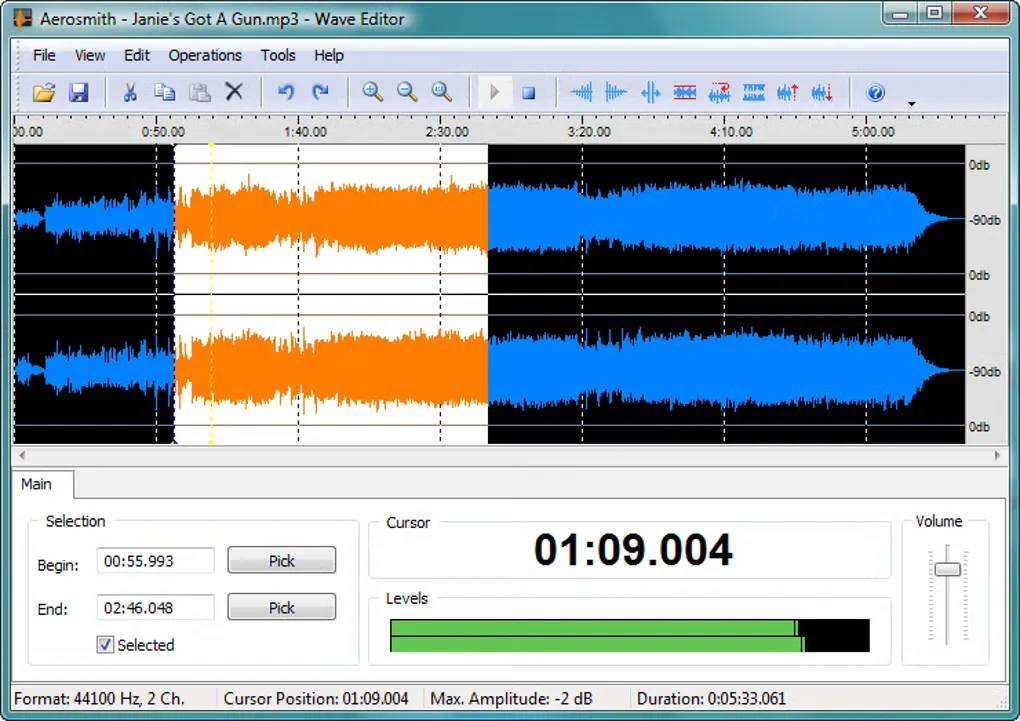
Wave Editor handles straightforward edits to an audio file: select part of its waveform, cut or copy a passage, insert silence, or save a selected fragment. It suits trimming a recording or preparing a short clip without a complex production workflow. The publisher lists MP3, WMA and WAV input, with export to WAV and MP3.
Its editing operations include normalization, amplification with a peak limiter, fade-in and fade-out, reverse and invert. Selection during playback and undo/redo help with choosing and revising a passage.
Check the format and size of your source audio before choosing it. The publisher specifies mono or stereo audio, 8-bit or 16-bit samples, sample rates from 8,000 to 96,000 Hz, and a maximum audio file size of 2 GB. This entry links to the publisher's Windows x64 executable; a separate x86 download is also offered.
What it offers
- Cut, copy, paste or delete selected audio, insert silence and save a selected fragment.
- Normalize or amplify audio with a peak limiter, and apply fade-in or fade-out.
- Reverse or invert audio, select blocks during playback and undo or redo edits.
- Open MP3, WMA and WAV files; export to WAV or MP3.
Good to know
- The publisher specifies a maximum audio file size of 2 GB.
- Listed audio support is limited to mono/stereo, 8-bit or 16-bit samples and sample rates from 8,000 to 96,000 Hz; export is listed for WAV and MP3, not every input format.
Product images
Sources
References used for this listing. Retrieval dates do not indicate hands-on testing.
More in multimedia & graphics
View category ↗
1by1 2.17
Play music directly from folders with 1by1, a free Windows audio player with resume, gapless playback and file tools. Formats beyond MP3 need additional decoders.
3DVista Virtual Tour Pro
Build interactive 360° virtual tours from panoramas, videos and 3D models with 3DVista Virtual Tour Pro for Windows. Commercial software with a 30-day trial.

4DDiG Video Repair
Repair corrupted or unplayable videos in batches with the Video Repair tool in 4DDiG File Repair for Windows. A free trial is available; advanced features require a paid license.