

Multimedia & graphics Windows
Webcam Surveyor for Windows
Record webcam video with audio, capture motion-triggered clips and create time lapse videos on Windows with Webcam Surveyor. A 30-day trial is available before buying a one-time license.
- Operating system
- Windows 10 and Windows 11
- Architecture
- 32-bit and 64-bit Windows supported, according to publisher
- Download package
- EXE installer
Requires a Windows-compatible webcam or capture device. Installer architecture was not inspected. Recording capacity and hardware encoding depend on the camera, PC, GPU and drivers.
Link checked · Download guidance
What is Webcam Surveyor?
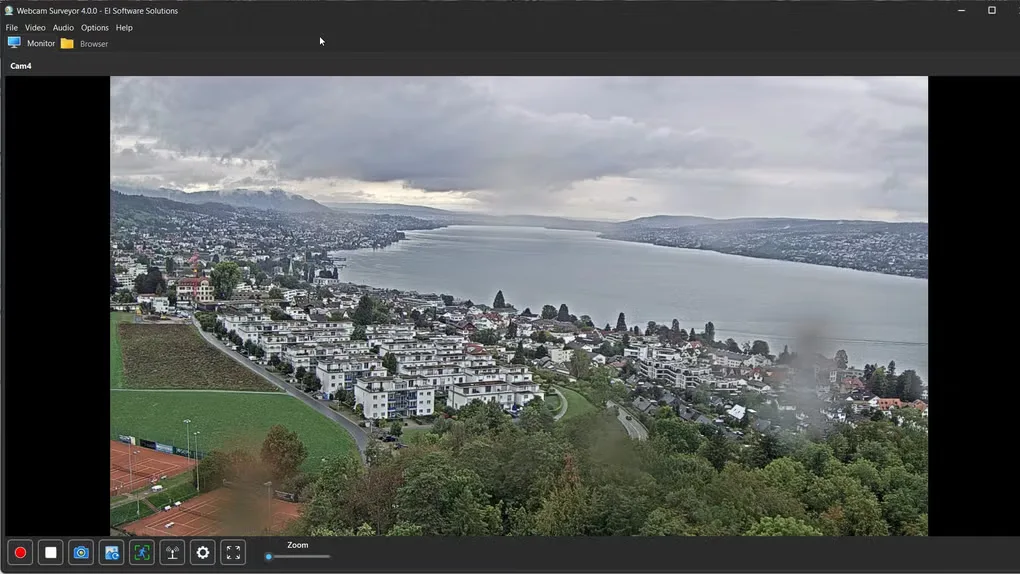
Webcam Surveyor records video and audio from a Windows-compatible webcam or capture device to your PC. It suits continuous recording, motion-triggered monitoring and time lapse capture. The Monitor tab provides a camera preview and recording controls; the Browser tab lets you review saved videos and images. Recordings can be saved in MKV or WMV format.
For unattended capture, use automatic recording or the built-in Scheduler. Motion Capture includes a pre-motion buffer, while email, Telegram and Discord alerts can notify you about events. Multiple cameras work through separate application instances, each with its own camera view.
The trial lasts 30 days and includes a watermark and reminder screen; a paid license removes them. Camera count, resolution and recording performance depend on the cameras, computer, drivers and available USB bandwidth. Support for 4K does not guarantee that every camera and PC can sustain it.
What it offers
- Record webcam video with audio locally in MKV or WMV format.
- Capture motion-triggered clips with a pre-motion buffer and optional email, Telegram or Discord alerts.
- Create time lapse videos or automate capture with the built-in Scheduler.
- Use separate application instances for multiple cameras on one PC.
- Preview the camera in the Monitor tab and review captured files in the Browser tab.
Good to know
- The 30-day trial includes a watermark and reminder screen; removing them requires a paid license.
- Multiple-camera and high-resolution recording capacity depends on hardware, drivers, USB bandwidth and storage performance; H.264 encoding also needs a supported encoder.
Product images
Sources
References used for this listing. Retrieval dates do not indicate hands-on testing.
More in multimedia & graphics
View category ↗
1by1 2.17
Play music directly from folders with 1by1, a free Windows audio player with resume, gapless playback and file tools. Formats beyond MP3 need additional decoders.
3DVista Virtual Tour Pro
Build interactive 360° virtual tours from panoramas, videos and 3D models with 3DVista Virtual Tour Pro for Windows. Commercial software with a 30-day trial.

4DDiG Video Repair
Repair corrupted or unplayable videos in batches with the Video Repair tool in 4DDiG File Repair for Windows. A free trial is available; advanced features require a paid license.