

Multimedia & graphics Windows
Wings 3D for Windows
Build polygon models and prepare UV layouts with Wings 3D, a free, open-source subdivision modeler for Windows. Animation is not supported.
- Operating system
- Windows 10 or later
- Architecture
- x64 (64-bit)
- Download package
- EXE installer
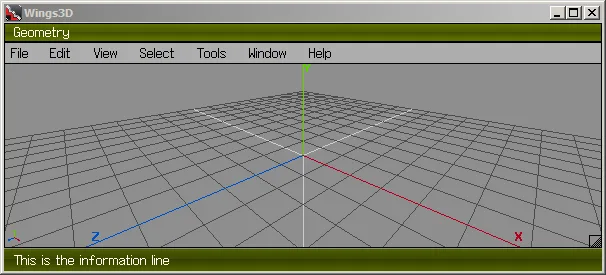
OpenGL 2.1 required. Publisher also lists a separate 32-bit Windows package. Documentation screenshots depict an older interface.
Link checked · Download guidance
What is Wings 3D?
Wings 3D is a subdivision modeler for shaping polygon meshes. Its selection and mesh tools cover operations such as extruding, beveling, cutting and welding, while Virtual Mirror supports symmetrical modeling. Context-sensitive right-click menus change with the current selection, and configurable hotkeys let you adjust how you reach commands.
The built-in AutoUV facility cuts and unfolds a model's surface into a layout that can be exported for painting and texturing. Wings also supports vertex colors, materials and lights, and exports to common 3D formats including OBJ. It is free for personal and commercial projects.
Wings 3D does not support animation: choose it for creating and preparing models, not for an animated production workflow within one application. The linked package is the Windows 64-bit EXE for version 2.4.1 listed on the publisher's download page. Windows 10 or later and OpenGL 2.1 are required. The accompanying publisher documentation screenshots show an older interface, not a verified view of this release.
What it offers
- Shape meshes with tools including Extrude, Bevel, Cut, Weld and Inset.
- Use Virtual Mirror for symmetrical modeling and Smooth Preview to inspect shapes.
- Cut and unfold UV layouts with AutoUV, then export them for painting and texturing.
- Work with vertex colors, materials and lights; export models in common formats including OBJ.
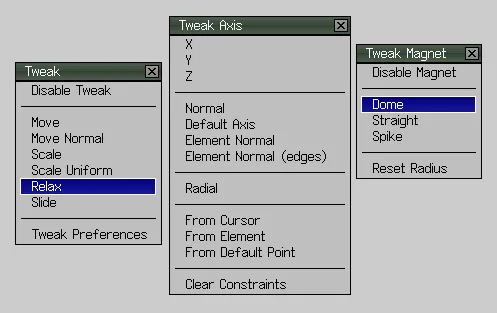
- Customize hotkeys and use context-sensitive right-click menus or Tweak palettes.
Good to know
- Animation is not supported.
- The Windows package requires Windows 10 or later and OpenGL 2.1.
Product images
Sources
References used for this listing. Retrieval dates do not indicate hands-on testing.
- Wings 3D — publisher overview ↗Retrieved
- Features | Wings 3D ↗Retrieved
- Downloads | Wings 3D ↗Retrieved
- Wings Program Window | Wings 3D ↗Retrieved
- Tweak | Wings 3D ↗Retrieved
More in multimedia & graphics
View category ↗
1by1 2.17
Play music directly from folders with 1by1, a free Windows audio player with resume, gapless playback and file tools. Formats beyond MP3 need additional decoders.
3DVista Virtual Tour Pro
Build interactive 360° virtual tours from panoramas, videos and 3D models with 3DVista Virtual Tour Pro for Windows. Commercial software with a 30-day trial.

4DDiG Video Repair
Repair corrupted or unplayable videos in batches with the Video Repair tool in 4DDiG File Repair for Windows. A free trial is available; advanced features require a paid license.