

Multimedia & graphics Windows
WO Mic for Windows
Use your phone as a Windows microphone with WO Mic, a free audio utility that sends voice to a virtual input device over Wi-Fi, USB or Bluetooth.
Version 6.3 · Direct publisher file
Link checked · Download guidance
What is WO Mic?
WO Mic sends audio from your phone's microphone to a Windows PC. Its phone app captures your voice, the desktop client receives it, and a virtual microphone driver makes that audio available to recording, chat and other applications. Select WO Mic Device as the application's microphone, or make it the default recording device in Windows when the application has no input selector.
The Windows installer includes the client and driver, but you also need the phone app and Microsoft's x86 Visual C++ runtime. For Wi-Fi, connect the phone and PC to the same router and enter the phone's IP address in the client. Android supports USB, Bluetooth, Wi-Fi and Wi-Fi Direct; the iOS app supports Wi-Fi only. WO Mic accepts one phone connection at a time. The publisher states that the installer is unsigned, so Windows may display a warning; a working download link is not a security assessment.
What it offers
- Expose phone microphone audio as WO Mic Device for Windows applications that accept microphone input.
- Connect an Android phone over USB, Bluetooth, Wi-Fi or Wi-Fi Direct; connect an iPhone over Wi-Fi.
- Transmit 48 kHz, 16-bit mono PCM audio.
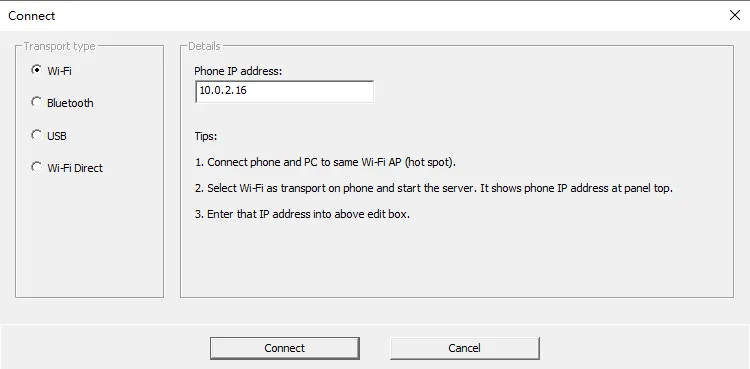
- Use the client connection dialog to select a transport and enter the phone's IP address for Wi-Fi.
Good to know
- Requires the companion phone app, Windows client and virtual microphone driver; the publisher also requires Microsoft's x86 Visual C++ runtime.
- Only one phone connection is supported at a time.
- The iOS app supports Wi-Fi only, unlike the additional Android connection methods.
- The Windows installer is unsigned according to the publisher and may trigger a Windows warning. No security or installation test is claimed.
Product images
Sources
References used for this listing. Retrieval dates do not indicate hands-on testing.
- WO Mic - Download — Windows product page ↗Retrieved
- WO Mic — official introduction and transport support ↗Retrieved
- WO Mic — Download and install ↗Retrieved
- WO Mic — Quick Start ↗Retrieved
- WO Mic — official FAQ ↗Retrieved
More in multimedia & graphics
View category ↗
1by1 2.17
Play music directly from folders with 1by1, a free Windows audio player with resume, gapless playback and file tools. Formats beyond MP3 need additional decoders.
3DVista Virtual Tour Pro
Build interactive 360° virtual tours from panoramas, videos and 3D models with 3DVista Virtual Tour Pro for Windows. Commercial software with a 30-day trial.

4DDiG Video Repair
Repair corrupted or unplayable videos in batches with the Video Repair tool in 4DDiG File Repair for Windows. A free trial is available; advanced features require a paid license.