
Games macOS
Frets on Fire
Play guitar parts with a keyboard in Frets on Fire, an open-source rhythm game with a song editor and a legacy Intel Mac OS X download.
- Operating system
- Legacy Mac OS X; exact supported versions not established
- Architecture
- Intel; exact bitness not established
- Download package
- ZIP archive
Publisher lists 128 MB RAM and an OpenGL graphics card. Current macOS and Apple silicon support are unverified; historical Mac crash reports remain relevant.
Link checked · Download guidance
What is Frets on Fire?
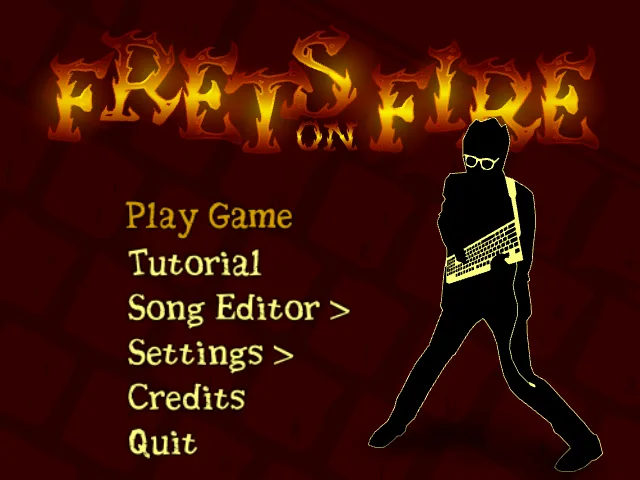
Frets on Fire turns a keyboard into a guitar-style rhythm controller. Hold the matching fret keys as notes reach the bottom of the screen, then press the pick key in time with the music. Longer notes require holding the frets down. The default layout uses F1–F5 for frets and Enter to pick, with controls changeable in the settings menu.
The game includes a tutorial and song editor, and the publisher lists support for guitar controllers and generic joysticks. Keyboard choice matters: some keyboards cannot register particular multi-key combinations. The publisher recommends trying different bindings and using the settings menu's key tester when chords fail to register.
This entry links to the publisher project's version 1.3.110 Mac OS X ZIP archive, not a new macOS release. The official requirements identify an Intel processor, but do not establish support for current macOS versions or Apple silicon. The publisher's historical FAQ also warns of blank screens and crashes in the Mac version. Treat it as a legacy game rather than a confirmed option for a modern Mac.
What it offers
- Play guitar-style note patterns with configurable fret and pick keys.
- Hold sustained notes and build a score multiplier through consecutive correct notes.
- Use the included tutorial and song editor.
- Publisher-listed support for guitar controllers and generic joysticks.
Good to know
- Legacy Mac OS X package: current macOS and Apple silicon compatibility are unverified; the publisher specifies an Intel processor.
- The publisher's historical FAQ warns that the Mac version can show a blank screen or crash.
- Some keyboards cannot register certain chords; different bindings may be necessary.
Product images
Sources
References used for this listing. Retrieval dates do not indicate hands-on testing.
- Frets On Fire — official platform downloads ↗Retrieved
- About Frets On Fire — features and requirements ↗Retrieved
- Frets on Fire — how to play ↗Retrieved
- Frets on Fire FAQ — keyboard and Mac limitations ↗Retrieved
- Frets on Fire source code guide ↗Retrieved
- Frets on Fire — SourceForge project file feed ↗Retrieved
- Frets on Fire — official screenshot gallery ↗Retrieved
More in games
View category ↗
0 A.D. 0.28.0 (Release 28: Boiorix)
Build an ancient city, gather resources and command citizen-soldiers in 0 A.D., a free, open-source real-time strategy game for Windows.
123 Free Solitaire 12.1
Play 12 solitaire variations on Windows, including FreeCell, Klondike, Pyramid and Spider, with customizable cards and backgrounds.
AirXoniX
Claim territory with a flying device while avoiding balls and mines in AirXoniX, a 3D Xonix-style arcade game for Windows. The publisher offers a free trial; the full game requires paid registration.