

Games Windows
openBVE for Windows
Drive trains with simulated brakes, cab controls and positional sound in openBVE, a free, open-source train simulator for Windows.
Version 1.14.1.2 · Direct publisher file
Link checked · Download guidance
What is openBVE?
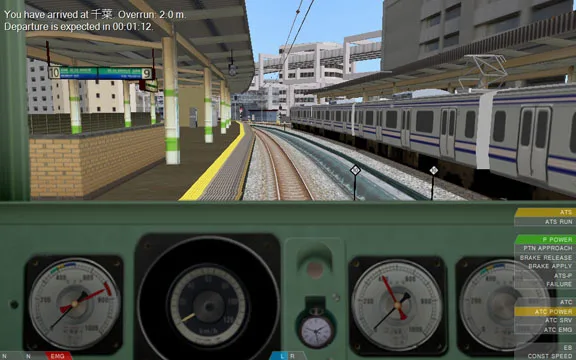
openBVE is a train-driving simulator built around operating the train rather than arcade-style driving. It models braking for individual cars, friction and air resistance, with cab movement, exterior train views and a timetable for the current run. Choose a route and train from the main menu, then configure keyboard or joystick controls for the driving setup you want.
The learning curve is part of the experience: the project recommends studying the operating manuals for the routes and trains you use. Add-on routes and trains have their own installation instructions and folder structure; OpenBVE package files can be installed through the Package Management tab. Train plugins can introduce their own controls and safety systems, so the basic control guide does not cover every train.
This entry links to the publisher's Windows EXE installer for version 1.14.1.2. The publisher states that its binaries are not code-signed. The accompanying cab screenshot comes from the official driving guide and illustrates the interface; it is not a verified capture of this release.
What it offers
- Per-car simulation of braking, friction, air resistance and toppling.
- Cab movement during acceleration, braking and curves, plus exterior train views.
- 3D positional sound and timetables for the current run.
- Route and train selection with configurable keyboard or joystick controls.
- Package Management tab for installing OpenBVE add-on package files.
Good to know
- Realism takes priority over ease of use; routes and trains can require studying their operating manuals.
- Add-on routes and trains need their prescribed folder structure and installation steps; plugin-equipped trains may use controls beyond the basic guide.
- The publisher does not provide code-signed binaries.
Product images
Sources
References used for this listing. Retrieval dates do not indicate hands-on testing.
- Welcome to the OpenBVE Project homepage. – OpenBVE ↗Retrieved
- Download – OpenBVE ↗Retrieved
- Copyright and Licencing – OpenBVE ↗Retrieved
- Installing Addons – OpenBVE ↗Retrieved
- Playing OpenBVE – OpenBVE ↗Retrieved
More in games
View category ↗
0 A.D. 0.28.0 (Release 28: Boiorix)
Build an ancient city, gather resources and command citizen-soldiers in 0 A.D., a free, open-source real-time strategy game for Windows.
AirXoniX
Claim territory with a flying device while avoiding balls and mines in AirXoniX, a 3D Xonix-style arcade game for Windows. The publisher offers a free trial; the full game requires paid registration.

Alien Arena 7.72.3
Play retro sci-fi arena combat in Alien Arena for Windows, with deathmatch, capture the flag and single-player modes. The publisher installer downloads and updates the game files.