

Development macOS
010 Editor for macOS
Inspect and edit binary files on Mac with 010 Editor, a paid text and hex editor with Binary Templates, file comparison and a 30-day trial.
- Operating system
- Publisher lists macOS 10.14 to 27
- Architecture
- ARM64 (Apple silicon)
- Download package
- DMG disk image
This link selects the ARM64 edition. A separate 64-bit Intel Mac installer is available from the publisher; the listed OS range does not imply every Mac supports every macOS version.
Link checked · Download guidance
What is 010 Editor?
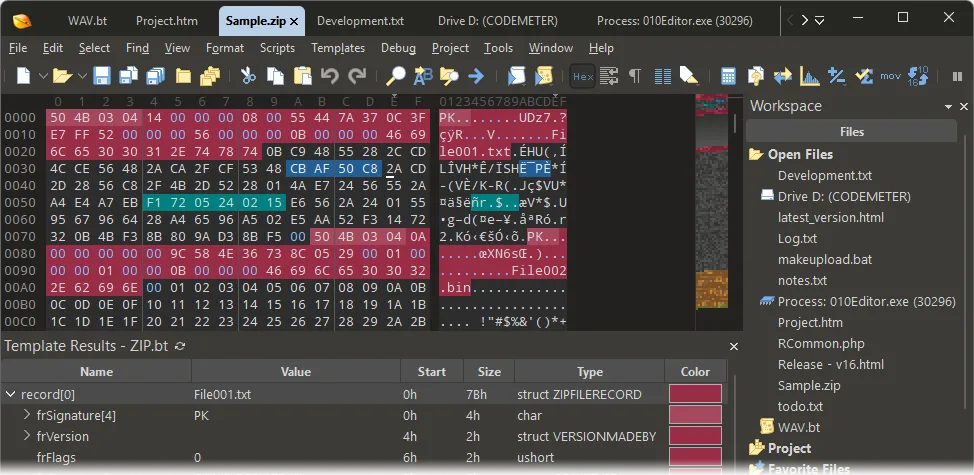
010 Editor combines text editing with byte-level inspection of binary files. Its Binary Templates map raw bytes to named fields and structures, so you can examine a ZIP archive or WAV file without interpreting every byte manually. The Inspector, binary comparison, searches, checksums and histograms help investigate file contents, while C-style scripts automate repeated editing tasks.
The linked DMG is the macOS ARM64 edition for Apple silicon. SweetScape also provides a separate Intel Mac installer on its download page. The software is commercial: it can be evaluated for 30 days, after which a license is required. Process editing is a Windows-only feature, not a capability of the Mac edition. The publisher screenshot illustrates the Windows interface; Mac window controls differ.
What it offers
- Inspect and edit files in text or hexadecimal views, including Unicode and UTF-8 text.
- Parse binary data into structured fields with C/C++-style Binary Templates.
- Compare files byte by byte and search for text or numeric data.
- Analyze data with the Inspector, checksums and histograms.
- Automate editing operations with C-style scripts.
Good to know
- The free evaluation lasts 30 days; continued use requires a purchased license.
- Process editing is available only on Windows, not macOS.
- The linked ARM64 DMG is for Apple silicon; Intel Macs require the separate Intel download.
Product images
More in development
View category ↗010 Editor 17.0
Inspect and edit binary files with 010 Editor for Windows, a text and hex editor with Binary Templates, file comparison and scripting. Includes a 30-day trial.

Abyss Web Server X1 2.16.22
Host a website on your Mac with Abyss Web Server X1, a free personal web server with a browser-based console, HTTPS and CGI/FastCGI support. X1 serves one host; multi-site virtual hosting requires X2.

Actual Installer 10.10
Build Windows setup packages with Actual Installer, a form-based installer builder with a Free edition and a Pro Trial for evaluating advanced features.