

Development Windows
010 Editor for Windows
Inspect and edit binary files with 010 Editor for Windows, a text and hex editor with Binary Templates, file comparison and scripting. Includes a 30-day trial.
- Operating system
- Windows 10 and 11
- Architecture
- x64 (64-bit)
- Download package
- EXE installer
This link selects the 64-bit installer. The publisher lists separate 32-bit installers and portable ZIP packages.
Link checked · Download guidance
What is 010 Editor?
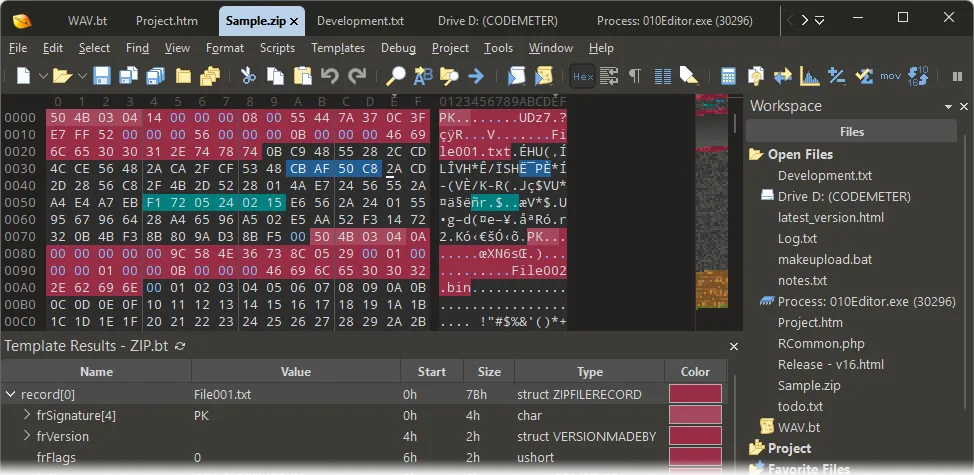
010 Editor combines text editing with byte-level binary inspection. Its Binary Templates turn raw file bytes into named fields and hierarchical structures, making it useful for examining file formats rather than reading a hex dump alone. The Windows edition also includes binary comparison, checksums and C/C++-style scripts for repeatable editing tasks.
Use the text editor for source code and Unicode files, or switch to the hex view to inspect individual bytes. Templates and the Inspector provide different ways to interpret the data; comparison tools help locate differences between two files.
This entry links to the publisher’s 64-bit EXE installer for Windows 10 and 11. The download is a 30-day evaluation of proprietary software, not freeware. Continued use requires a paid license, and Home/Academic licenses restrict commercial use. The publisher-supplied screenshot illustrates the interface; it is not a claim that the downloaded release was installed or tested.
What it offers
- Parse binary files into structured fields with Binary Templates.
- Compare files byte by byte and calculate checksums or hashes, including SHA-256.
- Automate editing with C/C++-style scripts.
- Edit text, source code and Unicode files alongside hex data.
Good to know
- The evaluation lasts 30 days; continued use requires a paid license.
- Home/Academic licenses restrict commercial use; check the publisher’s license terms for your use case.
Product images
More in development
View category ↗010 Editor 17.0
Inspect and edit binary files on Mac with 010 Editor, a paid text and hex editor with Binary Templates, file comparison and a 30-day trial.

Abyss Web Server X1 2.16.22
Host a website on your Mac with Abyss Web Server X1, a free personal web server with a browser-based console, HTTPS and CGI/FastCGI support. X1 serves one host; multi-site virtual hosting requires X2.

Actual Installer 10.10
Build Windows setup packages with Actual Installer, a form-based installer builder with a Free edition and a Pro Trial for evaluating advanced features.