

Utilities Windows
AB Download Manager for Windows
Organize file downloads into queues, schedule transfers and limit bandwidth with AB Download Manager, a free, open-source Windows download manager.
- Operating system
- Windows; Softonic lists Windows 11
- Architecture
- x64
- Download package
- EXE installer
This link selects the publisher's x64 installer. Separate ARM64 and ZIP assets are available. Minimum Windows version was not established from the publisher sources inspected.
Link checked · Download guidance
What is AB Download Manager?
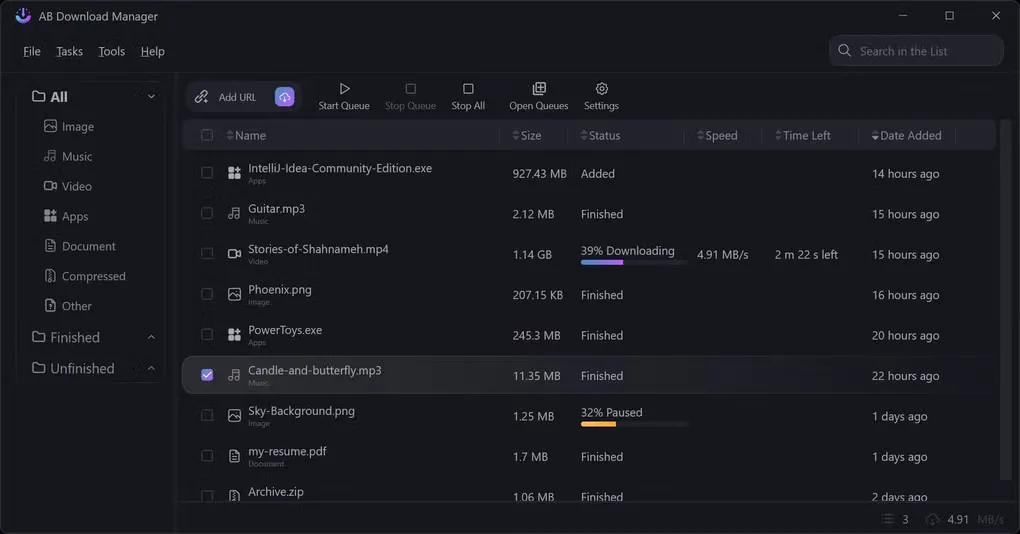
AB Download Manager organizes file transfers in a desktop interface rather than leaving them in a browser's download list. Create queues to download files sequentially, schedule when those queues start and stop, or set a speed limit to control how much bandwidth downloads use. The application supports multiple connections for file transfers and includes a dark interface.
Browser integration can capture download links from supported browsers, but it needs a separate browser extension and the desktop application running in the background. The publisher lists Chrome, Firefox, Edge, Brave, Opera and Vivaldi. Without that setup, automatic browser capture is not available.
This entry links to the publisher's version 1.11.1 Windows x64 EXE installer on GitHub. ARM64 and ZIP packages are separate release assets. The gallery image shows the Windows download list and queue controls; its application version is not identified, so it should not be treated as a version-specific preview.
What it offers
- Create queues that download files sequentially.
- Schedule queues to start and stop automatically.
- Set a download speed limit to control bandwidth use.
- Use multiple connections for file transfers.
- Capture browser download links through a separate extension for supported browsers.
Good to know
- Automatic browser link capture requires the matching extension and the desktop application running in the background.
- The linked installer is for Windows x64; ARM64 systems use a separate publisher package.
Product images
Sources
References used for this listing. Retrieval dates do not indicate hands-on testing.
More in utilities
View category ↗
1.1.1.1 with WARP 2026.8.2115.0
Encrypt traffic from your Mac to Cloudflare’s network with WARP, or use DNS-only mode for encrypted DNS queries to the 1.1.1.1 resolver.
1.1.1.1 with WARP 2026.8.2115.0
Encrypt traffic between your Windows PC and Cloudflare, or use encrypted DNS only, with the free 1.1.1.1 with WARP app.

3uTools 9.12.005
Manage iPhone and iPad photos, music, apps and backups from Windows with 3uTools, a free utility that also includes device checks and firmware flashing tools.