
Utilities Windows
Absolute Uninstaller
Find installed Windows programs, batch uninstall unwanted applications and manage invalid uninstall entries with Glarysoft's free Absolute Uninstaller.
- Operating system
- Windows; specific supported versions and builds not stated on the official product page
- Architecture
- Not specified on the official product page
- Download package
- EXE installer
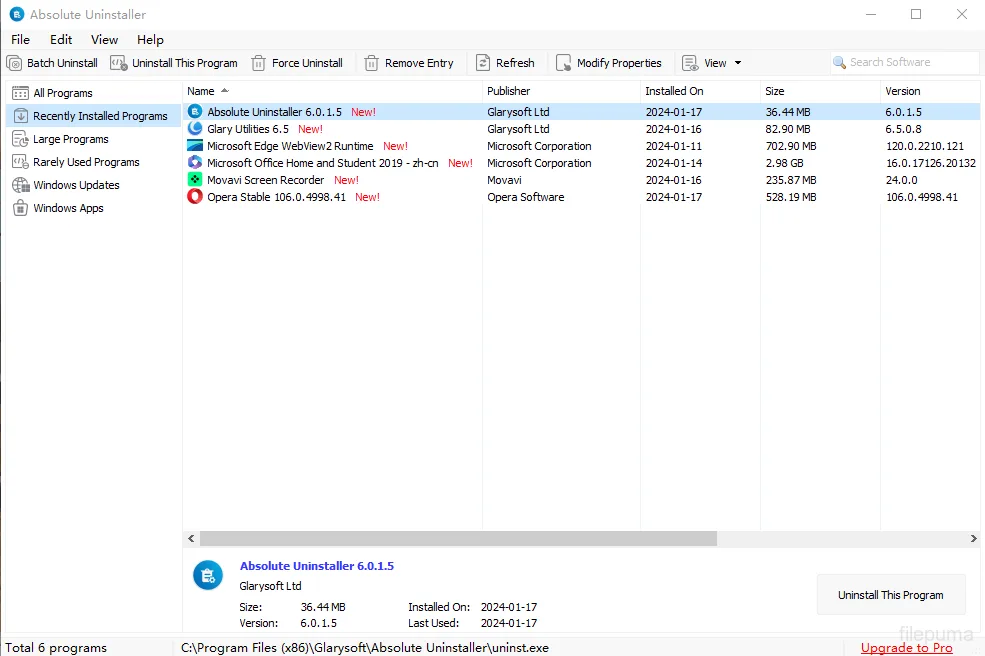
Publisher lists an update dated October 19, 2026. The supplied screenshot depicts the older 6.0.1.5 interface, not a verified run of 6.0.1.28.
Link checked · Download guidance
What is Absolute Uninstaller?
Absolute Uninstaller organizes installed Windows software in a searchable list and lets you select multiple programs for removal. It is useful when you want to work through several unwanted applications rather than find each one separately. Glarysoft also lists tools for fixing invalid program entries, viewing uninstall commands and exporting the program list.
Uninstall-entry management is a separate task from removing an application. The publisher describes backup and restore of uninstall information, not a full backup of installed programs or personal files. Do not treat that feature as a promise that an uninstalled application can be restored. The screenshot illustrates an older 6.0.1.5 interface; the publisher currently lists version 6.0.1.28.
What it offers
- Select multiple installed programs for batch uninstallation.
- Search the application list and identify recently installed programs.
- Fix invalid program entries and edit program properties.
- View uninstall command lines and program support information.
- Back up or restore uninstall information and export the installed-program list.
Good to know
- Backup and restore is described for uninstall information, not as a full application or personal-file backup.
- The official product page lists Windows without specifying supported Windows builds or CPU architectures.
Product images
Sources
References used for this listing. Retrieval dates do not indicate hands-on testing.
More in utilities
View category ↗
1.1.1.1 with WARP 2026.8.2115.0
Encrypt traffic from your Mac to Cloudflare’s network with WARP, or use DNS-only mode for encrypted DNS queries to the 1.1.1.1 resolver.
1.1.1.1 with WARP 2026.8.2115.0
Encrypt traffic between your Windows PC and Cloudflare, or use encrypted DNS only, with the free 1.1.1.1 with WARP app.

3uTools 9.12.005
Manage iPhone and iPad photos, music, apps and backups from Windows with 3uTools, a free utility that also includes device checks and firmware flashing tools.