

Utilities Windows
Advanced IP Scanner for Windows
Find devices on a local network, view IP and MAC addresses, open shared folders and export results with Advanced IP Scanner, a free Windows network scanner.
What is Advanced IP Scanner?
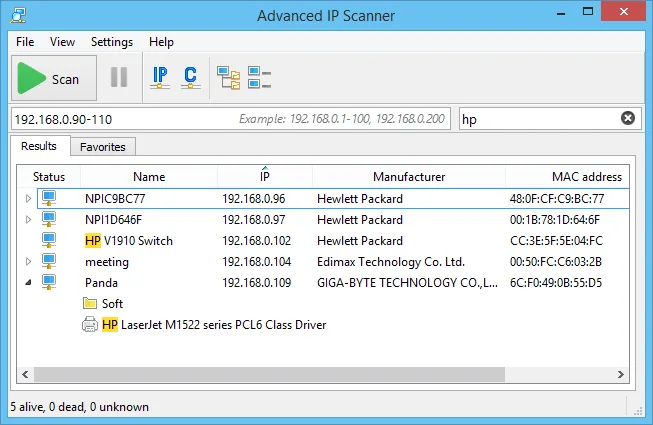
Advanced IP Scanner helps you identify devices on a LAN from a Windows computer. Enter an IP address range and scan it to build a list of network computers and other devices. From the results, you can inspect IP and MAC addresses, open available shared folders and save the device list for later use. A Favorites tab keeps regularly used computers together.
The publisher lists Windows 11, 10, 8 and 7 compatibility and offers a portable mode that does not require installation. Results can be saved as CSV, HTML or XML; importing a saved Favorites list requires XML.
Remote actions have prerequisites. Radmin remote control requires Radmin Server on the target computer and an installed or configured portable Radmin Viewer on your computer. Remote shutdown requires authorization, and the scanner only sends its Wake-on-LAN command to devices whose MAC addresses it has identified. Finding a device is not itself permission to control it.
What it offers
- Scan a specified IP address range and view detected network devices with IP and MAC addresses.
- Open available network shares from scan results.
- Keep frequently used computers in a Favorites list.
- Export device lists as CSV, HTML or XML.
- Use the publisher's portable mode without installation.
Good to know
- Radmin remote control requires Radmin Server on the remote computer and an installed or configured portable Radmin Viewer locally.
- Saved Favorites lists can only be imported from XML, although export also supports CSV and HTML.
- Remote shutdown requires authorization; Wake-on-LAN commands are only sent for devices with identified MAC addresses.
Product images
Sources
References used for this listing. Retrieval dates do not indicate hands-on testing.
More in utilities
View category ↗
1.1.1.1 with WARP 2026.8.2115.0
Encrypt traffic from your Mac to Cloudflare’s network with WARP, or use DNS-only mode for encrypted DNS queries to the 1.1.1.1 resolver.
1.1.1.1 with WARP 2026.8.2115.0
Encrypt traffic between your Windows PC and Cloudflare, or use encrypted DNS only, with the free 1.1.1.1 with WARP app.

3uTools 9.12.005
Manage iPhone and iPad photos, music, apps and backups from Windows with 3uTools, a free utility that also includes device checks and firmware flashing tools.