

Utilities Windows
Advanced Port Scanner for Windows
Find open ports on network computers, identify services and open shared resources with Advanced Port Scanner, a free Windows network utility from Famatech.
- Operating system
- Windows 11, 10, 8 and 7
- Architecture
- Not specified in the cited publisher pages
- Download package
- Windows EXE download
Publisher-listed compatibility, not independently installation-tested. Radmin remote control requires separate Radmin components.
Link checked · Download guidance
What is Advanced Port Scanner?
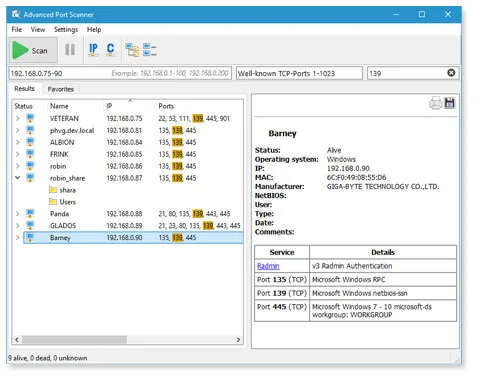
Advanced Port Scanner helps you inspect computers on a network by scanning a chosen IP range and list of ports. It reports open ports and information about programs running on them, with shortcuts to discovered HTTP, HTTPS, FTP and shared-folder resources. Favorites let you keep frequently used computers together, and scan lists can be exported as XML, HTML or CSV.
The publisher lists support for Windows 11, 10, 8 and 7. Remote-control integration is not a self-contained remote desktop service: Radmin connections require Radmin Server on the target computer and Radmin Viewer on the computer making the connection. Wake-on-LAN is limited to computers whose MAC addresses the scanner has identified. The scanning-rate control lets you balance speed against processor and network load.
What it offers
- Scan a selected IP-address range and port list using a multithreaded scanner.
- Identify programs and their versions on detected open ports.
- Open discovered web, FTP and shared-folder resources from scan results.
- Keep a Favorites list and export computer lists as XML, HTML or CSV.
- Access remote-management actions including RDP, Radmin and Wake-on-LAN.
Good to know
- Radmin remote control requires Radmin Server on the target computer and a separate Radmin Viewer on the connecting computer.
- Wake-on-LAN commands are sent only to computers whose MAC addresses have been identified.
- Computer lists can be exported in several formats, but only XML lists can be loaded into Favorites.
Product images
Sources
References used for this listing. Retrieval dates do not indicate hands-on testing.
More in utilities
View category ↗
1.1.1.1 with WARP 2026.8.2115.0
Encrypt traffic from your Mac to Cloudflare’s network with WARP, or use DNS-only mode for encrypted DNS queries to the 1.1.1.1 resolver.
1.1.1.1 with WARP 2026.8.2115.0
Encrypt traffic between your Windows PC and Cloudflare, or use encrypted DNS only, with the free 1.1.1.1 with WARP app.

3uTools 9.12.005
Manage iPhone and iPad photos, music, apps and backups from Windows with 3uTools, a free utility that also includes device checks and firmware flashing tools.