

Utilities Windows
AdwCleaner for Windows
Scan a Windows PC for adware, potentially unwanted programs and unwanted preinstalled software with Malwarebytes AdwCleaner, a free cleanup utility.
What is AdwCleaner?
AdwCleaner is a focused Windows cleanup tool from Malwarebytes. It targets adware, potentially unwanted programs (PUPs), browser hijackers and unwanted preinstalled software. Use it to investigate unwanted browser changes or bundled software, rather than treating it as a general-purpose antivirus replacement.
Start a scan, review the detected items and select what to quarantine. The publisher's cleanup procedure asks you to save and close your work, then restart the device to finish. Scan and cleanup logs can be opened in Notepad for a record of the actions taken.
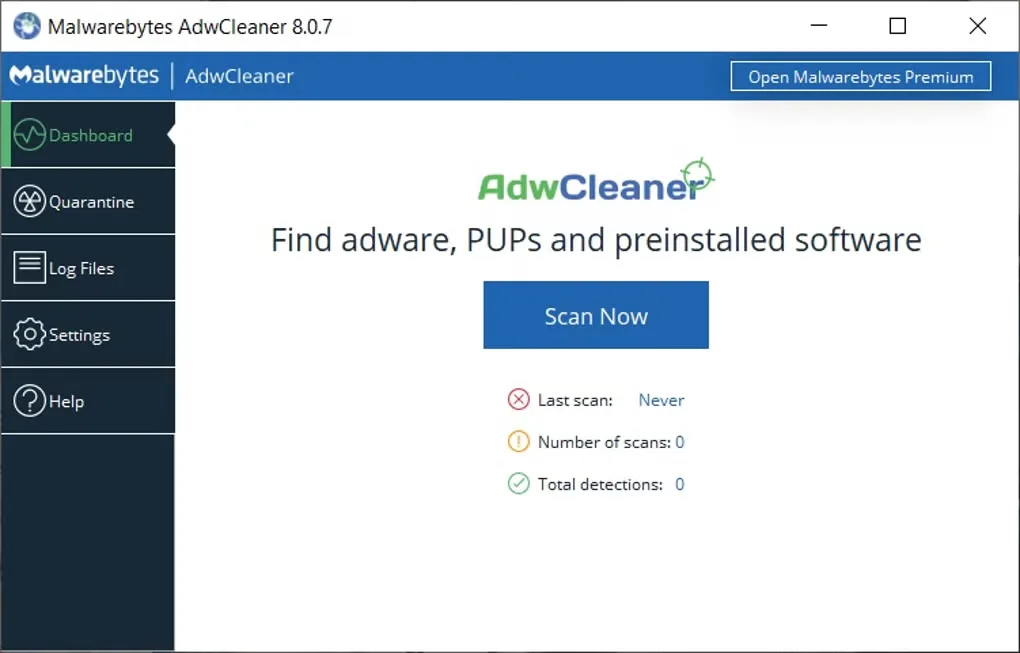
Malwarebytes distinguishes AdwCleaner's targeted cleanup from its broader malware-removal and ongoing-protection products. The screenshot shows the older 8.0.7 dashboard from Softonic's Windows gallery; it illustrates the workflow, not the version currently delivered by the publisher's release-channel link.
What it offers
- Scan for adware, potentially unwanted programs and unwanted preinstalled software.
- Target browser hijackers as part of focused unwanted-software cleanup.
- Review scan results and select detected items for quarantine.
- Open detailed scan and cleanup logs in Notepad.
Good to know
- Focused cleanup is not a substitute for broader malware removal or ongoing antivirus protection.
- The publisher's cleanup procedure requires saving and closing work and restarting the device.
- Windows XP, Vista, 7 and 8 are no longer supported; the publisher lists Windows 8.1, 10 and 11.
- The publisher warns not to use Run Basic Repair unless instructed by a support agent.
Product images
More in utilities
View category ↗
1.1.1.1 with WARP 2026.8.2115.0
Encrypt traffic from your Mac to Cloudflare’s network with WARP, or use DNS-only mode for encrypted DNS queries to the 1.1.1.1 resolver.
1.1.1.1 with WARP 2026.8.2115.0
Encrypt traffic between your Windows PC and Cloudflare, or use encrypted DNS only, with the free 1.1.1.1 with WARP app.

3uTools 9.12.005
Manage iPhone and iPad photos, music, apps and backups from Windows with 3uTools, a free utility that also includes device checks and firmware flashing tools.