

Utilities Windows
AllDup for Windows
Find duplicate files by content or file properties, compare similar photos and music, and review matches before removing them with AllDup for Windows.
- Operating system
- Windows 11, 10, 8 and 7; Windows Server 2008 R2, 2012, 2016, 2019, 2022 and 2025
- Architecture
- 32-bit and 64-bit Windows compatibility; package architecture not separately specified
- Download package
- EXE installer
Publisher lists 32/64-bit compatibility without identifying a separate native x64 or ARM64 build. Portable ZIP is offered separately.
Link checked · Download guidance
What is AllDup?
AllDup helps you find repeated files across folders, drives and network paths. Choose a comparison method for the job: file content for duplicate copies, file properties such as name or size, or dedicated searches for similar pictures and sound files. File and folder filters let you narrow the scan, and profiles save settings for another search.
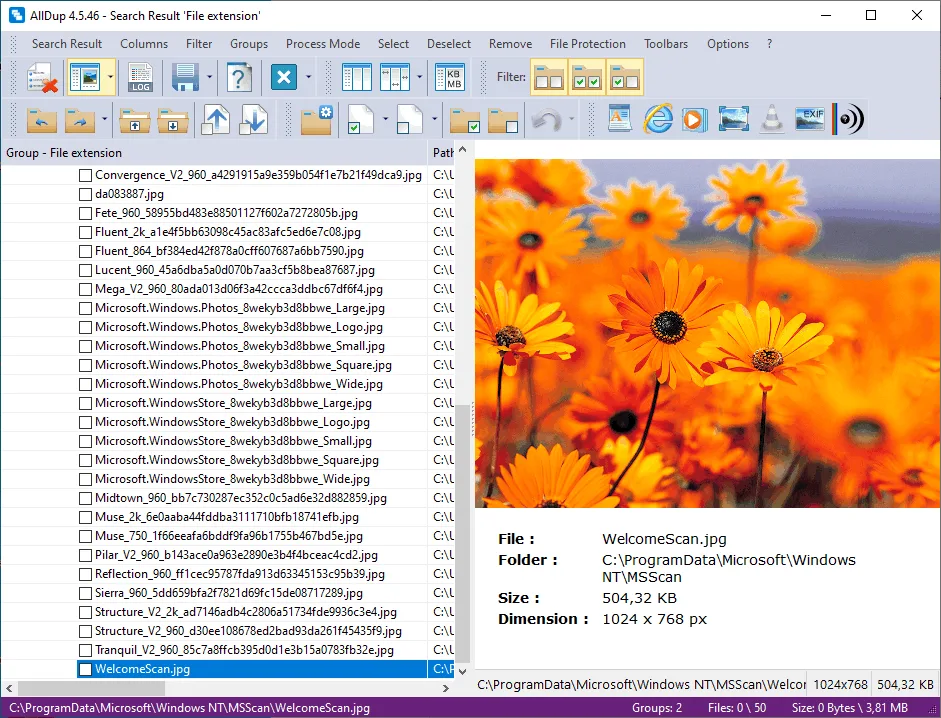
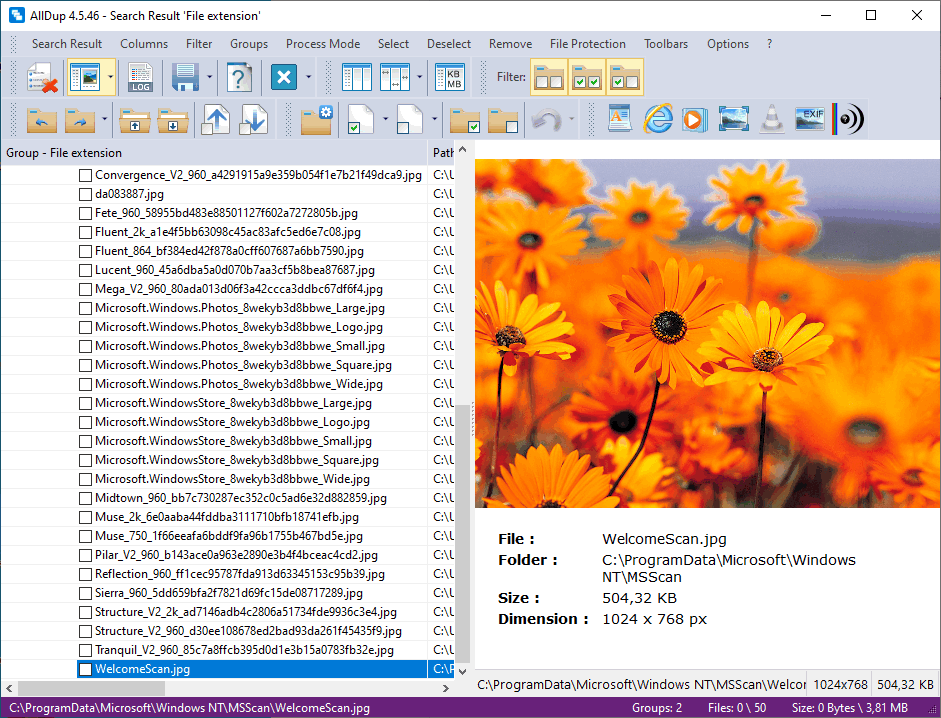
The results view groups matches and includes previews for images, text, sound and video. Its file manager can copy, move, rename or delete selected results, so finding matches does not have to mean immediately deleting them. The linked download is the Windows EXE installer; the publisher also offers a separate portable ZIP. AllDup is freeware for private and company use.
Review the selected files carefully. The publisher warns that deleting, moving or renaming files needed by Windows or another application can prevent it from starting. Recycle Bin handling also has limits: non-local files are deleted rather than sent to the bin, and files inside archives cannot be moved there. The screenshot is a publisher illustration of version 4.5.46, not a capture of the listed 4.5.72 release.
What it offers
- Search by file content or properties such as name, size and dates, with separate methods for similar pictures and sound files.
- Scan drive letters, network paths and supported archives, including ZIP, RAR and 7Z.
- Exclude files or folders with filters and save search settings in reusable profiles.
- Preview images, text, sound and video within the results view.
- Copy, move, rename or delete selected results using the integrated file manager.
Good to know
- Deleting, moving or renaming files required by Windows or other programs can prevent them from starting; a match is not a reason to remove a file without review.
- The Recycle Bin action deletes files on non-local drives instead of sending them to the bin; files inside archives cannot be moved to the Recycle Bin.
Product images
Sources
References used for this listing. Retrieval dates do not indicate hands-on testing.
- AllDup Download - Find and Delete Duplicate Files Free ↗Retrieved
- AllDup - Find & Remove Duplicate Files Efficiently ↗Retrieved
- AllDup System Requirements - Compatible Windows Versions ↗Retrieved
- AllDup - Important Notes on File Deletion ↗Retrieved
- AllDup File Manager: Manage Duplicates ↗Retrieved
- Download AllDup - Free - latest version ↗Retrieved
- AllDup Screenshots - Visual Overview of Functions ↗Retrieved
More in utilities
View category ↗
1.1.1.1 with WARP 2026.8.2115.0
Encrypt traffic from your Mac to Cloudflare’s network with WARP, or use DNS-only mode for encrypted DNS queries to the 1.1.1.1 resolver.
1.1.1.1 with WARP 2026.8.2115.0
Encrypt traffic between your Windows PC and Cloudflare, or use encrypted DNS only, with the free 1.1.1.1 with WARP app.

3uTools 9.12.005
Manage iPhone and iPad photos, music, apps and backups from Windows with 3uTools, a free utility that also includes device checks and firmware flashing tools.