
Development Windows
ALM Toolkit
Compare and merge Power BI semantic models with ALM Toolkit for Windows. Review metadata changes, reuse model objects and retain partitions during deployment.
- Operating system
- Windows; Softonic lists Windows 11
- Architecture
- Not specified in the inspected release asset listing
- Download package
- MSI installer
Standalone Windows application and Power BI Desktop external tool. Power BI service updates require read/write XMLA access.
Link checked · Download guidance
What is ALM Toolkit?
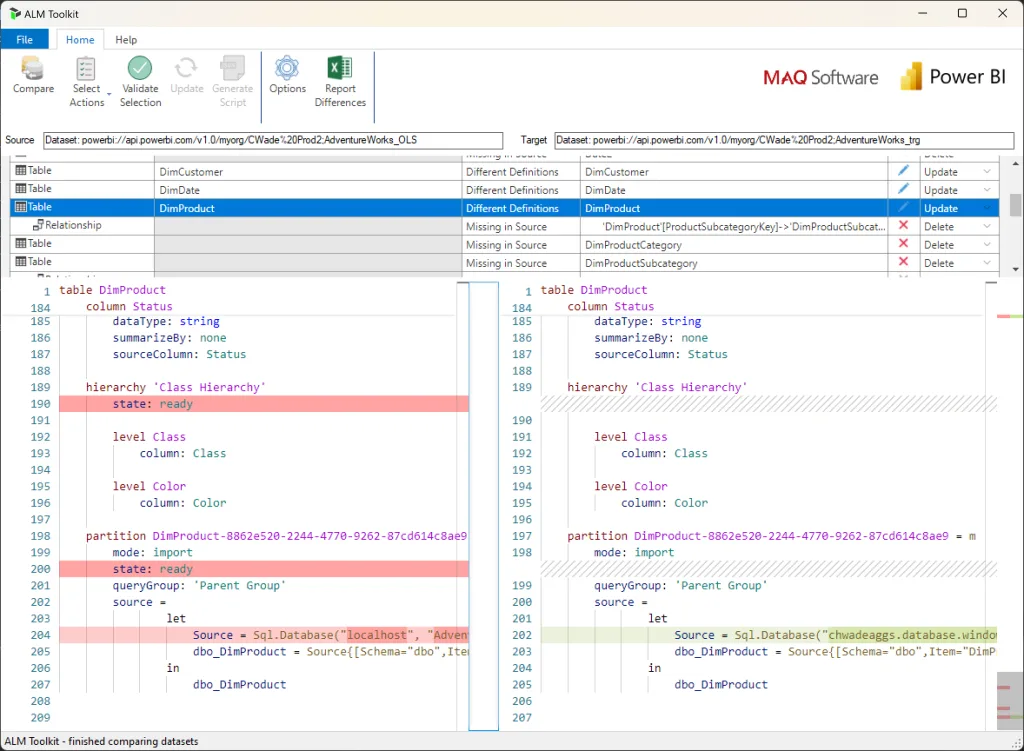
ALM Toolkit compares the structure of Power BI semantic models so you can select which metadata changes to apply to a target. It is useful when moving model changes between environments or reusing shared measures and dimensions without replacing the entire model. The comparison window lists object differences above a side-by-side metadata view.
Sources and targets can include Power BI workspaces, local Power BI Desktop models, Analysis Services tabular models, TMDL folders and BIM metadata files. You can compare metadata files offline, choose Create, Update, Delete or Skip actions, validate the selection and generate a deployment script. Saved ALMT comparisons and command-line execution support repeatable deployments.
Deployment settings control whether target partitions and refresh policies are retained; preserving data is a configured workflow, not a guarantee for every change. Power BI service updates require an XMLA endpoint enabled for read/write operations. The publisher describes ALM Toolkit as a community tool rather than a Microsoft-supported product.
What it offers
- Compare Power BI semantic models and view differences in human-readable TMDL format.
- Select individual model objects to create, update, delete or skip, with dependency validation.
- Retain target partitions and refresh policies through deployment options.
- Compare TMDL folders and BIM metadata files offline.
- Save comparisons as ALMT files, generate TMSL scripts and automate deployments from the command line.
Good to know
- Power BI service model updates require an XMLA endpoint enabled for read/write operations.
- ALM Toolkit is an open-source community tool, not a Microsoft-supported product.
- DAX dependency warnings do not prevent changes from being applied; review them before updating a target.
Product images
Sources
References used for this listing. Retrieval dates do not indicate hands-on testing.
- Power BI ALM Toolkit - Download ↗Retrieved
- ALM Toolkit — Microsoft Analysis Services README ↗Retrieved
- Release ALM Toolkit 5.1.20 · microsoft/Analysis-Services · GitHub ↗Retrieved
- ALM Toolkit 5.1.20 — publisher release assets ↗Retrieved
- Semantic Model Comparison & Merging with ALM Toolkit — publisher documentation ↗Retrieved
- Microsoft Analysis Services repository — MIT license ↗Retrieved
More in development
View category ↗
010 Editor 17.0
Inspect and edit binary files on Mac with 010 Editor, a paid text and hex editor with Binary Templates, file comparison and a 30-day trial.
010 Editor 17.0
Inspect and edit binary files with 010 Editor for Windows, a text and hex editor with Binary Templates, file comparison and scripting. Includes a 30-day trial.
10x Editor
Edit and navigate C++ projects on Windows with a built-in parser, workspace search and Visual Studio project support. A paid license is required after the 30-day trial.