

Utilities macOS
AnyDesk for macOS
Access remote computers, transfer files and manage incoming support sessions with AnyDesk for Mac. Personal use is free; professional use requires a license.
- Operating system
- macOS 11 Big Sur or newer
- Architecture
- amd64 (as listed by the publisher)
- Download package
- DMG disk image
Publisher lists older downloads separately. Native Apple silicon support is not established by the cited download table; system permissions are required for incoming control.
Link checked · Download guidance
What is AnyDesk?
AnyDesk for Mac provides remote desktop access for working on another computer or helping someone with a support session. Connect using the remote device's AnyDesk ID or Alias, or use the File Manager for a file-transfer session. The publisher describes connections between Macs and computers running Windows or Linux.
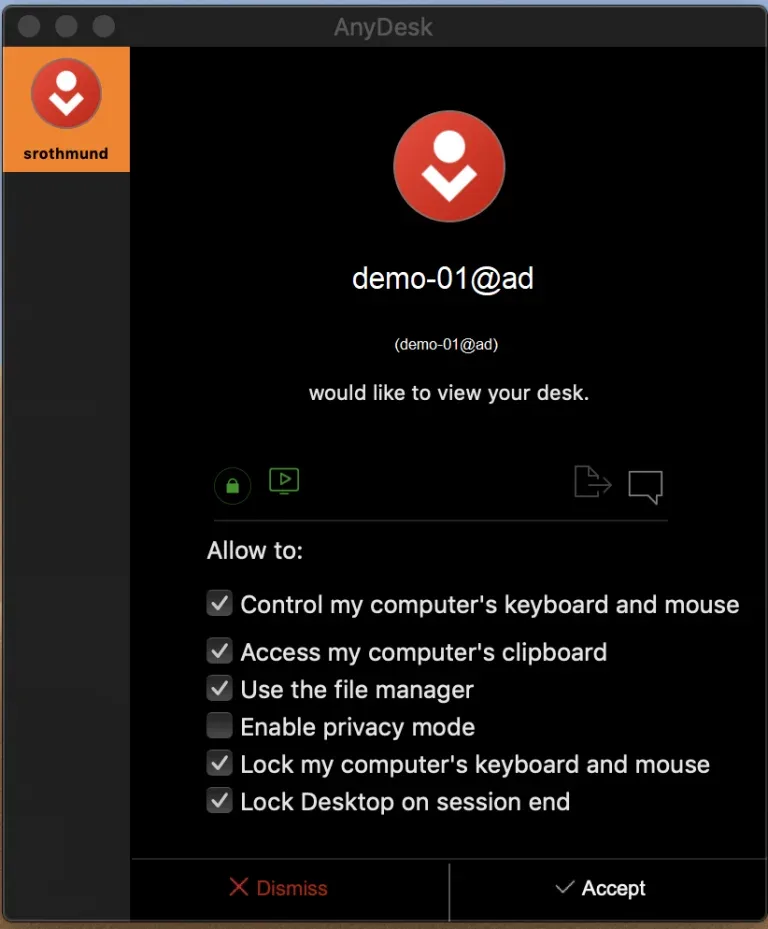
Incoming requests appear in an Accept Window, where you can accept or reject a session and choose the connecting user's permissions. This gives you control over keyboard and mouse access, clipboard access and other session capabilities. The screenshot shows the publisher's documented macOS Accept Window, not a capture of the current release made for this entry.
macOS permissions are a required part of setup: Screen Recording permits screen viewing, Accessibility permits keyboard and mouse control, and Full Disk Access permits file access for transfers. The publisher currently lists macOS 11 or newer as supported. Personal use has a limited feature set and support; professional users need a paid license.
What it offers
- Connect to a remote device using its AnyDesk ID or Alias.
- Accept, reject or disconnect incoming sessions and configure the connecting user's permissions.
- Start a File Manager-only session or access files during a remote session.
- Use macOS-specific keyboard-shortcut settings when working across platforms.
Good to know
- Incoming screen viewing, keyboard and mouse control, and file access require the corresponding macOS system permissions.
- Free personal use includes limited features and support; professional use requires a paid license.
- Audio transmission requires macOS 13 Ventura or newer and AnyDesk 7.2.0 or newer.
Product images
More in utilities
View category ↗
1.1.1.1 with WARP 2026.8.2115.0
Encrypt traffic from your Mac to Cloudflare’s network with WARP, or use DNS-only mode for encrypted DNS queries to the 1.1.1.1 resolver.
1.1.1.1 with WARP 2026.8.2115.0
Encrypt traffic between your Windows PC and Cloudflare, or use encrypted DNS only, with the free 1.1.1.1 with WARP app.

3uTools 9.12.005
Manage iPhone and iPad photos, music, apps and backups from Windows with 3uTools, a free utility that also includes device checks and firmware flashing tools.