
Utilities macOS
AnyUnlock
Manage forgotten iPhone passcodes and encrypted backup passwords from a Mac with AnyUnlock. Unlocking features require paid activation, and screen-passcode removal erases device data.
- Operating system
- macOS 10.13 High Sierra and later, according to the publisher
- Architecture
- Intel listed by publisher; native Apple silicon support unconfirmed
- Download package
- DMG disk image
Mac desktop application for connected iOS devices. Check the requirements for the selected feature; support is not identical across devices and iOS versions.
Link checked · Download guidance
What is AnyUnlock?
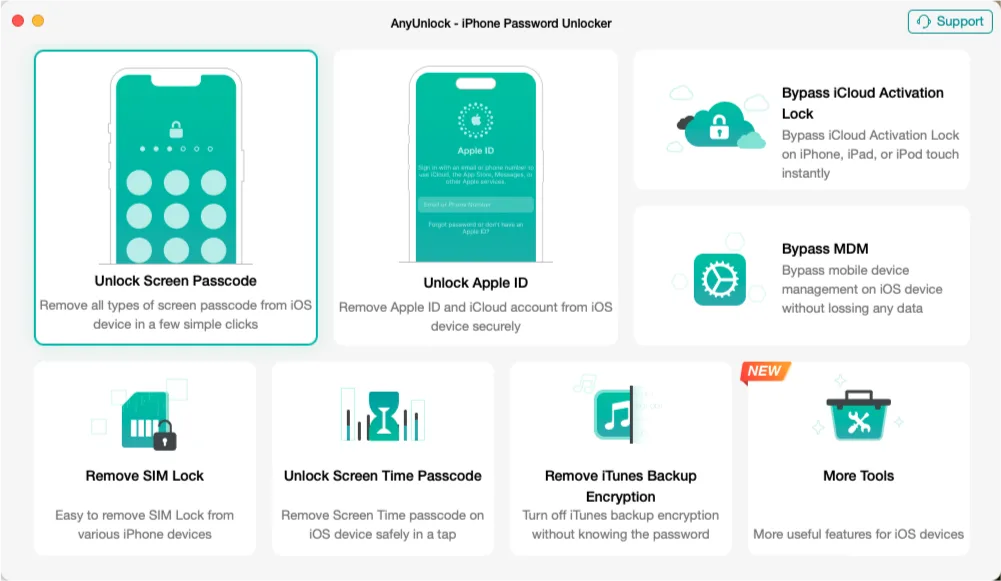
AnyUnlock is a Mac desktop utility for password and lock-related problems on iPhone, iPad and iPod touch. It groups screen-passcode removal, Apple ID removal, MDM tools, Screen Time passcode tools and iTunes/Finder backup-password recovery in one interface. Connect the device to your computer and select the relevant function; this is not an app installed on the iPhone itself.
The free trial includes selected scans and checks, not unrestricted unlocking. The publisher requires paid activation for screen-passcode removal and other advanced operations. Removing a screen passcode erases the device and updates it to the newest iOS version it supports. If Find My was enabled, the associated iCloud account is still needed during setup.
Feature support depends on the device model, iOS version and Find My status. Review the instructions for the particular operation before buying: the presence of a tool in the interface does not mean it works on every device. Use it only on devices and backups you own or are authorized to manage.
What it offers
- Screen-passcode removal tools for numeric and alphanumeric codes, Touch ID and Face ID, as described by the publisher.
- Separate Apple ID, MDM and Screen Time modules with operation-specific requirements.
- Recover encrypted iTunes/Finder backup passwords or remove backup-encryption settings on supported devices.
- Scan stored iOS passwords and perform selected device checks in the trial.
Good to know
- Screen-passcode removal erases all device data and updates iOS; an existing backup is needed to restore personal data.
- If Find My was enabled, the associated iCloud credentials are required to set up the device after screen-passcode removal.
- Unlocking and recovery operations require paid activation; the free trial is limited to selected scans and checks.
- Availability varies by feature, iOS version and hardware. The publisher requires Find My to be disabled for MDM bypass.
Product images
More in utilities
View category ↗
1.1.1.1 with WARP 2026.8.2115.0
Encrypt traffic from your Mac to Cloudflare’s network with WARP, or use DNS-only mode for encrypted DNS queries to the 1.1.1.1 resolver.
1.1.1.1 with WARP 2026.8.2115.0
Encrypt traffic between your Windows PC and Cloudflare, or use encrypted DNS only, with the free 1.1.1.1 with WARP app.

3uTools 9.12.005
Manage iPhone and iPad photos, music, apps and backups from Windows with 3uTools, a free utility that also includes device checks and firmware flashing tools.