
Utilities Windows
AppleWin
Run Apple II disk images on Windows with AppleWin, an open-source emulator with configurable expansion cards, NTSC and RGB display modes, and a symbolic debugger.
Version 1.32.1.0 · Direct publisher file
Link checked · Download guidance
What is AppleWin?
AppleWin emulates Apple II computers on Windows for running disk-based software and inspecting how it works. It supports the original Apple II, II Plus, original and enhanced //e, and several clones. Its configurable peripheral cards include disk controllers, sound cards and serial interfaces, while NTSC and RGB display modes offer different ways to view the emulated output. A built-in symbolic debugger supports closer investigation of Apple II programs.
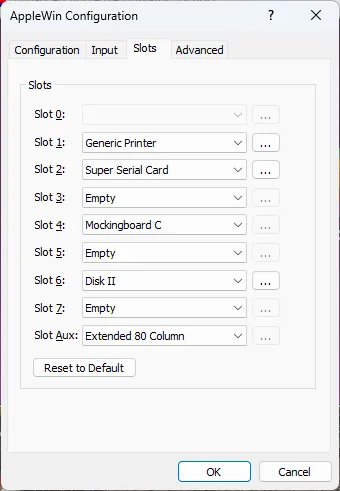
The publisher’s quick-start workflow is to select a disk image with the Drive 1 toolbar button and press Run to boot it. Slot settings let you choose the cards available to the emulated machine. This is not an emulator for every Apple II-family model: the publisher explicitly excludes the //c and Apple IIgs. Windows XP and older systems require historical releases rather than the 1.32.1.0 package linked here.
What it offers
- Emulate Apple II, II Plus, original and enhanced //e models, plus selected clones.
- Boot Apple II software from disk images using the Drive 1 and Run toolbar controls.
- Configure expansion slots for peripherals such as Disk II, Mockingboard and Super Serial Card.
- Choose NTSC or RGB display modes and inspect programs with the built-in symbolic debugger.
Good to know
- No support for Apple //c, //c+, Apple IIgs or the listed Laser 128 variants.
- Windows XP and older Windows versions require legacy releases; the selected download is 1.32.1.0.
- Do not swap disk images while they are being accessed: the publisher warns of program crashes or disk-image corruption.
Product images
Sources
References used for this listing. Retrieval dates do not indicate hands-on testing.
- AppleWin — official repository and supported hardware ↗Retrieved
- AppleWin v1.32.1.0 — official release ↗Retrieved
- AppleWin v1.32.1.0 — publisher release assets ↗Retrieved
- AppleWin official help — Quick Start ↗Retrieved
- AppleWin official help — Slot Settings ↗Retrieved
- AppleWin repository license — GNU GPL version 2 ↗Retrieved
More in utilities
View category ↗
1.1.1.1 with WARP 2026.8.2115.0
Encrypt traffic from your Mac to Cloudflare’s network with WARP, or use DNS-only mode for encrypted DNS queries to the 1.1.1.1 resolver.
1.1.1.1 with WARP 2026.8.2115.0
Encrypt traffic between your Windows PC and Cloudflare, or use encrypted DNS only, with the free 1.1.1.1 with WARP app.

3uTools 9.12.005
Manage iPhone and iPad photos, music, apps and backups from Windows with 3uTools, a free utility that also includes device checks and firmware flashing tools.