
Utilities Windows
Application Mover
Move an installed program to another folder or drive on the same Windows computer, updating registry references and Start Menu shortcuts with Application Mover.
- Operating system
- Windows Vista, 7, 8 and 10 listed by publisher
- Architecture
- x64 (64-bit Windows)
- Download package
- EXE demo installer
Run as administrator. Use x64 on a 64-bit OS; the publisher does not support the 32-bit build on a 64-bit OS. Windows 11 compatibility is unconfirmed.
Link checked · Download guidance
What is Application Mover?
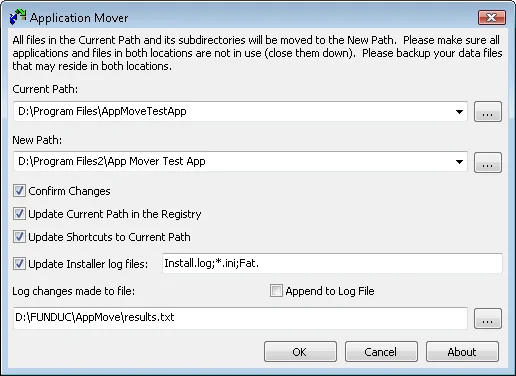
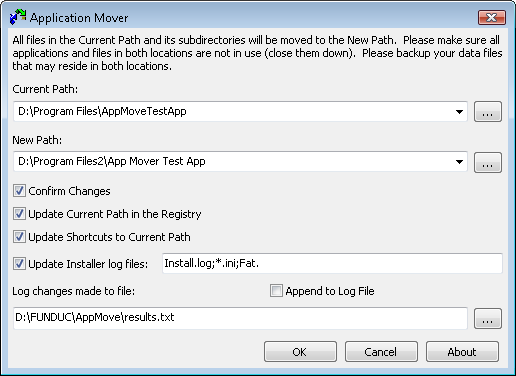
Application Mover relocates an installed program's folder to a different path on the same computer. It moves files from Current Path to New Path, updates matching Windows registry references and Start Menu shortcuts, and checks .ini and Install.log files in the original program folder for the old path. This can help when a suitable application needs to move to another drive without changing that drive's letter. Confirmation prompts and a change log let you supervise the operation; busy files may require a reboot.
This is a folder-relocation tool, not a way to clone Windows, transfer software to another computer or repair a failing installation. It changes registry entries and deletes files from the old path as part of the move. Make fresh backups of the system and associated data first, close running programs and read the publisher's Important Notes before proceeding. Never move Windows, Users or the entire Program Files folder. Funduc also advises against moving complex installations such as Microsoft Office, SQL Server and antivirus software.
The linked package is the publisher's x64 demo installer. Funduc lists Windows Vista, 7, 8 and 10; Windows 11 compatibility is not established by these sources. Run as administrator and use the version matching the operating system's architecture. The publisher offers paid registration, so the demo should not be mistaken for unrestricted freeware.
What it offers
- Move a program folder to another path on the same drive or another drive in the same computer.
- Update matching registry references and Windows Start Menu shortcuts to the destination path.
- Replace matching old-path strings in .ini and Install.log files within the original program folder.
- Enable confirmation prompts and log changes to an output file.
- Complete pending changes after a reboot when busy files cannot be moved immediately.
Good to know
- Relocation changes registry entries and removes files from the old path; make fresh backups of the system and related data before use.
- Not for moving Windows, Users, an entire Program Files folder, or software between computers; it is not a cloning or repair tool.
- Complex or tightly integrated programs may not move correctly; Funduc advises against relocating Microsoft Office, SQL Server and antivirus software.
- The program works on folders rather than individual files and does not discover all references to files outside the selected folder.
- Administrator access and the matching OS architecture are required. Windows 11 support is not confirmed by the cited publisher pages.
Product images
Sources
References used for this listing. Retrieval dates do not indicate hands-on testing.
- Application Mover - Funduc Software ↗Retrieved
- Application Mover Important Notes ↗Retrieved
- Application Mover Ordering Information ↗Retrieved
More in utilities
View category ↗
1.1.1.1 with WARP 2026.8.2115.0
Encrypt traffic from your Mac to Cloudflare’s network with WARP, or use DNS-only mode for encrypted DNS queries to the 1.1.1.1 resolver.
1.1.1.1 with WARP 2026.8.2115.0
Encrypt traffic between your Windows PC and Cloudflare, or use encrypted DNS only, with the free 1.1.1.1 with WARP app.

3uTools 9.12.005
Manage iPhone and iPad photos, music, apps and backups from Windows with 3uTools, a free utility that also includes device checks and firmware flashing tools.