

Utilities Windows
Ashampoo WinOptimizer Free for Windows
Clear browsing traces, inspect disk usage and manage Windows settings with Ashampoo WinOptimizer Free, a maintenance suite that requires administrator rights and online activation.
- Operating system
- Windows 11, Windows 10 and Windows 7
- Architecture
- x64; ARM processors not supported
- Download package
- EXE installer
Publisher requires full administrator rights, Internet activation with recurring license checks, and a 1280×1024 display at 100% scaling.
Link checked · Download guidance
What is Ashampoo WinOptimizer Free?
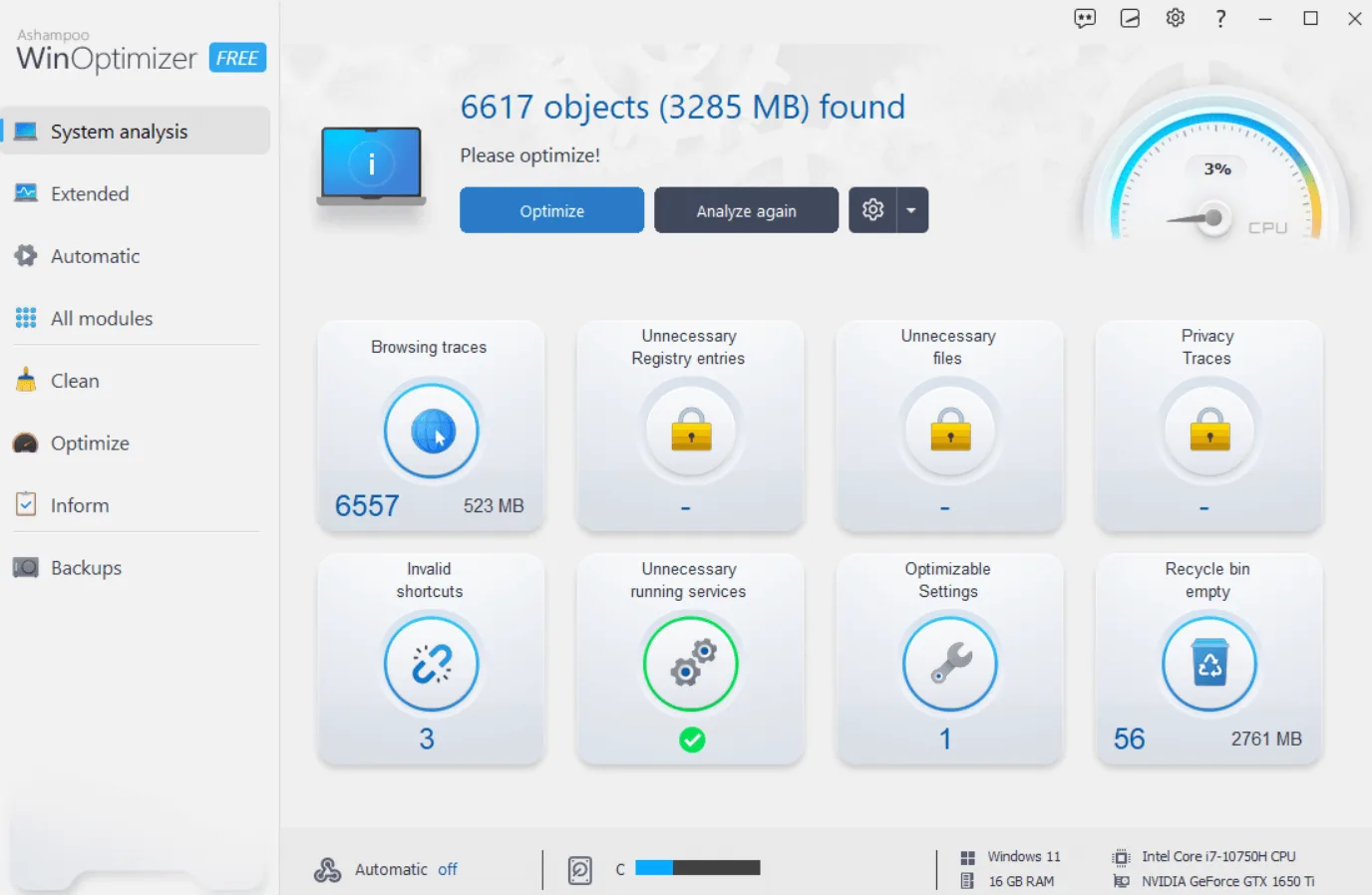
Ashampoo WinOptimizer Free brings Windows cleanup, system analysis and configuration tools into one application. Internet Cleaner removes browsing leftovers across browser profiles, while its cookie manager lets you keep selected cookies through a whitelist. DiskSpace Explorer helps locate files taking up storage, and the system information tools show installed hardware and software alongside CPU and disk benchmarks.
For maintenance beyond cleanup, Boot Center helps investigate startup delays and UnInstall Manager removes unwanted applications. Privacy settings cover options such as telemetry, location services and file syncing. These are tools for reviewing and changing your system, not evidence of a guaranteed speed increase.
Check the requirements before choosing this edition: the publisher lists Windows 11, 10 and 7 on x64 systems, excludes ARM processors, and requires full administrative rights. Activation needs an Internet connection, with license checks repeated at regular intervals. File recovery also has a boundary: Undeleter cannot recover data that has already been overwritten or deliberately wiped with File Wiper.
What it offers
- Remove web browsing leftovers across browser profiles and whitelist cookies you want to keep.
- Inspect storage usage with DiskSpace Explorer and view hardware, software, CPU and disk information.
- Investigate startup delays with Boot Center and remove unwanted applications with UnInstall Manager.
- Adjust privacy-related Windows settings, including telemetry, location services and file syncing.
- Recover eligible accidentally deleted files with Undeleter or deliberately erase files with File Wiper.
Good to know
- Full administrative rights and an Internet connection for activation are required; the license is checked repeatedly at regular intervals.
- Systems with ARM processors are not supported.
- Recovery applies only to files that have not been overwritten or wiped with File Wiper.
Product images
Sources
References used for this listing. Retrieval dates do not indicate hands-on testing.
- Ashampoo WinOptimizer FREE — official product fact sheet and artwork ↗Retrieved
- Ashampoo WinOptimizer FREE — publisher details and metadata ↗Retrieved
- Ashampoo WinOptimizer FREE — system requirements ↗Retrieved
- Ashampoo WinOptimizer FREE — official features ↗Retrieved
- WinOptimizer FREE — End User License Agreement ↗Retrieved
- Ashampoo WinOptimizer Free - Download — discovery and edition conflict ↗Retrieved
More in utilities
View category ↗
1.1.1.1 with WARP 2026.8.2115.0
Encrypt traffic from your Mac to Cloudflare’s network with WARP, or use DNS-only mode for encrypted DNS queries to the 1.1.1.1 resolver.
1.1.1.1 with WARP 2026.8.2115.0
Encrypt traffic between your Windows PC and Cloudflare, or use encrypted DNS only, with the free 1.1.1.1 with WARP app.

3uTools 9.12.005
Manage iPhone and iPad photos, music, apps and backups from Windows with 3uTools, a free utility that also includes device checks and firmware flashing tools.