
Utilities Windows
Astrolog
Create natal charts, compare transits and explore astrocartography with Astrolog, a free, open-source astrology program for Windows.
- Operating system
- Windows Vista and later, including Windows 11
- Architecture
- 32-bit; also runs on 64-bit Windows
- Download package
- EXE setup program
Publisher offers a separate native 64-bit ZIP and a separate Windows XP build. Compatibility is publisher-reported; installation was not tested.
Link checked · Download guidance
What is Astrolog?
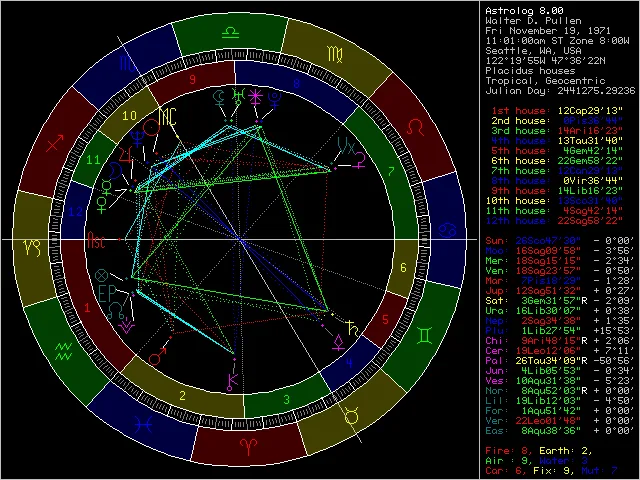
Astrolog is a desktop astrology program for drawing natal wheels, comparing charts and examining transits. Its chart views include aspect and midpoint grids, graphic ephemerides, transit calendars and astrocartography maps. Choose it for working with chart positions and visual comparisons rather than just viewing a single wheel.
Version 8.00 adds SVG and PNG chart export and iCalendar export for chart lists. SVG is useful when you need a scalable chart image; iCalendar files let you move chart times into calendar software. The publisher notes that reloading an exported iCalendar file into Astrolog changes its times to UTC, although planet positions remain unchanged.
The linked Windows setup program contains the 32-bit edition and supports Windows Vista and later, including Windows 11 and 64-bit Windows. A native 64-bit ZIP and a separate Windows XP build are offered on the publisher's download page. Optional ephemeris files are separate downloads. The screenshot shows the publisher's Astrolog 8.00 natal-wheel display, not an installation or test performed by SoftGalaxy.
What it offers
- Draw natal wheels and compare multiple charts with bi-wheel and multi-wheel displays.
- View aspect and midpoint grids, graphic ephemerides and transit calendars.
- Explore astrocartography maps, local-horizon views and solar-system orbit charts.
- Export charts as SVG or PNG and export chart lists to iCalendar format.
Good to know
- The standard setup program is the 32-bit edition; native 64-bit Windows and Windows XP use separate packages.
- Reloading an exported iCalendar file changes chart times to UTC while preserving planet positions.
- The publisher states that Astrolog's PNG exports are uncompressed.
Product images
Sources
References used for this listing. Retrieval dates do not indicate hands-on testing.
- Astrolog Downloads ↗Retrieved
- Astrolog Website ↗Retrieved
- Astrolog Features ↗Retrieved
- Astrolog 8.00 Changes ↗Retrieved
More in utilities
View category ↗
1.1.1.1 with WARP 2026.8.2115.0
Encrypt traffic from your Mac to Cloudflare’s network with WARP, or use DNS-only mode for encrypted DNS queries to the 1.1.1.1 resolver.
1.1.1.1 with WARP 2026.8.2115.0
Encrypt traffic between your Windows PC and Cloudflare, or use encrypted DNS only, with the free 1.1.1.1 with WARP app.

3uTools 9.12.005
Manage iPhone and iPad photos, music, apps and backups from Windows with 3uTools, a free utility that also includes device checks and firmware flashing tools.