

Utilities Windows
AutoHideDesktopIcons for Windows
Hide Windows desktop icons automatically with an adjustable timer, restore them with a desktop click, and optionally hide the taskbar using this portable freeware utility.
- Operating system
- Windows 11, 10, 8.1 and 7; Windows Server versions also listed by publisher
- Architecture
- Publisher lists x86 and x64 support; selected ZIP architecture is not specified
- Download package
- Portable ZIP archive
No installation required according to the publisher. The linked ZIP was checked by HEAD only; its contents were not downloaded or executed.
Link checked · Download guidance
What is AutoHideDesktopIcons?
AutoHideDesktopIcons temporarily hides desktop icons so your wallpaper is visible without shortcuts covering it. Set an adjustable timer for automatic hiding and choose how a desktop click brings the icons back. The optional taskbar-hiding feature extends the same cleaner-desktop approach to the taskbar. The publisher describes the program as portable: it does not require installation.
The useful distinction from Windows' built-in icon visibility controls is automation. If you only want to hide icons manually once, Windows already provides that basic function without an extra utility. Hiding icons does not delete the underlying items or organize your files; it changes what is visible.
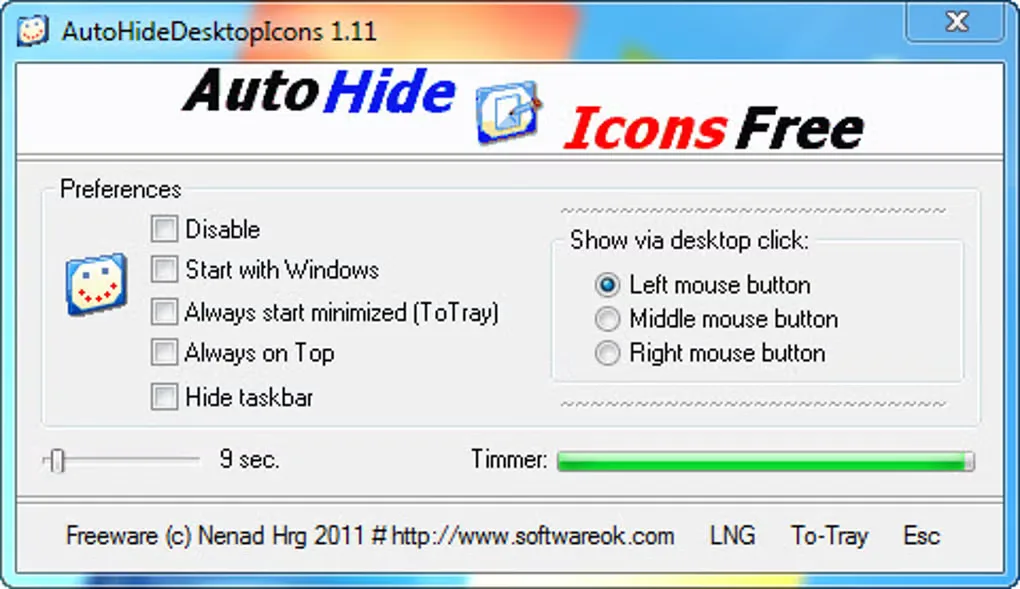
The publisher lists version 7.11, released on October 17, 2026. The screenshot retained from Softonic's gallery shows the older 1.11 interface, not the current release, so its layout and available controls may differ.
What it offers
- Set an adjustable timer to hide desktop icons automatically.
- Customize the desktop-click action that shows icons again.
- Optionally hide and show the Windows taskbar.
- Run as a portable utility without installation.
Good to know
- Windows already offers manual desktop-icon hiding; this utility is mainly useful when you want automatic hiding and configurable restore actions.
- Hiding desktop icons changes their visibility; it does not delete the underlying items.
Product images
Sources
References used for this listing. Retrieval dates do not indicate hands-on testing.
- AutoHideDesktopIcons 7.11 Auto Hide Desktop Icons Portable Win-App. ↗Retrieved
- AutoHideDesktopIcons — official PAD distribution metadata ↗Retrieved
- AutoHideDesktopIcons - License Agreement ↗Retrieved
- AutoHideDesktopIcons - Download ↗Retrieved
- Desktop icons Hide and Show, Without the timer (Windows 10/8.1/7/...)! ↗Retrieved
More in utilities
View category ↗
1.1.1.1 with WARP 2026.8.2115.0
Encrypt traffic from your Mac to Cloudflare’s network with WARP, or use DNS-only mode for encrypted DNS queries to the 1.1.1.1 resolver.
1.1.1.1 with WARP 2026.8.2115.0
Encrypt traffic between your Windows PC and Cloudflare, or use encrypted DNS only, with the free 1.1.1.1 with WARP app.

3uTools 9.12.005
Manage iPhone and iPad photos, music, apps and backups from Windows with 3uTools, a free utility that also includes device checks and firmware flashing tools.