

Development Windows
Automate SQL Backup & Restore for Windows
Schedule database backups to local, network or cloud storage with Prapl SQL Backup, a Windows desktop tool with retention rules and restore workflows.
- Operating system
- Windows 10, Windows 11 and Windows Server 2016 or newer
- Architecture
- 64-bit Windows required by publisher documentation
- Download package
- EXE installer
Publisher-listed version 3.0.1; Softonic lists 2.4.0. The unversioned setup.exe was HEAD-verified, not downloaded or inspected.
Link checked · Download guidance
What is Automate SQL Backup & Restore?
Automate SQL Backup & Restore is listed by its publisher as Prapl SQL Backup. It creates scheduled backups of databases such as MySQL, PostgreSQL, MariaDB, MongoDB and Microsoft SQL Server, with a separate destination and retention policy for each job. Choose local or NAS storage, OneDrive, supported cloud buckets, SFTP or FTP rather than a publisher-hosted backup repository.
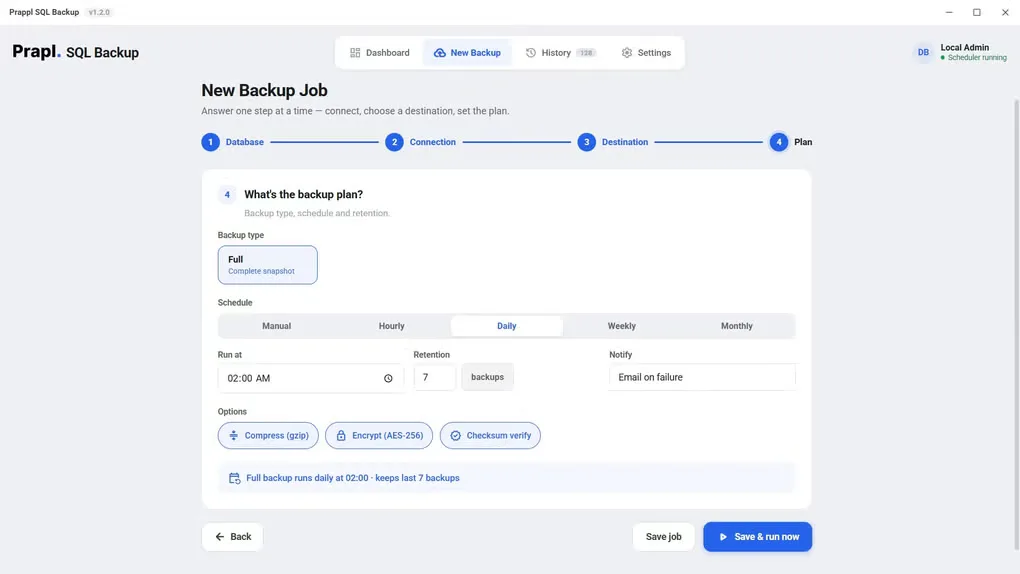
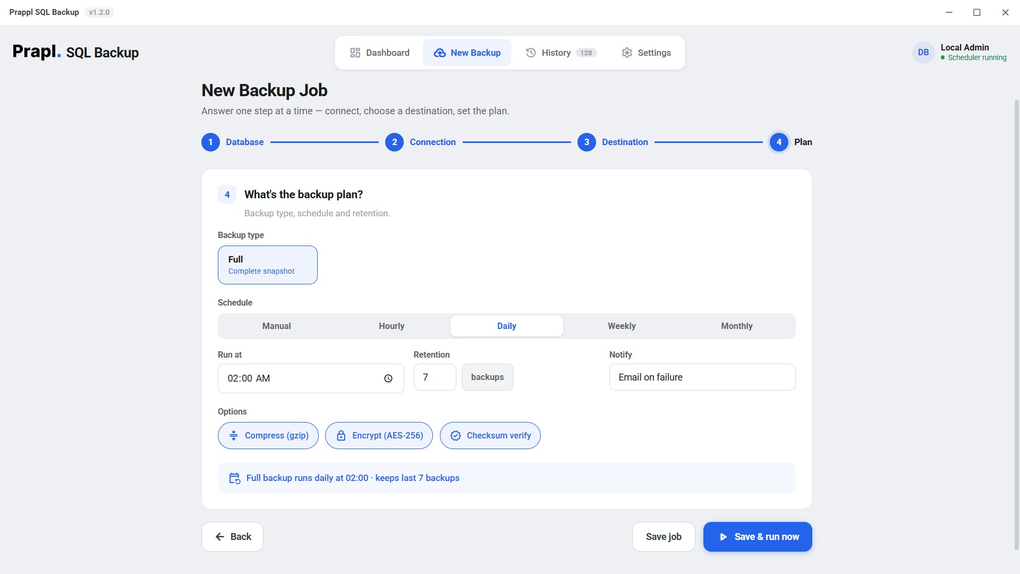
The backup wizard covers the database connection, storage destination and backup plan. Gzip compression, optional AES-256 encryption and checksum verification accompany the backup process; the dashboard and history show job status. Restore options include creating a new database, replacing an existing one or saving the unpacked backup file. Replacing an existing database overwrites its contents.
Backup methods depend on the engine and configuration: incremental or differential backups are not available for every database. Microsoft SQL Server backup is limited to servers installed on the same Windows computer. The app must be running for scheduled jobs to execute; missed jobs run when it starts again.
The publisher lists version 3.0.1, while the Softonic listing still shows 2.4.0. The linked setup.exe is the publisher's unversioned Windows installer; its binary contents were not inspected. A 15-day trial is available, but creating and running backup jobs requires a paid license after it expires. The publisher says restore and backup history remain accessible.
What it offers
- Back up multiple database engines, including MySQL, PostgreSQL, MariaDB, MongoDB, SQL Server, Oracle, SQLite, Redis, ClickHouse and Elasticsearch.
- Configure scheduled jobs with retention rules and an optional secondary storage destination.
- Write backups to local or NAS storage, OneDrive, S3-compatible cloud storage, SFTP or FTP.
- Use gzip compression, optional AES-256 encryption and checksum verification.
- Review backup history and restore to a new database, replace an existing database or export the backup file.
Good to know
- After the 15-day trial, creating and running backup jobs requires a paid license; the publisher says history and restore remain available.
- Microsoft SQL Server backup requires SQL Server on the same Windows computer; remote SQL Server backup is not supported.
- Incremental and differential support varies by engine and server setup; hosted PostgreSQL uses per-database full backups.
- Scheduled backups require the desktop app to be running. Jobs missed while the computer is off run when the app starts again.
Product images
Sources
References used for this listing. Retrieval dates do not indicate hands-on testing.
More in development
View category ↗
010 Editor 17.0
Inspect and edit binary files on Mac with 010 Editor, a paid text and hex editor with Binary Templates, file comparison and a 30-day trial.
010 Editor 17.0
Inspect and edit binary files with 010 Editor for Windows, a text and hex editor with Binary Templates, file comparison and scripting. Includes a 30-day trial.
10x Editor
Edit and navigate C++ projects on Windows with a built-in parser, workspace search and Visual Studio project support. A paid license is required after the 30-day trial.