
Utilities Windows
Automize
Schedule Windows programs, file operations and transfers with Automize, a commercial automation suite with task chains and email notifications.
What is Automize?
Automize schedules recurring computer tasks and links them into workflows. Use it to run programs or batch files, copy and archive folders, transfer files over FTP, or send email. Its task chains can choose the next action using exit codes, while variables pass information between tasks. Directory monitors and database checks provide further ways to build automation around changes rather than a fixed timetable.
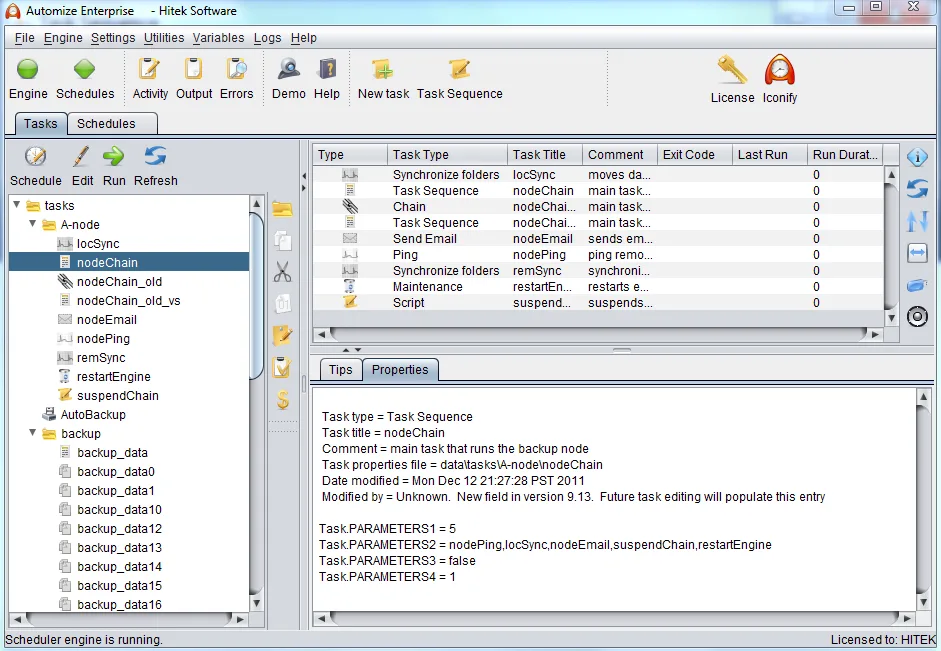
The Windows background engine can run as a service. Standard and Enterprise are separate paid editions: the publisher reserves SFTP, PGP, XML and scripting modules for Enterprise. Choose the edition around the tasks you need, rather than assuming every advertised module is included in Standard. The publisher's Windows download catalog lists the 14.x release family and a bundled AdoptOpenJDK 24 runtime; it does not identify an exact patch version. The gallery screenshot illustrates an older Automize Enterprise interface, not a verified view of version 14.x.
What it offers
- Schedule programs, batch files, file copying and ZIP archiving.
- Build task chains with exit-code conditions and variables shared between tasks.
- Automate FTP transfers, email sending and attachment retrieval.
- Monitor directories, websites and database tables for changes.
- Run the task engine as a Windows service and send email notifications based on task exit codes.
Good to know
- SFTP, PGP, XML and scripting modules require the Enterprise edition rather than Standard.
- Commercial licensing: the initial full license includes one year of maintenance and support subscription; subsequent subscription years are charged separately.
Product images
Sources
References used for this listing. Retrieval dates do not indicate hands-on testing.
More in utilities
View category ↗
1.1.1.1 with WARP 2026.8.2115.0
Encrypt traffic from your Mac to Cloudflare’s network with WARP, or use DNS-only mode for encrypted DNS queries to the 1.1.1.1 resolver.
1.1.1.1 with WARP 2026.8.2115.0
Encrypt traffic between your Windows PC and Cloudflare, or use encrypted DNS only, with the free 1.1.1.1 with WARP app.


3uTools 9.12.005
Manage iPhone and iPad photos, music, apps and backups from Windows with 3uTools, a free utility that also includes device checks and firmware flashing tools.