
Utilities Windows
AutoPlay Menu Builder
Design CD and DVD launcher menus on Windows with a visual editor. AutoPlay Menu Builder can open programs, documents and movies; its shareware trial adds a nag screen to created menus.
- Operating system
- Windows XP and later, according to the publisher
- Architecture
- Not specified by the publisher
- Download package
- ZIP archive (trial)
Publisher lists 40 MB of installation space and 32 MB RAM. The archive was not downloaded or executed; compatibility was not independently tested.
Link checked · Download guidance
What is AutoPlay Menu Builder?
AutoPlay Menu Builder creates graphical launcher menus for CDs and DVDs without requiring programming. Arrange controls in a WYSIWYG editor, assign actions to launch applications or open documents, and build a standalone executable with a custom icon. Multiple pages, splash screens, background music and slide shows let a disc menu present more than a list of files.
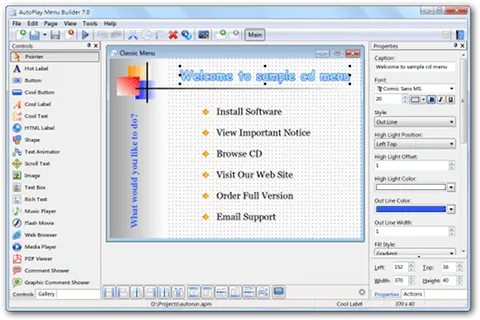
The publisher lists version 9.1 for Windows XP and later. This download is the publisher's trial ZIP, not a free license: menus produced by the trial always display a nag screen. Registration removes that restriction. The screenshot is the publisher's older version 7.0 example, showing the editor layout rather than documenting the appearance of version 9.1.
What it offers
- Arrange menu controls visually with a WYSIWYG designer; no programming is required.
- Build standalone menu executables and customize their icons.
- Create multi-page menus with splash and end screens.
- Add background music and slide shows, or use controls to launch applications and open documents.
- Use Unicode text and high-DPI support, both listed by the publisher.
Good to know
- Menus created with the trial always display a nag screen; a paid registration is required to remove it.
Product images
Sources
References used for this listing. Retrieval dates do not indicate hands-on testing.
More in utilities
View category ↗
1.1.1.1 with WARP 2026.8.2115.0
Encrypt traffic from your Mac to Cloudflare’s network with WARP, or use DNS-only mode for encrypted DNS queries to the 1.1.1.1 resolver.
1.1.1.1 with WARP 2026.8.2115.0
Encrypt traffic between your Windows PC and Cloudflare, or use encrypted DNS only, with the free 1.1.1.1 with WARP app.


3uTools 9.12.005
Manage iPhone and iPad photos, music, apps and backups from Windows with 3uTools, a free utility that also includes device checks and firmware flashing tools.