
Development Windows
Azul Zulu Builds of OpenJDK
Build and run Java applications on Windows with Azul Zulu, a free OpenJDK distribution. This entry links to the Java 17 JDK MSI for x64 PCs.
- Operating system
- Windows 11; Windows Server 2019, 2022 and 2025
- Architecture
- x64 (x86 64-bit)
- Download package
- MSI installer, JDK 17, Community Availability
Selected package excludes bundled JavaFX. Windows x86 32-bit and ARM64 builds are separate downloads.
Link checked · Download guidance
What is Azul Zulu Builds of OpenJDK?
Azul Zulu Builds of OpenJDK provides a Java development kit and runtime for building and running Java applications. It is an open-source OpenJDK distribution from Azul, whose documentation describes its builds as TCK-tested and Java SE compliant. The selected download is the Community Availability Java 17 JDK for Windows x64, rather than the separate JRE or ARM64 package.
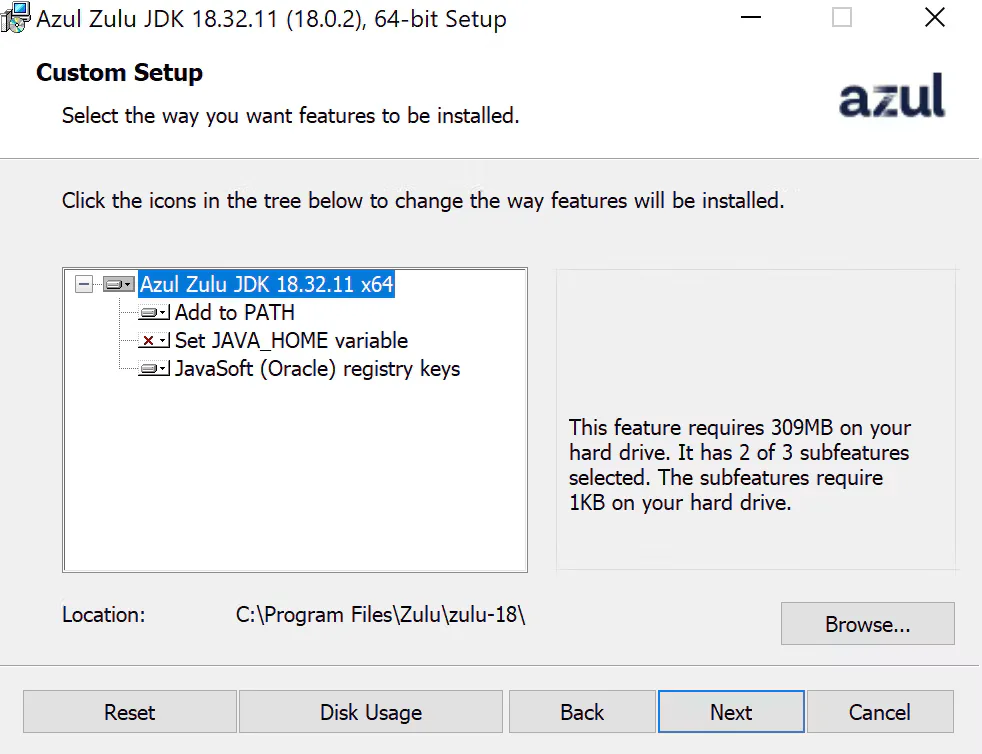
The Windows MSI offers choices for adding Java to PATH, setting JAVA_HOME and creating JavaSoft registry keys. A ZIP package is also available from the publisher for users who prefer to unpack the JDK and configure their environment manually.
A per-machine MSI installation requires administrator privileges. Per-user installation is documented separately, with restrictions on registry integration and upgrading to a per-machine installation. Free Community Availability downloads do not include a promise of support: Azul requires a separate support agreement. The screenshot shows the publisher’s historical Zulu JDK 18.0.2 Windows installer, not the selected Java 17 build.
What it offers
- Develop and run Java applications with an OpenJDK-based JDK and runtime.
- Use TCK-tested builds that Azul documents as Java SE compliant.
- Configure PATH, JAVA_HOME and JavaSoft registry integration through the Windows MSI installer.
- Choose an MSI installer or a separate ZIP package from the publisher.
Good to know
- Per-machine MSI installation requires administrator privileges; per-user installations cannot be upgraded to per-machine installations and cannot use the JavaSoft registry-key option.
- Azul is not obligated to provide support without a separate written support agreement.
Product images
Sources
References used for this listing. Retrieval dates do not indicate hands-on testing.
- Azul Zulu Builds of OpenJDK - Download ↗Retrieved
- Java 8, 11, 17, 21, 25 Download for Linux, Windows and macOS ↗Retrieved
- Azul Metadata API — Windows Java 17 CA JDK MSI package metadata ↗Retrieved
- Azul Core Documentation ↗Retrieved
- Installing Azul Zulu on Windows | Azul Core ↗Retrieved
- October 2026 Supported Platforms | Azul Core ↗Retrieved
- Azul builds of OpenJDK Terms of Use ↗Retrieved
- Java Setup for Salesforce Dataloader Users - Azul | Better Java Performance, Superior Java Support ↗Retrieved
More in development
View category ↗

010 Editor 17.0
Inspect and edit binary files on Mac with 010 Editor, a paid text and hex editor with Binary Templates, file comparison and a 30-day trial.
010 Editor 17.0
Inspect and edit binary files with 010 Editor for Windows, a text and hex editor with Binary Templates, file comparison and scripting. Includes a 30-day trial.
10x Editor
Edit and navigate C++ projects on Windows with a built-in parser, workspace search and Visual Studio project support. A paid license is required after the 30-day trial.