
Development Windows
Azure Batch Explorer
Manage Azure Batch accounts, inspect pool nodes and track jobs and tasks with Microsoft's desktop client for Windows.
Version 2.23.0-stable.1210 · Direct publisher file
Link checked · Download guidance
What is Azure Batch Explorer?
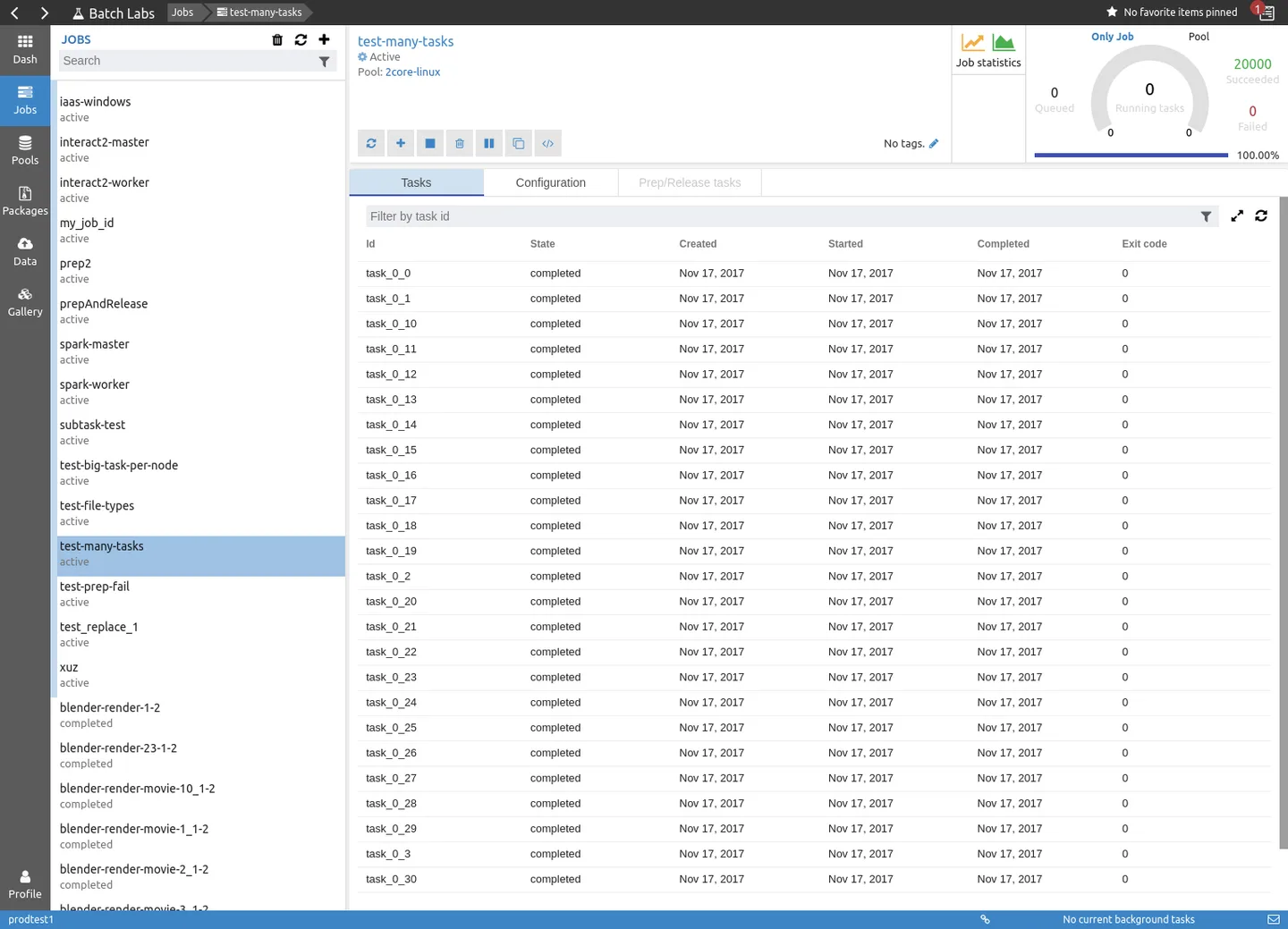
Azure Batch Explorer is a desktop client for people managing workloads in Azure Batch. It brings account statistics, pool information and job progress into a graphical interface, helping you inspect a workload without treating each task as an isolated item. Account overviews show quotas and properties; pool views expose node activity and provide access to node details and files.
For job monitoring, the publisher describes queue size, throughput and error highlighting. Task runtime graphs help identify outliers and possible performance bottlenecks. These are views into your Azure Batch resources, not a replacement for the cloud service or a way to run a batch workload locally without it. Azure-connected features remain subject to your Azure subscription's separate terms and regional availability.
The linked Windows setup package is version 2.23.0-stable.1210. The publisher also lists a separate Windows ZIP and standalone EXE, but this entry selects the setup EXE. The consulted product and release pages do not establish a minimum Windows version or the selected installer's CPU architecture. The screenshot is a historical publisher illustration with Batch Labs branding, not a capture of this release running on Windows.
The standalone application has Microsoft's free-use terms, while the source repository is MIT-licensed. That distinction does not make Azure services free or make the standalone binary's distribution terms identical to the source license. Batch Explorer sends telemetry and crash information to Microsoft; the official wiki documents an option to disable reporting that requires an application restart.
What it offers
- View Azure Batch account statistics, quotas and account properties.
- Inspect pool nodes with a real-time heat map, metrics, node properties and file explorers.
- Track job progress, queue size and throughput, with error highlighting.
- Use task runtime distribution graphs to investigate outliers and possible bottlenecks.
Good to know
- Azure-connected features depend on Azure services under separate subscription terms; service availability can vary by region.
- Telemetry and crash reporting are enabled by default; disabling them through the documented setting requires a restart.
- The consulted publisher product and release pages do not specify the selected installer's CPU architecture or minimum supported Windows version.
Product images
Sources
References used for this listing. Retrieval dates do not indicate hands-on testing.
- Azure/BatchExplorer — official repository ↗Retrieved
- Batch Explorer — official features and screenshots ↗Retrieved
- Version 2.23.0-stable.1210 — official release ↗Retrieved
- Official release asset list — Windows setup ↗Retrieved
- Microsoft Azure Batch Explorer — Standalone (free) Use Terms ↗Retrieved
- BatchExplorer source repository — MIT license ↗Retrieved
- Crash reporting and telemetry — official wiki ↗Retrieved
More in development
View category ↗
010 Editor 17.0
Inspect and edit binary files on Mac with 010 Editor, a paid text and hex editor with Binary Templates, file comparison and a 30-day trial.
010 Editor 17.0
Inspect and edit binary files with 010 Editor for Windows, a text and hex editor with Binary Templates, file comparison and scripting. Includes a 30-day trial.
10x Editor
Edit and navigate C++ projects on Windows with a built-in parser, workspace search and Visual Studio project support. A paid license is required after the 30-day trial.