
Utilities macOS
balenaEtcher for macOS
Write OS images to SD cards and USB drives with balenaEtcher for Mac, a free, open-source image flasher. This download is the Apple Silicon DMG.
- Operating system
- macOS; exact minimum for this release not established
- Architecture
- Apple Silicon (ARM64)
- Download package
- DMG disk image
Selected package: balenaEtcher-2.1.9-arm64.dmg. Intel Macs need the separate x64 DMG. Publisher minimum macOS statements conflict; no installation or runtime compatibility test performed.
Link checked · Download guidance
What is balenaEtcher?
balenaEtcher writes an operating-system image to an SD card or USB drive. Its graphical workflow separates choosing the image, selecting the target and flashing, making it useful when preparing removable media for a Raspberry Pi or a bootable Linux system. It validates the written data and hides system drives by default, but you still need to check the selected target: flashing replaces the contents of the whole drive.
This entry links to the publisher’s version 2.1.9 DMG for Apple Silicon Macs. Intel Macs need the separate x64 package on the publisher’s release page. The publisher’s general macOS minimum-version statements differ between its homepage and repository, so an exact minimum for this release is not asserted here.
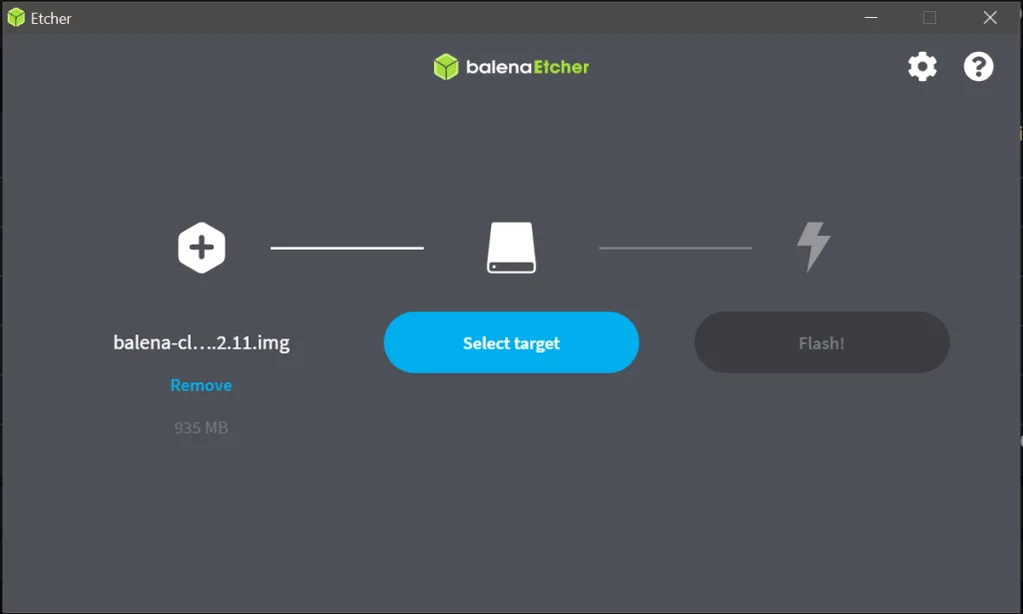
Etcher writes an image as supplied rather than adapting it into a different boot format. Windows installation images need additional processing that Etcher does not perform, and it does not configure persistent storage for live USB systems. The screenshot is a publisher-provided older Windows view illustrating the shared flashing workflow, not a capture of the linked macOS release.
What it offers
- Write OS images to SD cards and USB drives through a graphical three-step workflow.
- Validate written data after flashing.
- Hide system drives by default and show drive-selection warnings.
Good to know
- Flashing erases the selected drive’s existing contents; back up needed files and check the target before starting.
- Windows installation images require extra processing to become bootable; Etcher does not perform that processing.
- Persistent storage setup for live USB systems is not supported.
- The linked arm64 DMG is for Apple Silicon Macs; Intel Macs require the separate x64 package.
Product images
Sources
References used for this listing. Retrieval dates do not indicate hands-on testing.
- balenaEtcher for Mac - Download ↗Retrieved
- balenaEtcher - Flash OS images to SD cards & USB drives ↗Retrieved
- balenaEtcher v2.1.9 publisher package metadata ↗Retrieved
- balenaEtcher v2.1.9 publisher release assets ↗Retrieved
- Etcher User Documentation ↗Retrieved
- Etcher broke my USB stick … or did it? ↗Retrieved
More in utilities
View category ↗
1.1.1.1 with WARP 2026.8.2115.0
Encrypt traffic from your Mac to Cloudflare’s network with WARP, or use DNS-only mode for encrypted DNS queries to the 1.1.1.1 resolver.
1.1.1.1 with WARP 2026.8.2115.0
Encrypt traffic between your Windows PC and Cloudflare, or use encrypted DNS only, with the free 1.1.1.1 with WARP app.


3uTools 9.12.005
Manage iPhone and iPad photos, music, apps and backups from Windows with 3uTools, a free utility that also includes device checks and firmware flashing tools.