
Utilities Windows
BatteryInfoView for Windows
Inspect laptop battery health, capacity and charging activity with BatteryInfoView, a free portable Windows utility with logging and export tools.
- Operating system
- Windows 2000 through Windows 11, as listed by the publisher
- Architecture
- 64-bit
- Download package
- Portable ZIP archive
This link selects the publisher's 64-bit package; a separate 32-bit package is available. Battery details depend on hardware support.
Link checked · Download guidance
What is BatteryInfoView?
BatteryInfoView puts a laptop battery's status and capacity readings in one Windows utility. Its information view shows the current charge, full charged capacity, designed capacity, voltage and charge or discharge rate. The battery health percentage compares full charged capacity with designed capacity, helping you distinguish the battery's condition from its current charge level.
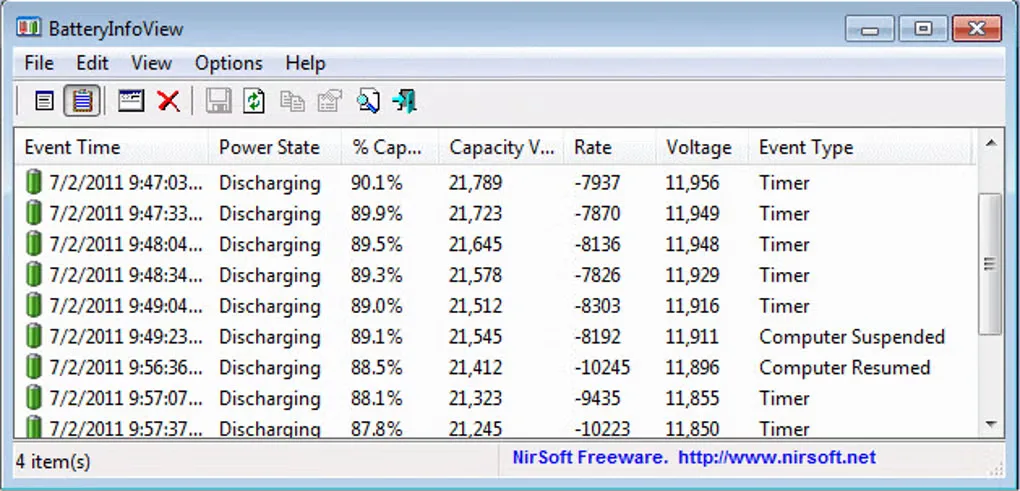
Switch to Battery Log to record readings at an interval you choose. The log can also record when the computer enters standby or hibernation and when it resumes, providing a record of capacity changes around those events. Selected information can be saved as CSV, tab-delimited text, HTML or XML, or copied to a spreadsheet. The publisher supplies ZIP packages and says the utility needs no installation or additional DLL files. This entry links to the 64-bit package.
The available detail depends on what the battery reports: serial number, manufacture date and cycle count may be absent. Remaining runtime and charging times are estimates calculated from recent capacity changes, not guaranteed durations. The gallery image is a historical publisher-branded Battery Log view, not a capture of a new local test or proof of the current version's appearance.
What it offers
- View current charge, full charged and designed capacities, battery health, voltage and charge/discharge rate.
- Record battery status at adjustable intervals, including suspend and resume events.
- Export selected readings as CSV, tab-delimited text, HTML or XML, or copy them to the clipboard.
- Use separate information and log views with configurable update intervals.
Good to know
- Serial number, manufacture date and cycle count appear only when the battery supplies those details.
- Runtime and charging-time figures are estimates based on recent capacity changes.
Product images
Sources
References used for this listing. Retrieval dates do not indicate hands-on testing.
More in utilities
View category ↗
1.1.1.1 with WARP 2026.8.2115.0
Encrypt traffic from your Mac to Cloudflare’s network with WARP, or use DNS-only mode for encrypted DNS queries to the 1.1.1.1 resolver.
1.1.1.1 with WARP 2026.8.2115.0
Encrypt traffic between your Windows PC and Cloudflare, or use encrypted DNS only, with the free 1.1.1.1 with WARP app.

3uTools 9.12.005
Manage iPhone and iPad photos, music, apps and backups from Windows with 3uTools, a free utility that also includes device checks and firmware flashing tools.