

Utilities Windows
BetterDiscord for Windows
Customize the locally installed Discord desktop client with CSS themes, JavaScript plugins and live styling tools. BetterDiscord is an unofficial client modification with compatibility and account-policy risks.
- Operating system
- Windows 10 or later, with a locally installed Discord desktop client
- Architecture
- x64 (current installer repository)
- Download package
- Windows EXE installer; resolved installer release v2.0.0
Uses system WebView2. Not the Discord web client or a portable installation. Installer and BetterDiscord core use separate version numbers; no application installation or compatibility testing performed.
Link checked · Download guidance
What is BetterDiscord?
BetterDiscord adds customization tools to the local Discord desktop application. Themes change its appearance through CSS, while plugins extend behavior through JavaScript. A live CSS editor, transparency support and dual-boot switching between modified and unmodified Discord give it a different scope from simply choosing a standard Discord appearance setting.
It is not an alternative Discord service, a server bot or a modification for the web client. The current installer repository lists Windows 10 or later on x64 with the system WebView2 runtime. Older BetterDiscord repository text still mentions Windows 7, but that does not override the current installer and Discord requirements.
The project is independent of Discord. Discord’s terms prohibit unauthorized software designed to modify its services and allow account suspension or termination for breaches. Neither installation nor an official BetterDiscord addon listing establishes Discord approval, a guarantee against account action or a security guarantee for every plugin.
What it offers
- Load CSS themes and JavaScript plugins from BetterDiscord settings.
- Edit CSS and see interface changes live.
- Use transparency with an appropriate transparent theme.
- Switch between BetterDiscord and an unmodified Discord experience with dual boot.
- Install, repair and remove the modification with the project’s installer.
Good to know
- Unofficial client modification; Discord’s terms restrict unauthorized modifying software and permit account action for breaches.
- Requires a local desktop Discord installation; the web version and portable apps are not supported by the main project documentation.
- Plugins or Discord changes can produce crashes or broken functionality; compatibility is not permanent.
- Current Windows installer requires Windows 10+ x64 and the system WebView2 runtime.
- The installer repository reports that its installer is not code-signed and may trigger Windows SmartScreen; no package signature or safety assessment was performed here.
Choose between themes, plugins and live CSS
Themes and plugins solve different problems. A theme changes the client’s appearance using CSS; a plugin adds behavior through JavaScript. If your goal is styling, a theme or a small live-CSS adjustment is a narrower change than adding unrelated plugins. Available functionality depends on the addon, not just BetterDiscord itself.
The project’s live editor applies CSS changes in real time, and transparency can be enabled with an appropriate theme. Its dual-boot feature switches between BetterDiscord and an unmodified Discord experience. None of those features turn BetterDiscord into an official Discord product.
Use current installer requirements, not old support badges
BetterDiscord works on a standard local desktop Discord installation. It is not a plugin for the browser version, and the main project excludes portable applications. The Windows installer’s current compatibility matrix specifies Windows 10 or later, x64 and the system WebView2 runtime. Discord’s own current desktop requirement is also Windows 10 or later.
The main BetterDiscord repository still shows older Windows 7-era platform text. That historical listing is not a sound reason to promise a current Windows 7 installation. Installer version and BetterDiscord core version are also different: retained research dated October 29, 2026 observed core v1.14.4 on the homepage and installer v2.0.0 in the Windows download’s HEAD redirect. The installer requirements are the current repository’s published requirements, not a compatibility test of that release.
Account policy is a separate risk from software licensing
BetterDiscord’s open-source licenses do not grant permission from Discord to modify Discord’s client or service. Discord’s current terms prohibit unauthorized software designed to modify its services and reserve account suspension or termination rights for breaches. That makes policy risk a material part of deciding whether to use a client modification.
This page does not predict the likelihood of account action and does not claim that cosmetic-only use is exempt. If you require the official supported client experience without client-modification uncertainty, use Discord’s unmodified desktop client and its own settings instead.
Keep installation and addon setup separate
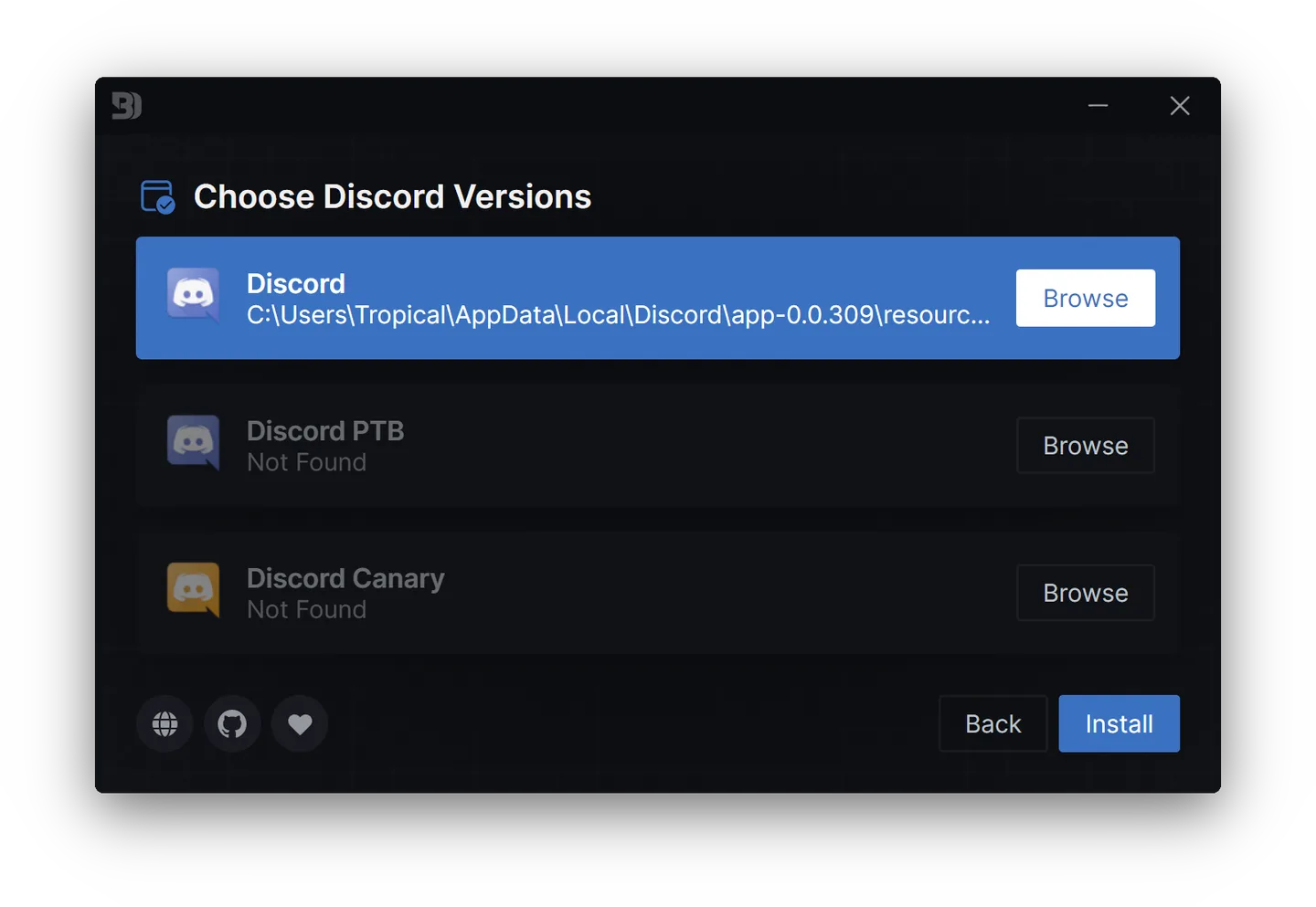
The official automatic installation guide selects the Install action and then the Discord channel to modify. It suggests Stable when the user is unsure. The project’s screenshot shows this channel-selection UI with Stable, PTB and Canary entries; its paths and appearance are illustrative rather than proof of the currently linked installer’s exact screen.
After installation, the documented addon workflow is inside Discord’s BetterDiscord settings: choose Plugins or Themes, open that category’s folder, move the addon into it and enable it. Adding many different addons at once makes it harder to identify which one caused a problem; the troubleshooting documentation explicitly recognizes plugins as a possible source of crashes.
Plan for maintenance and know the removal path
The installer repository describes placing a loader within Discord’s application resources while preserving its original app.asar. Uninstalling through that installer restores the original application files. Its purpose includes repair and removal, not only the first installation. The modification therefore involves the local client’s application files, not merely a remote account preference.
When a crash appears, the project warns that a generic error cannot reliably distinguish BetterDiscord, a plugin or Discord itself. Its guidance includes Stable-channel use, updating plugin libraries and removing problematic or unofficial plugins. This entry does not reproduce suggestions to disable antivirus or firewalls, and no protective setting was changed during research.
What the Windows download evidence does and does not establish
The Windows button points to the installer endpoint linked by both BetterDiscord repositories, not to a separate copy hosted by this site. The retained October 29, 2026 HEAD check reached installer v2.0.0 with an application/octet-stream response and transferred no installer body. The endpoint uses latest/download, so it can point to a different release later. That dated check is not a hash, signature, malware scan or installation result for the package.
The installer repository says the installer is currently not code-signed and that Windows SmartScreen can warn about it. This is a publisher statement, not an independently inspected signature result. A successful download check does not remove that limitation or the account-policy risk. This guide does not ask you to disable Windows protections; the unmodified Discord client remains the alternative if those uncertainties are unacceptable.
Product images
Sources
References used for this listing. Retrieval dates do not indicate hands-on testing.
- BetterDiscord — official feature overview ↗Retrieved
- BetterDiscord — main project repository ↗Retrieved
- BetterDiscord Installer — current compatibility and maintenance ↗Retrieved
- BetterDiscord — installation guide ↗Retrieved
- BetterDiscord — installing addons ↗Retrieved
- BetterDiscord — crashes and maintenance ↗Retrieved
- Discord Terms of Service — modifying software and account consequences ↗Retrieved
- Discord — current operating system requirements ↗Retrieved
- BetterDiscord Installer — new author source check ↗Retrieved
More in utilities
View category ↗
1.1.1.1 with WARP 2026.8.2115.0
Encrypt traffic from your Mac to Cloudflare’s network with WARP, or use DNS-only mode for encrypted DNS queries to the 1.1.1.1 resolver.
1.1.1.1 with WARP 2026.8.2115.0
Encrypt traffic between your Windows PC and Cloudflare, or use encrypted DNS only, with the free 1.1.1.1 with WARP app.


3uTools 9.12.005
Manage iPhone and iPad photos, music, apps and backups from Windows with 3uTools, a free utility that also includes device checks and firmware flashing tools.