

Utilities macOS
BetterTouchTool for macOS
Customize Mac trackpad gestures, mouse buttons and keyboard shortcuts with BetterTouchTool, then chain actions to automate recurring tasks. A 45-day trial is available.
What is BetterTouchTool?
BetterTouchTool maps Mac input gestures and shortcuts to actions. Use it to give a trackpad gesture a different job, assign commands to mouse buttons or build keyboard shortcuts for repeated tasks. Chaining actions lets a single trigger perform a sequence rather than just one command.
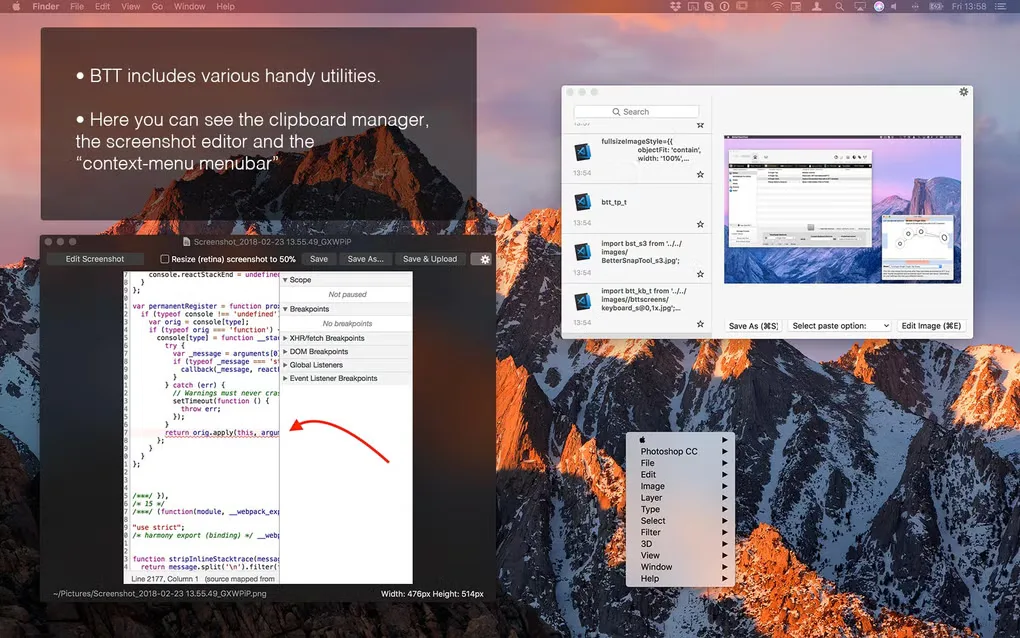
Its tools also cover window snapping, clipboard history, floating menus and a Spotlight-style launcher. That broad scope is useful when you want several kinds of customization in one app, but it makes BetterTouchTool more complicated than the publisher’s simpler BetterSnapTool window utility.
The publisher offers a 45-day trial and paid Standard or Lifetime licenses. A Standard license includes two years of updates; after that, you can keep using the last version received during that period. The download below is the publisher-linked Mac ZIP. The gallery image shows an older interface, not a verified view of the current release.
What it offers
- Assign actions to trackpad and Magic Mouse gestures.
- Customize normal mouse buttons, keyboard shortcuts and key sequences.
- Chain actions to automate recurring tasks from a trigger.
- Snap and resize windows with built-in window-management tools.
- Use clipboard history, floating menus and a Spotlight-style launcher.
Good to know
- The free trial lasts 45 days; continued use requires a paid license or an applicable subscription.
- Standard licenses include two years of updates, not lifetime updates; the last eligible version remains usable afterwards.
- The publisher describes BetterTouchTool as more complicated than BetterSnapTool because of its broader scope.
Product images
Sources
References used for this listing. Retrieval dates do not indicate hands-on testing.
More in utilities
View category ↗
1.1.1.1 with WARP 2026.8.2115.0
Encrypt traffic from your Mac to Cloudflare’s network with WARP, or use DNS-only mode for encrypted DNS queries to the 1.1.1.1 resolver.
1.1.1.1 with WARP 2026.8.2115.0
Encrypt traffic between your Windows PC and Cloudflare, or use encrypted DNS only, with the free 1.1.1.1 with WARP app.

3uTools 9.12.005
Manage iPhone and iPad photos, music, apps and backups from Windows with 3uTools, a free utility that also includes device checks and firmware flashing tools.