

Utilities Windows
BGInfo for Windows
Display a Windows computer's name, IP address and other system details on its desktop background with BGInfo, a free Sysinternals utility.
- Operating system
- Windows 10 and higher; Windows Server 2016 and higher
- Architecture
- Not specified in the cited publisher documentation
- Download package
- ZIP archive
The publisher lists these client and server requirements. The archive was checked by HEAD only; its contents and processor architectures were not inspected.
Link checked · Download guidance
What is BGInfo?
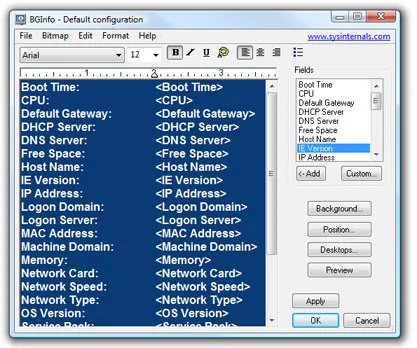
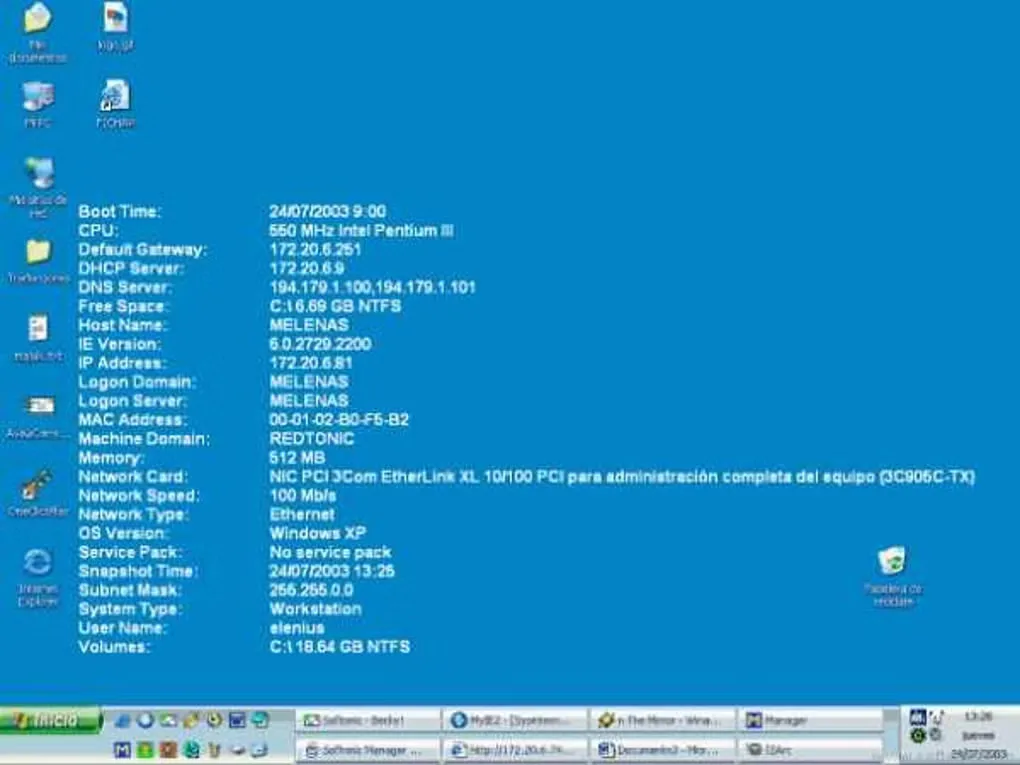
BGInfo puts selected system information on the Windows desktop background so you can identify a machine without opening several settings windows. It is useful when working across multiple computers: choose fields such as the computer name, IP address and operating system, then adjust their order, font, colors and position. The configuration editor also offers a preview before you apply the background.
Save a configuration as a .bgi file to reuse the layout. For repeat updates, the publisher documents running BGInfo from the Startup folder or through Windows Scheduler; the /timer:0 option applies the configuration without displaying the editor.
The desktop information is a snapshot, not a live monitoring panel. BGInfo writes a background bitmap and exits, so changes made after that run will not appear until it runs again. The download linked here is the publisher's ZIP archive; no specific processor architecture or numeric release version is asserted.
What it offers
- Show system details such as computer name, IP address and operating system on the desktop background.
- Choose and arrange fields, with editable fonts, background colors and text position.
- Preview the background before applying it.
- Save and reopen .bgi configurations to reuse a layout.
- Refresh through startup or scheduled runs, with /timer:0 for an update without the configuration dialog.
Good to know
- Desktop information does not update continuously: BGInfo writes a bitmap and exits. Run it again, at startup or on a schedule, to refresh changed details.
Product images
Sources
References used for this listing. Retrieval dates do not indicate hands-on testing.
- BGInfo - Download ↗Retrieved
- BgInfo - Sysinternals | Microsoft Learn ↗Retrieved
More in utilities
View category ↗
1.1.1.1 with WARP 2026.8.2115.0
Encrypt traffic from your Mac to Cloudflare’s network with WARP, or use DNS-only mode for encrypted DNS queries to the 1.1.1.1 resolver.
1.1.1.1 with WARP 2026.8.2115.0
Encrypt traffic between your Windows PC and Cloudflare, or use encrypted DNS only, with the free 1.1.1.1 with WARP app.

3uTools 9.12.005
Manage iPhone and iPad photos, music, apps and backups from Windows with 3uTools, a free utility that also includes device checks and firmware flashing tools.