

Utilities Windows
Big Stretch Reminder for Windows
Set break reminders for Windows 10 and 11 with adjustable intervals, custom messages and a choice of notifications, popups or timed breaks.
- Operating system
- Windows 10 and Windows 11
- Architecture
- Not specified on the publisher product page
- Download package
- EXE installer
This link selects bsrp_setup.exe. The publisher also offers a separate MSI installer; no architecture or release number is inferred.
Link checked · Download guidance
What is Big Stretch Reminder?
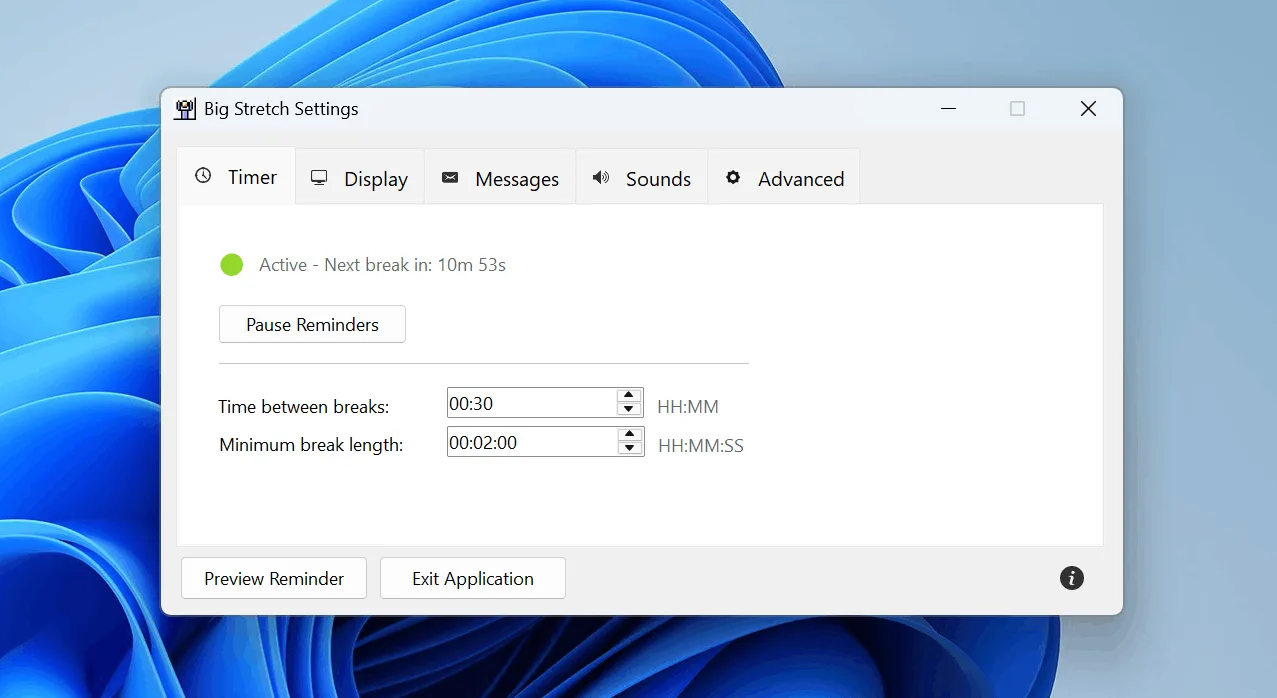
Big Stretch Reminder prompts you to step away from your Windows computer at intervals you choose. Set the time between breaks and the minimum break length, then choose a reminder style: a notification, a centered popup, a taskbar flash or a timed break. Activity and idle-time options let the timer account for time already spent away from the desk.
Custom messages, optional sounds and multi-monitor placement help tailor reminders to your workspace. Optional escalation makes reminders more intrusive when breaks are missed; full-screen and away-time settings let you adjust when reminders appear.
The reminder style matters if interruptions are a concern. Timed breaks temporarily interrupt work, and the optional desktop-disable setting prevents interaction during intrusive reminders. Choose a notification or taskbar flash for a less intrusive prompt. The publisher lists Windows 10 and 11; the served product page does not state a release number or release date.
What it offers
- Adjust the interval between reminders and the minimum length of a break.
- Choose notifications, centered popups, timed breaks or a taskbar flash.
- Enable optional escalation when breaks are missed.
- Use built-in break tips, quotes or your own messages, with optional sounds.
- Account for idle time and skip reminders during full-screen use through configurable settings.
- Move the Settings window to the monitor on which reminders should appear.
Good to know
- Timed breaks temporarily interrupt workflow; enabling desktop disabling prevents interaction during intrusive reminders.
- The served publisher page leaves the version and release-date fields blank, so the linked installer is not identified here by release.
Product images
Sources
References used for this listing. Retrieval dates do not indicate hands-on testing.
- Big Stretch Reminder ↗Retrieved
- Big Stretch Reminder — Quick Start Guide ↗Retrieved
More in utilities
View category ↗
1.1.1.1 with WARP 2026.8.2115.0
Encrypt traffic from your Mac to Cloudflare’s network with WARP, or use DNS-only mode for encrypted DNS queries to the 1.1.1.1 resolver.
1.1.1.1 with WARP 2026.8.2115.0
Encrypt traffic between your Windows PC and Cloudflare, or use encrypted DNS only, with the free 1.1.1.1 with WARP app.

3uTools 9.12.005
Manage iPhone and iPad photos, music, apps and backups from Windows with 3uTools, a free utility that also includes device checks and firmware flashing tools.