

Utilities Windows
BleachBit for Windows
Remove temporary files, browser caches and application traces with BleachBit, a free Windows cleanup utility that lets you preview selected files before deleting them.
- Operating system
- Windows 10 and Windows 11
- Architecture
- x86 (32-bit application); usable on x86 and x64 Windows
- Download package
- Standard EXE installer
BleachBit 6.0.6; bundled dependencies. Not the portable ZIP. Windows XP, Vista, 7 and 8 require an older release.
Link checked · Download guidance
What is BleachBit?
BleachBit cleans selected system and application data to reclaim disk space and remove local activity traces. Its cleaners cover temporary files, logs and browsers such as Chrome, Edge and Firefox. Each cleaner has individual options, so you can choose which types of data to remove rather than clearing everything at once.
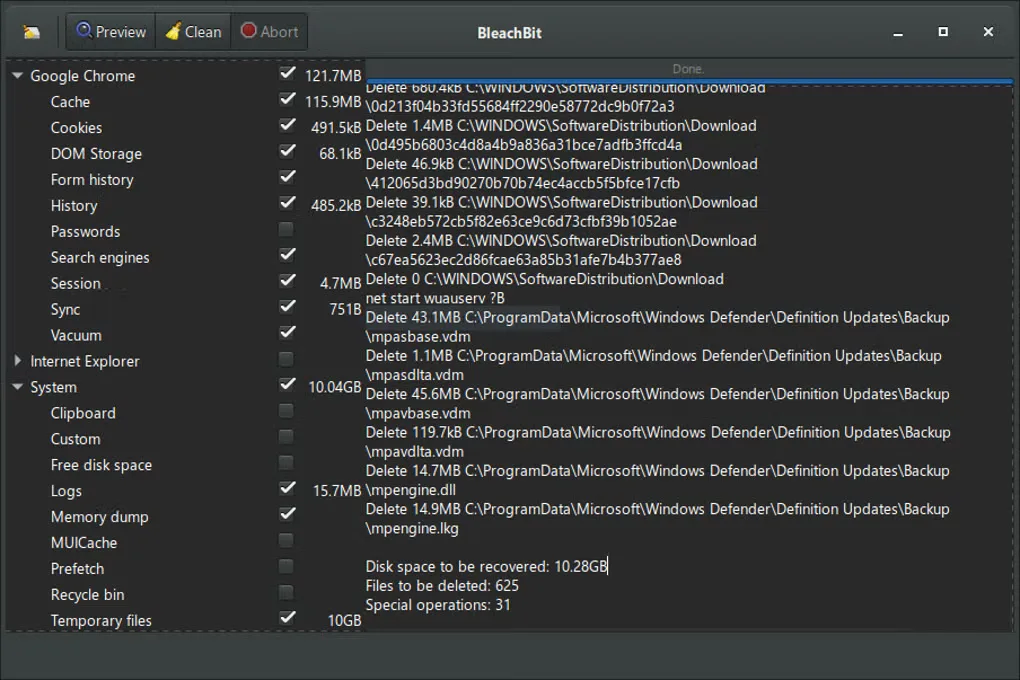
Read each option's description, close the applications you intend to clean and use Preview to inspect the proposed deletions. Adjust the selection before clicking Delete: cleanup can include cookies, browsing history and other data you may want to retain. BleachBit also provides file shredding, free-space wiping and a command-line interface for scripted cleanup; these are separate tools, not a promise that every deleted file becomes unrecoverable.
The linked download is the standard BleachBit 6.0.6 EXE installer for Windows 10 and 11. Dependencies are bundled. A portable ZIP is offered separately by the publisher, but it is not the package linked here. Older Windows releases require an older BleachBit branch, not this installer.
What it offers
- Choose individual cleaner options for temporary files, system logs and supported application data.
- Preview the files selected for deletion before committing to cleanup.
- Clean browser data in supported applications including Chrome, Edge and Firefox.
- Use separate file-shredding and free-space-wiping tools when those operations are needed.
- Automate cleanup through the command-line interface or define custom cleaners with CleanerML.
Good to know
- Cleanup removes the selected data, which can include cookies and browsing history. Review Preview and disable options you do not understand; close each application before cleaning its data.
- This 6.0.6 installer requires Windows 10 or 11; it is not the publisher's legacy Windows package.
Product images
Sources
References used for this listing. Retrieval dates do not indicate hands-on testing.
- Download BleachBit for Windows — official package selection ↗Retrieved
- BleachBit features — official cleaner and automation capabilities ↗Retrieved
- BleachBit documentation — general usage ↗Retrieved
- BleachBit homepage — cleanup scope and publisher icon ↗Retrieved
- BleachBit publisher repository — license ↗Retrieved
- BleachBit Windows installation documentation — architecture and package distinction ↗Retrieved
- BleachBit v6.0.6 publisher build definition — Windows application architecture ↗Retrieved
- Official BleachBit 6.0.6 installer — bounded HEAD ↗Retrieved
- BleachBit for Windows — observed Softonic screenshot gallery ↗Retrieved
More in utilities
View category ↗
1.1.1.1 with WARP 2026.8.2115.0
Encrypt traffic from your Mac to Cloudflare’s network with WARP, or use DNS-only mode for encrypted DNS queries to the 1.1.1.1 resolver.
1.1.1.1 with WARP 2026.8.2115.0
Encrypt traffic between your Windows PC and Cloudflare, or use encrypted DNS only, with the free 1.1.1.1 with WARP app.

3uTools 9.12.005
Manage iPhone and iPad photos, music, apps and backups from Windows with 3uTools, a free utility that also includes device checks and firmware flashing tools.