
Utilities Windows
BlindScanner
Share a scanner across a Windows network, save remote scans to images or multipage PDF/TIFF, and automate scanning with BlindScanner’s command-line client.
- Operating system
- Windows; version 4.6 release notes mention restored Windows XP support
- Architecture
- Server can run in x64 environments; requires a 32-bit scanner driver
- Download package
- EXE installer with server and client components
Current Windows 11 build support was not established. A working TWAIN or WIA driver and a reachable configured server port are required.
Link checked · Download guidance
What is BlindScanner?
BlindScanner makes a scanner connected to one PC available to other computers on a home or office network. Install the server component on the scanner’s PC and the client component on the computer that needs the scans. The publisher also describes scanning into graphics applications and using a local scanner from a remote desktop session.
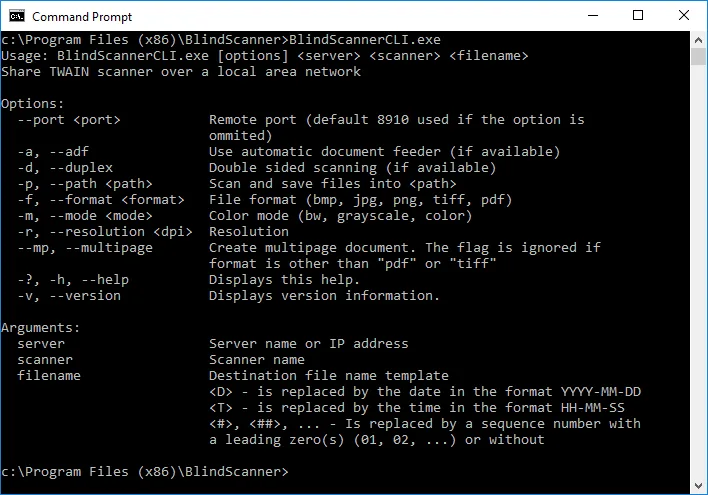
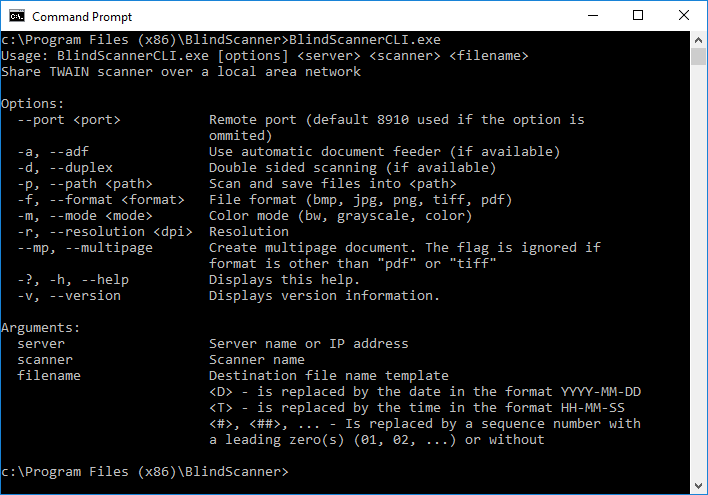
The standalone application can save scans as BMP, JPG, GIF or PNG images, or as multipage TIFF and PDF documents. Preview and rectangular area selection help choose what to capture. A separate BlindScannerCLI.exe console application supports scripted scanning, including resolution, color mode, output format and automatic document feeder options where the hardware supports them.
Setup depends on a working scanner driver and a reachable server port. A particularly important restriction is that BlindScanner Server uses a 32-bit TWAIN or WIA scanner driver even when running in an x64 environment. The software is a 30-day trial, not freeware. The publisher’s 4.6 release article dates from 2018; the sources checked here do not establish compatibility with current Windows 11 builds.
What it offers
- Share a scanner between networked computers using server and client components.
- Save standalone scans to image files or multipage TIFF/PDF documents.
- Preview a scan and select a rectangular area.
- Use supported automatic document feeders and duplex scanning when available.
- Automate remote scanning with BlindScannerCLI.exe.
Good to know
- The server requires an installed 32-bit TWAIN or WIA scanner driver, including in x64 environments.
- Both server and client setup are required; the configured connection port must be available and not blocked.
- Unregistered use is limited to a 30-day trial; continued use requires a paid license.
- Compatibility with current Windows 11 builds is not established by the checked publisher documentation.
Product images
Sources
References used for this listing. Retrieval dates do not indicate hands-on testing.
- BlindScanner - Share Your Scanner ↗Retrieved
- BlindScanner - Features ↗Retrieved
- BlindScanner - What scanners are supported? ↗Retrieved
- BlindScanner - How to install BlindScanner? ↗Retrieved
- BlindScanner - How to setup BlindScanner? ↗Retrieved
- BlindScanner - How to scan from command line using BlindScanner? ↗Retrieved
- BlindScanner - Buy ↗Retrieved
- BlindScanner - Release of the BlindScanner 4.6 ↗Retrieved
More in utilities
View category ↗
1.1.1.1 with WARP 2026.8.2115.0
Encrypt traffic from your Mac to Cloudflare’s network with WARP, or use DNS-only mode for encrypted DNS queries to the 1.1.1.1 resolver.
1.1.1.1 with WARP 2026.8.2115.0
Encrypt traffic between your Windows PC and Cloudflare, or use encrypted DNS only, with the free 1.1.1.1 with WARP app.

3uTools 9.12.005
Manage iPhone and iPad photos, music, apps and backups from Windows with 3uTools, a free utility that also includes device checks and firmware flashing tools.