

Utilities macOS
BlockBlock for macOS
Monitor common macOS persistence locations with BlockBlock, a free, open-source utility that alerts you when software adds a component to run automatically.
- Operating system
- macOS 10.15 or later
- Architecture
- Not specified in the consulted publisher product documentation
- Download package
- ZIP archive containing BlockBlock Installer.app
Publisher requirements and installation instructions; the package was not downloaded, installed or independently tested.
Link checked · Download guidance
What is BlockBlock?
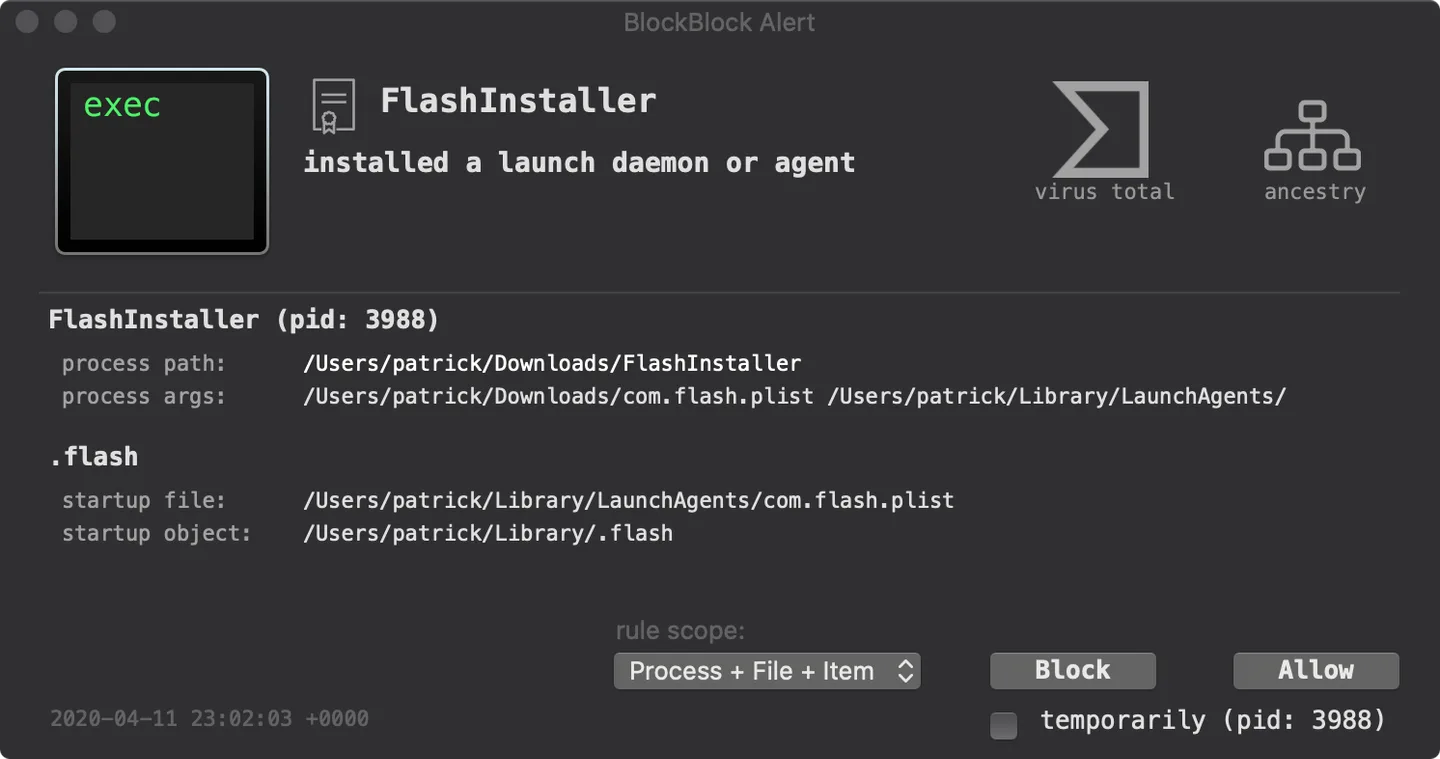
BlockBlock watches common persistence locations on your Mac and alerts when a new persistent component is added. An alert identifies the responsible process and the startup file or item involved, helping you decide whether to allow the change or block it. Blocking removes the persistent item from the file system; allowing or blocking normally creates a rule so the choice can be remembered. A temporary response avoids creating that rule.
The alert offers access to code-signing details, VirusTotal results and process ancestry. You can review or delete saved rules from the status-bar menu. Optional protections include checks on non-notarized programs, blocking downloaded scripts and alerts for content pasted into Terminal. Paste Protection can apply heuristics to limit blocking to pastes it considers suspicious.
An alert is not a malware verdict: legitimate applications also install persistent components. You need to examine the process and item before approving a change. BlockBlock requires system privileges and Full Disk Access for its monitoring, while Paste Protection additionally needs Accessibility permission for its helper. The download linked here is the publisher's version 2.5.2 ZIP, containing the installer application; the screenshot is a publisher-provided illustrative alert, not a capture of this package running in our environment.
What it offers
- Monitor common persistence locations and receive alerts when a new persistent component is added.
- Inspect the responsible process, startup file and persistent item, with links to code-signing information, VirusTotal results and process ancestry.
- Allow or block persistence changes, create remembered rules or respond temporarily, and review saved rules from the status-bar menu.
- Optionally enable non-notarized program checks, downloaded-script blocking and Terminal Paste Protection.
Good to know
- Legitimate software can trigger persistence alerts; an alert alone does not establish a malware infection.
- Monitoring requires system privileges and Full Disk Access. Terminal Paste Protection additionally requires Accessibility permission for the helper.
- Allow or block responses for notarization alerts are cached only until a reboot or BlockBlock restart, rather than saved persistently.
Product images
Sources
References used for this listing. Retrieval dates do not indicate hands-on testing.
More in utilities
View category ↗
1.1.1.1 with WARP 2026.8.2115.0
Encrypt traffic from your Mac to Cloudflare’s network with WARP, or use DNS-only mode for encrypted DNS queries to the 1.1.1.1 resolver.
1.1.1.1 with WARP 2026.8.2115.0
Encrypt traffic between your Windows PC and Cloudflare, or use encrypted DNS only, with the free 1.1.1.1 with WARP app.

3uTools 9.12.005
Manage iPhone and iPad photos, music, apps and backups from Windows with 3uTools, a free utility that also includes device checks and firmware flashing tools.