

Utilities Windows
BlueScreenView for Windows
Inspect Windows blue-screen minidumps with BlueScreenView, a free utility that lists crash details and highlights drivers found in the crash stack.
- Operating system
- Windows XP, Vista, 7, 8 and 10; Windows Server 2003 and 2008 (publisher-listed)
- Architecture
- x64 download; reads both 32-bit and x64 minidumps
- Download package
- Portable ZIP archive (64-bit)
Requires saved minidumps. Separate standard ZIP and installer are available. Windows 11 support is not stated in the publisher requirements; no runtime compatibility test was performed.
Link checked · Download guidance
What is BlueScreenView?
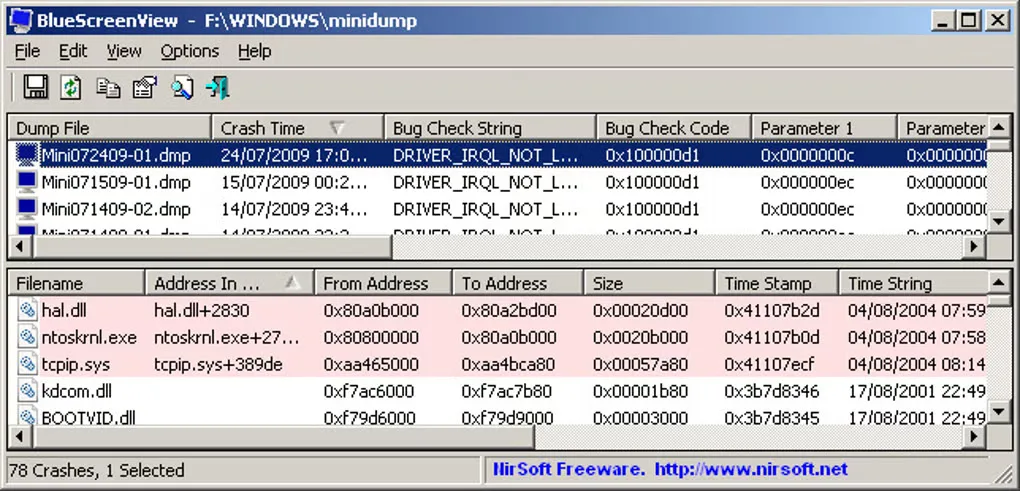
BlueScreenView reads minidump files that Windows has already saved after a blue-screen crash. Its upper pane lists crashes with their time, bug check code and parameters; selecting a crash shows its loaded drivers and modules in the lower pane. Driver names, file versions and stack highlighting give you evidence to investigate rather than a guaranteed diagnosis.
You can open a different minidump folder or a single dump file, view an XP-style blue-screen representation, and export the crash list to formats including text, CSV and HTML. The linked download is NirSoft's 64-bit ZIP package; the publisher also offers a separate standard ZIP and an installer. The portable utility does not require installation or additional DLL files.
Windows must be configured to save minidumps before there is anything to inspect. NirSoft warns that driver detection is not completely accurate and that some Windows 10 minidumps may be empty and will not appear. Use the displayed modules as investigation leads, not proof that a particular driver caused the crash.
What it offers
- Automatically list saved minidumps with crash times, bug check codes and parameters.
- Inspect loaded drivers and modules for a selected crash, with stack matches highlighted.
- Open a single minidump or choose another Windows installation's minidump folder.
- Export crash lists as text, CSV, HTML or XML using command-line options.
- View an XP-style blue-screen representation of a recorded crash.
Good to know
- Requires existing Windows minidump files; Windows must be configured to save them during crashes.
- The publisher says driver detection is not 100% accurate; a suspected driver is not a confirmed cause.
- Some Windows 10 minidumps may be empty and are not displayed.
Product images
Sources
References used for this listing. Retrieval dates do not indicate hands-on testing.
More in utilities
View category ↗
1.1.1.1 with WARP 2026.8.2115.0
Encrypt traffic from your Mac to Cloudflare’s network with WARP, or use DNS-only mode for encrypted DNS queries to the 1.1.1.1 resolver.
1.1.1.1 with WARP 2026.8.2115.0
Encrypt traffic between your Windows PC and Cloudflare, or use encrypted DNS only, with the free 1.1.1.1 with WARP app.

3uTools 9.12.005
Manage iPhone and iPad photos, music, apps and backups from Windows with 3uTools, a free utility that also includes device checks and firmware flashing tools.