
Utilities Windows
BluetoothView
Monitor nearby Bluetooth devices, view detection times and receive new-device alerts with BluetoothView, a portable freeware utility for Windows.
- Operating system
- Windows 11, 10, 8, 7, Vista and XP SP2, as listed by the publisher
- Architecture
- Not specified on the publisher product page
- Download package
- ZIP archive containing a portable Windows executable
Requires a compatible Bluetooth adapter and driver using the standard Windows Bluetooth module. No Windows build numbers are specified.
Link checked · Download guidance
What is BluetoothView?
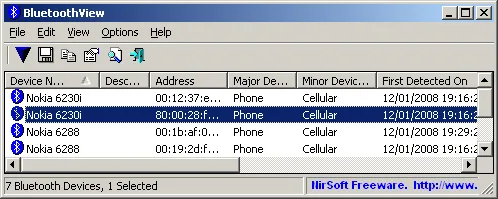
BluetoothView lists Bluetooth devices detected around your Windows PC. Its table shows device names, Bluetooth addresses, major and minor device types, and first and last detection times. It is useful for watching changes in the devices your adapter can detect, with taskbar balloon or sound alerts when a new device appears.
The publisher supplies a ZIP download and says no installation or additional DLL files are needed: place BluetoothView.exe in a folder and run it. Advanced Options can record device arrivals and departures in a log after five consecutive scans. Command-line export supports text, CSV, HTML and XML for keeping a device inventory.
This is a monitoring utility, not a Bluetooth driver or file-transfer tool. It requires a compatible Bluetooth adapter and a driver that works with the standard Windows Bluetooth module. Its Try To Connect action only tests a connection and closes it; it does not send data. A shorter scan timeout can miss devices, especially farther away, so an absent row is not proof that a device is absent.
What it offers
- View device names, Bluetooth addresses, device types and first and last detection times.
- Receive taskbar balloon or sound notifications when a new Bluetooth device is detected.
- Log device arrivals and departures after five consecutive scans in each state.
- Export device lists as text, CSV, HTML or XML using command-line options.
- Hide paired devices and add custom descriptions to help identify familiar entries.
Good to know
- Requires a Bluetooth adapter and a driver compatible with the standard Windows Bluetooth module; it does not supply a Bluetooth driver.
- Try To Connect tests a connection and closes it without sending information; it is not a file-transfer feature.
- Low scan timeout values can miss devices, particularly at greater distances.
- The Company Name column requires an external IEEE oui.txt file beside BluetoothView.exe.
Product images
Sources
References used for this listing. Retrieval dates do not indicate hands-on testing.
- Monitor the Bluetooth activity around you ↗Retrieved
- BluetoothView - Download ↗Retrieved
More in utilities
View category ↗
1.1.1.1 with WARP 2026.8.2115.0
Encrypt traffic from your Mac to Cloudflare’s network with WARP, or use DNS-only mode for encrypted DNS queries to the 1.1.1.1 resolver.
1.1.1.1 with WARP 2026.8.2115.0
Encrypt traffic between your Windows PC and Cloudflare, or use encrypted DNS only, with the free 1.1.1.1 with WARP app.

3uTools 9.12.005
Manage iPhone and iPad photos, music, apps and backups from Windows with 3uTools, a free utility that also includes device checks and firmware flashing tools.